QuickBooks Bookkeeping for Amazon FBA & Shopify | Thelonex


Amazon FBA Canada Tax Guide: GST, HST & Provincial Rules
- Home
- Amazon FBA Canada Tax Guide: GST, HST & Provincial Rules
- April 25, 2026
- 8 min read
- No Comments
Amazon FBA Canada Tax Guide: GST, HST & Provincial Rules
Selling on Amazon FBA in Canada can boost your business fast. But Amazon FBA Canada tax rules create real obligations. Many new sellers overlook GST, HST, or provincial taxes and face surprise bills or penalties later.
This guide explains everything in plain language. You will learn exactly when to register for sales tax, how Amazon handles collection, and how to stay compliant without stress. Whether you sell from inside Canada or ship to Canadian fulfillment centers as a non-resident, these rules apply to you.
Proper Amazon FBA Canada tax handling protects your profits and keeps your account in good standing. Let’s break it down step by step so you can sell confidently.
Why Amazon FBA Sellers Must Master Sales Tax in Canada.
Amazon FBA Canada tax matters more than most sellers realize. Canada uses a destination-based sales tax system. The tax rate depends on where the buyer lives, not where you operate.
If you store inventory in Canadian FBA warehouses, you create physical presence. This triggers sales tax obligations right away in many cases. Even without physical stock, crossing the $30,000 sales threshold activates registration rules.
Failing to handle GST/HST or provincial tax correctly can lead to:
- Paying uncollected taxes out of your own pocket
- CRA penalties and interest
- Problems with Amazon account health
Understanding GST, HST, and Provincial Sales Taxes
Canada’s sales tax system has two main layers: federal and provincial.
GST (Goods and Services Tax) is the federal 5% tax that applies across the country.
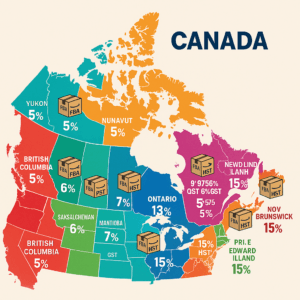
HST (Harmonized Sales Tax) combines GST with provincial tax in five participating provinces. Rates are:
- Ontario: 13%
- New Brunswick, Newfoundland and Labrador, Nova Scotia, Prince Edward Island: 15%
In the remaining provinces, you charge 5% GST plus a separate provincial sales tax (PST).
Here are the current GST + PST rates:
- British Columbia: 5% GST + 7% PST = 12% total
- Saskatchewan: 5% GST + 6% PST = 11% total
- Manitoba: 5% GST + 7% PST = 12% total
- Quebec: 5% GST + 9.975% QST (Quebec Sales Tax) = ~14.975% total
These taxes apply to most tangible goods sold on Amazon.ca. Some items (books, children’s clothing, groceries) may be exempt or zero-rated, but most FBA products are taxable.
Always check product tax codes in Seller Central.
When Do You Need to Register for GST/HST? The Threshold and Nexus Rules.
The key trigger is the small supplier threshold.
You must register for GST/HST if your worldwide taxable revenue exceeds CAD $30,000 in any four consecutive calendar quarters. Once you hit that number, you have 29 days to register.
For non-resident sellers using FBA Canada warehouses, registration is often required from day one because storing inventory counts as “carrying on business in Canada.” This is similar to economic nexus rules you may know from other countries.
Voluntary registration is allowed even below $30,000. Most sellers choose this option to claim ITCs on business expenses.
You also need to watch provincial requirements:
- Quebec sellers or those shipping heavily to Quebec must register separately for QST with Revenu Québec.
- British Columbia, Saskatchewan, and Manitoba have their own PST rules, but Amazon often handles collection as a marketplace facilitator.
Step-by-Step Guide to Sales Tax Registration for Amazon FBA Canada:
Follow these steps to complete your Amazon FBA Canada tax setup correctly.
Step 1: Decide if you need to register
Review your last four quarters of sales (including all marketplaces). Factor in FBA Canada inventory storage. If you are close to $30,000 or already using Canadian fulfillment centers, start registration now.
Step 2: Get your Business Number (BN)
Use the Canada Revenue Agency’s Business Registration Online (BRO) tool. It is free and instant for most applicants. You will receive a 9-digit BN.
Step 3: Register for GST/HST
Add a GST/HST program account (format ends in RT0001). Non-residents use Form RC1 and may need to post security in some cases. The process usually takes 4–8 weeks, but can be backdated.
Step 4: Handle provincial registrations
- For QST: Register directly with Revenu Québec if you ship to Quebec buyers.
- PST in BC, SK, or MB is usually covered by Amazon, but confirm your status.
- No separate registration needed in HST provinces.
Step 5: Update Amazon Seller Central
Go to Settings → Tax Settings (or VAT Information). Enter your full GST/HST number. Enable Amazon’s Tax Calculation Service (TCS) if you want help calculating taxes on orders. Also add any provincial tax IDs.
Step 6: Set up filing frequency
CRA assigns a monthly, quarterly, or annual filing based on your sales volume. File and pay on time to avoid penalties.
Step 7: Claim your input tax credits
Keep clean records of GST/HST paid on inventory, FBA fees, and supplies. These credits reduce or eliminate your net tax owing.
Keep clean records of GST/HST paid on inventory, FBA fees, and supplies. These credits reduce or eliminate your net tax owing.
How Amazon Handles Tax Collection and Remittance.
Since July 2021, Canada’s Marketplace Tax Collection rules have changed everything for Amazon sellers. If you have not provided a valid GST/HST number in Seller Central:
- Amazon collects GST/HST from buyers and remits it directly to the CRA.
- You do not collect or remit these taxes yourself.
- You are responsible for reporting and remitting the tax.
- Amazon can still calculate and collect it for you through the Tax Calculation Service and pass the amounts back in your payouts.
- Amazon acts as a facilitator and collects/remits PST in British Columbia, Saskatchewan, and Manitoba for all sellers.
- In Quebec, Amazon collects QST, and you remit it if registered.
Common Mistakes to Avoid with Amazon FBA Canada Tax.
New sellers often make these costly errors:
- Waiting too long to register – Missing the 29-day deadline after hitting $30,000 triggers penalties.
- Forgetting to enter your GST number in Seller Central – Amazon then collects tax but you may still owe it personally.
- Ignoring FBA inventory location – Canadian warehouses create immediate obligations even with low sales.
- Missing input tax credits – Many sellers pay GST/HST on fees and inventory but never claim refunds.
- Skipping QST registration – Quebec sales can create separate filing headaches.
- Poor record-keeping – Without clear Amazon reports and expense tracking, audits become painful.
- Assuming Amazon does everything – Even with marketplace collection, registered sellers must file returns.
Practical Tips for Managing Registrations Efficiently.
Stay on top of Amazon FBA Canada tax with these proven tips:
- Use accounting software that integrates directly with Amazon Seller Central. It pulls orders, fees, and tax data automatically.
- Set calendar reminders for quarterly sales reviews and filing deadlines.
- Work with a bookkeeper or accountant who specializes in Amazon sellers. They know the exact reports CRA wants.
- Keep separate folders for GST/HST invoices, FBA storage fees, and import documents.
- Review your Tax Settings in Seller Central every time you add new products or expand to new provinces.
- Consider voluntary registration early if you expect growth. The ITCs often pay for themselves quickly.
- Monitor economic nexus-style triggers by tracking both Canadian and worldwide sales.
- Join Amazon seller forums or communities focused on Canadian compliance for quick updates.
Conclusion: Take Control of Your Amazon FBA Canada Tax Today
Understanding Amazon FBA Canada tax does not have to be overwhelming. With clear rules around GST/HST registration, provincial sales tax, and Amazon’s marketplace facilitator role, you can sell profitably and stay fully compliant.
Register on time, enter your numbers in Seller Central, claim every input tax credit, and avoid the common mistakes that catch beginners off guard. The result? More money in your pocket and peace of mind while you scale.
Ready to simplify your Amazon FBA Canada tax setup? Visit Thelonex.com today. Our team specializes in Amazon seller accounting, GST/HST filing, and full tax compliance services across Canada. Whether you need help with initial registration, ongoing bookkeeping, or a multi-province sales tax strategy, we make it easy.
Book a free consultation now and let us handle the tax details while you focus on growing your FBA business. Your future profits will thank you.
.

Ashfaq helps e-commerce business owners turn messy numbers into clear, reliable financials. With over 15 years of experience, he specializes in bookkeeping for Amazon and Shopify sellers, ensuring accuracy, clarity, and confident decision-making.
Categories
Latest Posts
- August 2, 2026
Amazon Seller Connector by QuickBooks: Complete Guide
- July 21, 2026
How COGS Accounting Works for Canadian FBA Sellers
Tags
A2X
Accounting Method
Amazon FBA
Amazon Marketplace Connector
Amazon Seller Central
Amazon Seller Connector
Bookkeeping Tips
Canada Tax Registration
Canadian Bookkeeping
Canadian Sales Tax
Chart of Accounts
COGS
E-Commerce
E-Commerce Bookkeeping
Finance
Financial Statements
GST/HST
Inventory
Payout Reconciliation
Profit and Loss
QuickBooks Online
Sales Tax
Sales Tax Compliance
Shopify
TaxCloud