QuickBooks Bookkeeping for Amazon FBA & Shopify | Thelonex


Do Shopify Sellers in Canada Need to Charge GST/HST?
Step-by-Step Guide: How to Handle GST/HST as a Shopify Seller
Follow these steps in order. They keep you compliant and stress-free.
Step 1: Check If You Need to Register.
Log your total taxable sales for the past four quarters. Use Shopify reports or your bookkeeping software. If you are close to $30,000, set a monthly reminder. Many sellers use a simple Google Sheet or QuickBooks integration.
Step 2: Register for GST/HST with the CRA.
Since November 2025, you must register online through Business Registration Online (BRO). You need a Business Number (BN). The process takes minutes if you have your SIN or business details ready. You will receive a GST/HST account number (RT number) usually within days.
Choose your filing frequency when you register:
- Under $1.5 million in revenue: annual or quarterly
- Higher revenue: monthly
Keep your BN and RT number handy for Shopify setup.
Step 3: Understand Place-of-Supply Rules.
GST/HST rate depends on where your customer is, not where you are. Shopify uses the shipping address (or billing address for digital goods).
- Goods: Tax rate of the province where you ship or deliver.
- Digital products and services: Usually, the customer’s province.
Shopify calculates this automatically once you turn on tax collection.
Step 4: Set Up Taxes in Your Shopify Store
Go to Shopify Admin → Settings → Taxes and duties → Canada.
- Click “Collect sales tax.”
- Enter your 9-digit GST/HST number.
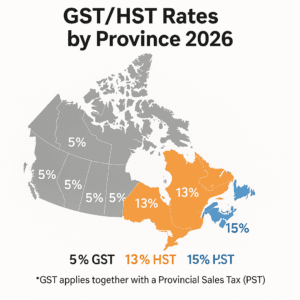
- Shopify shows every province. For HST provinces (Ontario 13%, Atlantic provinces 15%), select “instead of 5% federal tax.”
- For GST + PST provinces (BC, Saskatchewan, Manitoba), add the provincial rate separately if you have the provincial sales tax permit.
- Quebec sellers also register for QST and add it here.
Save and test with a sample order. Shopify handles the rest. It shows the correct rate at checkout based on the customer’s address.
Step 5: File and Remit Taxes on Time.
Shopify collects the tax but does not file or pay the CRA for you. You must:
- Download tax reports from Shopify each period.
- File your GST/HST return through CRA My Business Account or NETFILE.
- Pay any balance owing.
Keep records for at least six years: invoices, shipping proofs, and exemption documents.
Provincial Sales Taxes: Beyond GST/HST.
GST/HST is federal, but some provinces require extra steps.
- British Columbia, Saskatchewan, and Manitoba: Register separately for PST. Add your provincial number in Shopify.
- Quebec: Register for QST (Quebec Sales Tax) through Revenu Québec.
- Alberta and territories: Only GST/HST needed.
If you sell across provinces, you may need multiple sales tax registrations. This is similar to multi-state sales tax obligations in the US, but Canada uses place-of-supply rules instead of economic nexus for residents. Track each one to stay compliant.
Common Mistakes Shopify Sellers in Canada Make
Even experienced sellers trip on these:
- Waiting too long to register. Crossing $30,000 without action leads to back taxes plus penalties.
- Wrong tax rates in Shopify. Using flat 5% everywhere means under- or over-charging customers.
- Forgetting provincial PST or QST. Many assume GST/HST covers everything.
- Not tracking the rolling threshold. One big month can trigger registration unexpectedly.
- Ignoring zero-rated and exempt sales. Groceries or exports need special treatment.
- Poor record-keeping. CRA audits love clean books. Messy ones cost time and money.
- Assuming Shopify handles everything. The platform calculates tax but never files or remits.
Avoid these, and you stay ahead of 90 percent of problems.
Practical Tips for Managing Registrations Efficiently
Stay organized with these beginner-friendly habits:
- Automate tracking. Connect Shopify to QuickBooks or similar. Monthly reports flag when you near the $30,000 mark.
- Set calendar reminders. Mark quarter-end reviews and filing deadlines.
- Voluntary registration benefits. Claim input tax credits early on big purchases like inventory or ads.
- Use a tax professional or service. Bookkeeping firms that specialize in e-commerce (like those handling Shopify GST/HST Canada) save hours and reduce errors.
- Test your checkout. Run sample orders from different provinces every quarter.
- Separate business accounts. Keep personal and business finances clean for easy CRA reporting.
- Stay updated. Tax rules change. Bookmark the CRA GST/HST page and check once a year.
Smart systems turn tax season from a headache into a routine 30-minute task.

Ashfaq helps e-commerce business owners turn messy numbers into clear, reliable financials. With over 15 years of experience, he specializes in bookkeeping for Amazon and Shopify sellers, ensuring accuracy, clarity, and confident decision-making.