QuickBooks Bookkeeping for Amazon FBA & Shopify | Thelonex


How Shopify Bookkeeping Works for Canadian Stores
- Home
- How Shopify Bookkeeping Works for Canadian Stores
- July 21, 2026
- 5 min read
- No Comments
How Shopify Bookkeeping Works for Canadian Stores
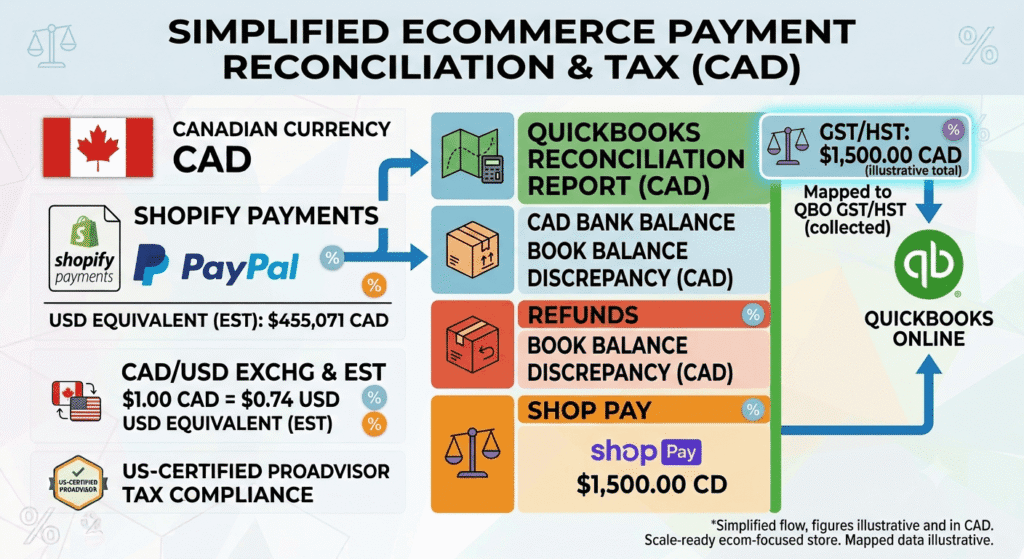
Shopify payouts look simple on the surface: money lands in your bank account every few days. Underneath, each payout blends sales, refunds, shipping charges, processing fees, and GST/HST from multiple gateways like Shopify Payments, PayPal, and Shop Pay.
For Canadian stores, this guide breaks that complexity into a repeatable monthly process, so your QuickBooks file matches reality instead of guesswork. It’s part of our complete Canadian bookkeeping guide — browse more free guides in our resources hub.
Quick takeaways • A Shopify payout is a net deposit, not a profit report — fees and refunds are already netted out • Each payment gateway needs its own account, or you can’t see which one is actually costing you the most • GST/HST collected at checkout must be separated from sales revenue • Weekly reconciliation catches errors far faster than waiting for month-end |
What Is Shopify Bookkeeping for Canadian Stores?
Shopify bookkeeping is the process of recording every Shopify payout accurately in QuickBooks, split into sales, fees, refunds, shipping, and GST/HST. For Canadian stores, it also covers multi-currency handling when customers pay in USD, but you bank in CAD, or the reverse.
This applies to you if you run a Shopify store based in Canada, ship into Canada, or sell to Canadian customers across multiple payment gateways.
Why Shopify Bookkeeping Matters for Canadian Stores
Shopify’s payout summary is not a profit report. It nets out fees and refunds before the money ever reaches your bank, which makes it easy to overestimate how much you actually earned. GST/HST adds another layer: tax collected at checkout sits inside your gross sales figure unless it is separated out. Our guide on GST/HST for Shopify sellers in Canada covers registration and rates in full.The mistake $8,500 through Shopify Payments and $1,200 through PayPal in the same week both get logged as one “Shopify income” figure. | The fix Each gateway gets its own account, revealing that PayPal’s processing fees run nearly double Shopify Payments’ rate on the same volume. |
| Next step• If you’re not sure which payment gateway is actually costing you the most, that visibility gap is common — and fixable. Thelonex reconciles every Shopify gateway separately for Canadian stores. Book a free consultation to see the breakdown. |
Step-by-Step Guide to Shopify Bookkeeping
Step 1: Connect Shopify to A2X
Link your Shopify store to A2X. A2X pulls in every payout across all connected gateways and breaks it into sales, discounts, shipping, refunds, fees, and tax collected.Step 2: Map Each Gateway to Its Own Account
Set up separate tracking for Shopify Payments, PayPal, and any other gateway you use. Fee structures differ between them, and blending them into one account hides which gateway is actually costing you the most. Our QuickBooks setup guide covers how to structure this in your chart of accounts.Step 3: Separate GST/HST From Sales Revenue
Confirm that GST/HST collected at checkout posts to a GST/HST payable liability account, not to your sales revenue account. This is the single most common error in Shopify bookkeeping for Canadian stores.Step 4: Reconcile Payouts to Bank Deposits Weekly or Monthly
Match each Shopify payout to the corresponding bank deposit. Shopify Payments typically settles every one to three business days, so weekly reconciliation catches issues faster than waiting for month-end.Step 5: Handle Multi-Currency Sales
If you sell in USD through Shopify Payments but bank in CAD, or use Shopify Markets to sell in multiple currencies, confirm QuickBooks is converting each transaction at the correct rate. Review the exchange gain or loss account monthly.Step 6: Review Fees and Margin by Sales Channel
Once payouts are reconciled, review your profit and loss statement by channel if you sell on more than one platform. This shows whether Shopify or another channel is actually your most profitable one.Practical Tips for Better Results
Reconcile Shopify Payments weekly if your payout volume is high. Waiting a full month to reconcile a high-volume store makes tracing a single missing transaction far harder.- Do not treat Shopify’s payout total as revenue instead of a net deposit
- Do not blend multiple payment gateways into one undifferentiated account
- Do not leave GST/HST inside sales revenue instead of its own liability account
- Do not ignore currency conversion settings when selling through Shopify Markets
Conclusion
Shopify bookkeeping for Canadian stores comes down to breaking each payout apart correctly: sales, fees, refunds, GST/HST, and currency, all tracked separately and reconciled on a consistent schedule. Get this process right, and your QuickBooks reports become a tool you can actually trust for pricing, inventory, and growth decisions.Next step Thelonex reconciles Shopify payouts across every gateway for Canadian stores, with GST/HST and multi-currency tracking handled monthly. Plans start at $199/month, reports are delivered by the 5th business day, and you get a dedicated account manager who knows your store by name. To get your Shopify books in order. Book a Free Consultation |
By:

Ashfaq helps e-commerce business owners turn messy numbers into clear, reliable financials. With over 15 years of experience, he specializes in bookkeeping for Amazon and Shopify sellers, ensuring accuracy, clarity, and confident decision-making.
Categories
Latest Posts
- August 2, 2026
Amazon Seller Connector by QuickBooks: Complete Guide
- July 21, 2026
How COGS Accounting Works for Canadian FBA Sellers
Tags
A2X
Accounting Method
Amazon FBA
Amazon Marketplace Connector
Amazon Seller Central
Amazon Seller Connector
Bookkeeping Tips
Canada Tax Registration
Canadian Bookkeeping
Canadian Sales Tax
Chart of Accounts
COGS
E-Commerce
E-Commerce Bookkeeping
Finance
Financial Statements
GST/HST
Inventory
Payout Reconciliation
Profit and Loss
QuickBooks Online
Sales Tax
Sales Tax Compliance
Shopify
TaxCloud