QuickBooks Bookkeeping for Amazon FBA & Shopify | Thelonex


How COGS Accounting Works for Canadian FBA Sellers
- Home
- How COGS Accounting Works for Canadian FBA Sellers
- July 21, 2026
- 5 min read
- No Comments

How COGS Accounting Works for Canadian Amazon FBA Sellers
A product that sells well is not the same as a product that earns well. Without accurate cost of goods sold tracking, those two things get confused constantly, and Canadian FBA sellers often keep reordering inventory that is barely breaking even.
This guide covers how to track COGS correctly for Canadian Amazon FBA sellers, including landed cost, currency conversion, and inventory valuation. It’s part of our complete Canadian bookkeeping guide — see our resources hub for more free tools.
Quick takeaways • Amazon’s settlement reports never include your COGS — you have to track it separately • Landed cost includes unit price, freight, duties, and prep fees, not just the invoice total • Currency conversion errors on supplier costs quietly distort your real margin • COGS should post to your P&L when a unit sells, not when you paid your supplier |
What Is COGS Accounting for Canadian Amazon FBA Sellers?
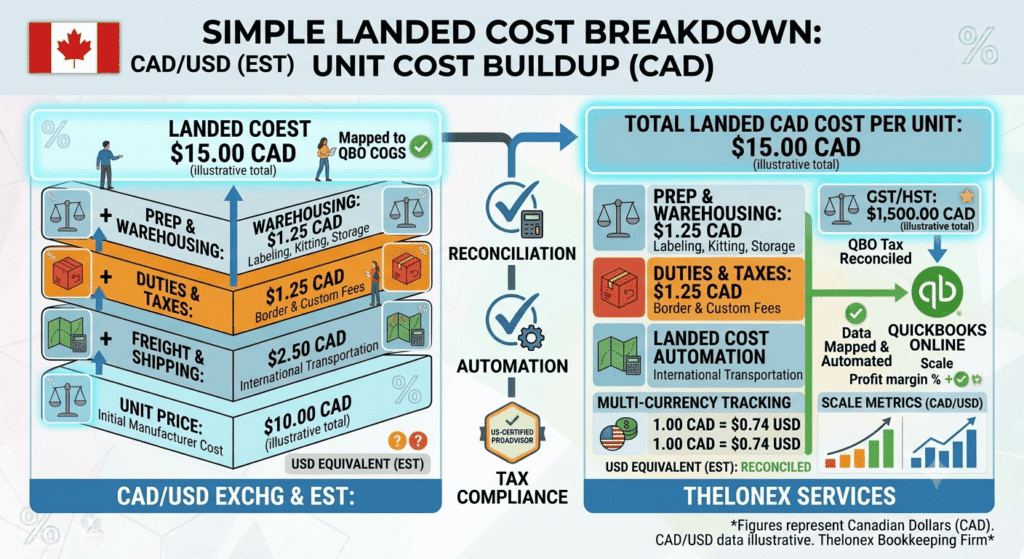
Cost of goods sold, or COGS, is the direct cost of the products you sell, including manufacturing, freight, duties, and any cost required to get inventory ready for sale. Accurate COGS accounting means recording these costs correctly and matching them to revenue as units actually sell, not when you pay for inventory.
This applies to you if you sell physical products through Fulfillment by Amazon and want to know your real profit margin per product, especially if you import inventory and pay in a currency other than CAD.
Why COGS Accounting Matters for Canadian FBA Sellers
Amazon’s settlement reports do not include your COGS. That means your Seller Central dashboard can show strong sales while your actual margin, after product cost, is thin or negative. For Canadian sellers, currency adds another layer — landed cost changes with the exchange rate at the time of purchase, not the time of sale.The mistake A product sells for $30 with $9 in Amazon fees, which looks like a $21 margin. | The fix Once a $14 landed cost — unit price, freight, and duties — is factored in, the real margin is $7, less than a third of what it first looked like. |
Step-by-Step Guide to COGS Accounting
Step 1: Define What Counts as Landed Cost
Landed cost includes the unit price from your supplier, freight to get it to Amazon’s warehouse, customs duties, and any prep or labeling fees. Anything required to make a unit sellable belongs in this number.Step 2: Convert Foreign Currency Costs to CAD
If you pay suppliers in USD or another currency, convert each cost to CAD using the exchange rate on the transaction date, not a rough estimate. Small conversion errors add up quickly across large purchase orders.Step 3: Set Up Inventory Tracking in QuickBooks
Use QuickBooks Online’s inventory feature, or a connected inventory management tool, to track quantity on hand and cost per unit. This lets QuickBooks calculate COGS automatically as sales are recorded. See our QuickBooks setup guide if your file isn’t configured for inventory yet.Step 4: Choose a Consistent Costing Method
Decide whether you will use average cost or another consistent method, and apply it the same way every period. Switching methods between periods makes your margin trends impossible to compare accurately.Step 5: Match COGS to Revenue as Units Sell
Post COGS to your profit and loss statement in the same period the matching revenue is recorded, not when you paid your supplier. This is what makes a monthly P&L reflect true profitability instead of cash flow timing.Step 6: Review Margin by SKU Monthly
Once COGS is tracked accurately, review gross margin at the product level every month. This is how you identify which SKUs to reorder, which to reprice, and which to discontinue. This pairs well with the monthly Amazon FBA settlement reconciliation process.Practical Tips for Better Results
Update landed cost every time you place a new purchase order, especially if freight rates or exchange rates have shifted. Using an outdated cost figure understates or overstates your real margin.- Do not record COGS as an expense at the time of purchase instead of when the unit sells
- Do not ignore freight, duties, and prep fees when calculating landed cost
- Do not use a flat estimated exchange rate instead of the actual rate on each purchase
- Do not leave cost per unit unrevisited after the first calculation, even as supplier prices change
Conclusion
COGS accounting for Canadian Amazon FBA sellers determines whether your profit numbers are real or fiction. Landed cost, currency conversion, and consistent tracking in QuickBooks are what separate the two. Get this right, and every reorder, pricing, and product decision you make is based on numbers you can actually trust.Next step Thelonex tracks accurate COGS and inventory for Canadian Amazon FBA sellers as part of monthly bookkeeping, starting at $199/month with a dedicated account manager and QuickBooks Online ProAdvisor certified standards. To see your true product-level margins. Book a Free Consultation |
By:

Ashfaq helps e-commerce business owners turn messy numbers into clear, reliable financials. With over 15 years of experience, he specializes in bookkeeping for Amazon and Shopify sellers, ensuring accuracy, clarity, and confident decision-making.
Categories
Latest Posts
- August 2, 2026
Amazon Seller Connector by QuickBooks: Complete Guide
- July 21, 2026
How COGS Accounting Works for Canadian FBA Sellers
Tags
A2X
Accounting Method
Amazon FBA
Amazon Marketplace Connector
Amazon Seller Central
Amazon Seller Connector
Bookkeeping Tips
Canada Tax Registration
Canadian Bookkeeping
Canadian Sales Tax
Chart of Accounts
COGS
E-Commerce
E-Commerce Bookkeeping
Finance
Financial Statements
GST/HST
Inventory
Payout Reconciliation
Profit and Loss
QuickBooks Online
Sales Tax
Sales Tax Compliance
Shopify
TaxCloud