QuickBooks Bookkeeping for Amazon FBA & Shopify | Thelonex


How Amazon FBA Bookkeeping Works for Canadian Sellers
- Home
- How Amazon FBA Bookkeeping Works for Canadian Sellers
- July 21, 2026
- 5 min read
- No Comments

How Amazon FBA Bookkeeping Works for Canadian Sellers
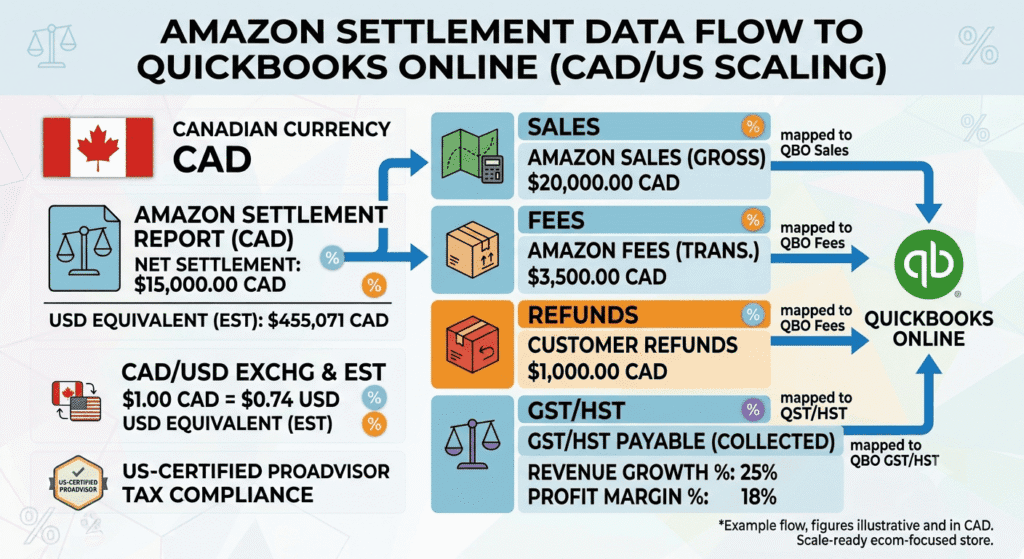
Amazon does not send you a clean paycheck. It sends a settlement that bundles sales, fees, refunds, storage costs, and tax into one number. For Canadian FBA sellers, that number also needs to be split apart correctly for GST/HST and, often, converted between currencies.
This guide breaks down exactly how to reconcile Amazon FBA settlements in QuickBooks, so your reports show real profit instead of a mystery deposit. It builds on our complete Canadian bookkeeping guide — see our resources hub for more free guides like this one.
Quick takeaways • A settlement deposit is not revenue — it’s revenue minus fees, refunds, and tax, all bundled together • GST/HST collected sits inside your gross sales figure unless you separate it out • Cost of goods sold has to come from supplier records, not from Amazon’s reports • Reconciling every two weeks, on Amazon’s own settlement cycle, catches errors while they’re still fresh |
What Is Amazon FBA Bookkeeping for Canadian Sellers?
Amazon FBA bookkeeping is the process of taking your Amazon settlement reports and recording them accurately in QuickBooks, broken into revenue, fees, refunds, cost of goods sold, and tax. For Canadian sellers, it also means tracking GST/HST collected and handling any USD-to-CAD conversion correctly.This applies to you if you sell through Fulfillment by Amazon on Amazon.ca, Amazon.com, or both, and you are a Canadian-registered business or GST/HST registrant.Why Amazon FBA Bookkeeping Matters for Canadian Sellers
Amazon settlements are net deposits, not revenue reports. Recording a settlement at face value hides everything that happened before the deposit landed — fees, refunds, reserve holds, and tax all disappear into one number.This matters more in Canada because GST/HST is baked into your sales figures. If you do not separate it out, your reported revenue is inflated by tax you owe the CRA, and your real margin looks better than it is.The mistake Two settlements totaling $22,000 get recorded as $22,000 of revenue for the month. | The fix After separating GST/HST, referral fees, and storage costs, real product revenue is $19,000 — with $2,860 belonging to the CRA, not the business. |
Step-by-Step Guide to Amazon FBA Bookkeeping
Step 1: Connect Your Amazon Account to A2X
Link Amazon Seller Central to A2X. A2X pulls in every settlement and itemizes it into sales, FBA fees, referral fees, refunds, reimbursements, and tax, matching Amazon’s own reporting structure. If A2X isn’t connected to QuickBooks yet, see our QuickBooks setup guide first.Step 2: Map Settlement Categories to QuickBooks Accounts
Set up A2X to send each category to its matching QuickBooks account: gross sales to revenue, FBA fees to a fees expense account, refunds to a contra-revenue account, and GST/HST collected to GST/HST payable.Step 3: Record Cost of Goods Sold Separately
COGS does not come from your Amazon settlement. Track it from your supplier invoices and inventory records, then post it to QuickBooks as units sell. This is what turns a revenue report into a real profit report — see our COGS and inventory accounting guide for the full breakdown.Step 4: Reconcile Settlements to Bank Deposits Monthly
Match each settlement in QuickBooks to the actual deposit in your bank account. Amazon settles roughly every two weeks, so most months have two to three settlements to reconcile. If a deposit does not match the expected total, check for reserve holds or delayed disbursements before assuming an error.Step 5: Handle Currency Conversion If You Sell in USD
If you sell on Amazon.com in USD but bank in CAD, confirm A2X and QuickBooks are converting each settlement at the correct exchange rate, not a flat estimate. Review the exchange gain or loss account monthly for accuracy.Step 6: Review Profit by Product Line
Once fees, refunds, COGS, and tax are separated, run a profit and loss report filtered by product or SKU where possible. This tells you which listings are actually worth your ad spend.Practical Tips for Better Results
Reconcile on a schedule tied to Amazon’s settlement cycle, not the calendar month. Checking in every two weeks catches errors while the settlement details are still fresh in Seller Central.- Do not record the net settlement deposit as total revenue
- Do not ignore long-term storage fees and reserve holds, which distort monthly totals if untracked
- Do not estimate COGS instead of tracking it from real supplier costs
- Do not let GST/HST sit inside revenue instead of its own liability account
Conclusion
Amazon FBA bookkeeping for Canadian sellers takes more than connecting a bank feed. It requires breaking settlements apart correctly, tracking real COGS, and keeping GST/HST separate from revenue. Done consistently, it turns Amazon’s confusing deposits into a clear, monthly picture of what your business actually earns.Next step TThelonex reconciles Amazon FBA settlements for Canadian sellers every month, with GST/HST tracking and multi-currency handling built in. Plans start at $199/month and every client works with a dedicated account manager, not a call center. To see your real Amazon profit margins. Book a Free Consultation |
By:

Ashfaq helps e-commerce business owners turn messy numbers into clear, reliable financials. With over 15 years of experience, he specializes in bookkeeping for Amazon and Shopify sellers, ensuring accuracy, clarity, and confident decision-making.
Categories
Latest Posts
- August 2, 2026
Amazon Seller Connector by QuickBooks: Complete Guide
- July 21, 2026
How COGS Accounting Works for Canadian FBA Sellers
Tags
A2X
Accounting Method
Amazon FBA
Amazon Marketplace Connector
Amazon Seller Central
Amazon Seller Connector
Bookkeeping Tips
Canada Tax Registration
Canadian Bookkeeping
Canadian Sales Tax
Chart of Accounts
COGS
E-Commerce
E-Commerce Bookkeeping
Finance
Financial Statements
GST/HST
Inventory
Payout Reconciliation
Profit and Loss
QuickBooks Online
Sales Tax
Sales Tax Compliance
Shopify
TaxCloud