QuickBooks Bookkeeping for Amazon FBA & Shopify | Thelonex


What Are GST/HST Input Tax Credits for Sellers?
- Home
- What Are GST/HST Input Tax Credits for Sellers?
- July 19, 2026
- 4 min read
- No Comments

What Are GST/HST Input Tax Credits for Sellers
Most GST/HST-registered sellers pay tax on business expenses without ever claiming it back. That is money the CRA owes you, sitting unclaimed.
This guide explains what input tax credits are, which expenses qualify, and how to claim them accurately in QuickBooks Online. For the full registration and filing picture, start with our Canadian GST/HST guide.
What Are GST/HST Input Tax Credits?
An input tax credit, or ITC, lets a GST/HST-registered business recover the tax it paid on eligible purchases used for commercial activity. Instead of treating GST/HST paid as a cost, you subtract it from the tax you collected before remitting to the CRA.
This applies to any business registered for GST/HST, including non-resident US sellers registered to collect Canadian tax. Amazon FBA and Shopify sellers who pay GST/HST on fulfillment fees, software subscriptions, or shipping supplies are typical candidates for meaningful ITC recovery.
Why Input Tax Credits Matter for E-Commerce Sellers
Every dollar of GST/HST paid on a qualifying expense and left unclaimed is a dollar handed to the CRA for nothing. For sellers running FBA fees, subscription software, and shipping costs through Canadian operations, that adds up fast over a year.
Claiming ITCs correctly also lowers your net remittance each period, improving cash flow. A seller who claims $4,000 in ITCs against $10,000 collected only remits $6,000, not the full amount.
Missed ITCs are one of the most common reasons e-commerce sellers overpay the CRA. It usually comes down to expenses not being tracked with tax paid broken out separately in the books.
Step-by-Step Guide to Claiming Input Tax Credits
Step 1: Confirm You Are GST/HST Registered
You can only claim ITCs if you are registered for GST/HST. Voluntary registration below the small supplier threshold can make sense specifically to unlock ITC recovery earlier.
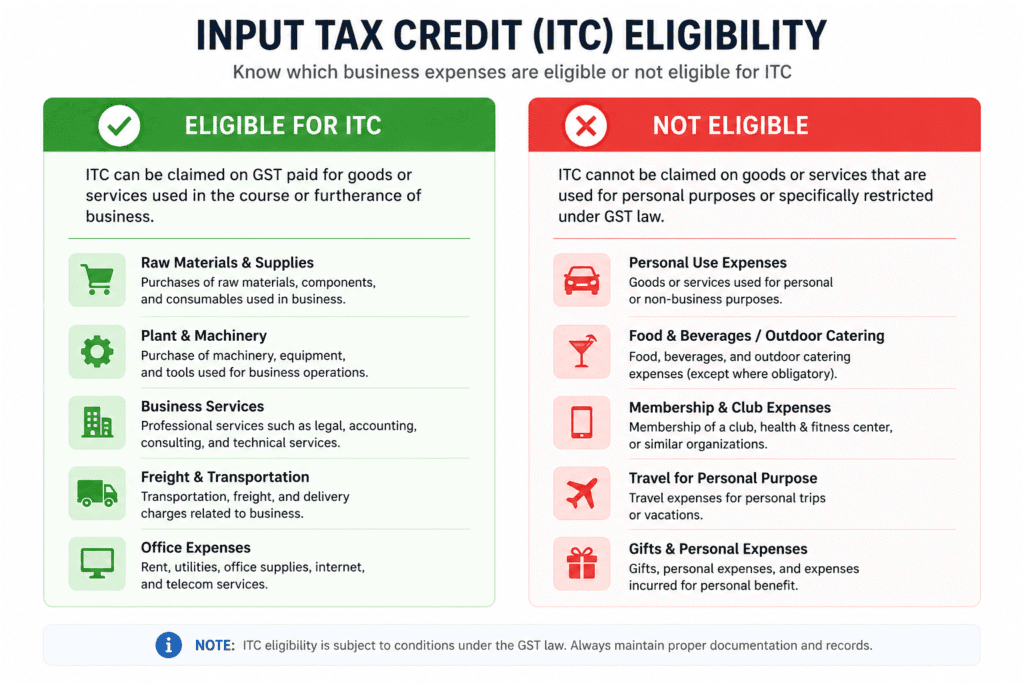
Step 2: Identify Eligible Business Expenses
- Amazon FBA fees and Fulfillment by Amazon storage costs
- Shopify subscription and app fees where GST/HST was charged
- Shipping and packaging supplies purchased in Canada
- Professional services such as bookkeeping and accounting
- Software subscriptions used for business operations, including QuickBooks Online
Expenses must relate to your commercial activity. Personal purchases, meals beyond CRA limits, and exempt supplies do not qualify.
Step 3: Keep Proper Documentation
The CRA requires supporting documentation for every ITC claimed, including the supplier’s GST/HST number, the amount of tax paid, and the date of purchase. Missing documentation is the most common reason ITC claims get denied during a review.
Step 4: Track Tax Paid Separately in QuickBooks Online
Set up your chart of accounts so GST/HST paid on expenses posts to a distinct tracking account, not blended into the expense total. This is the same account QuickBooks pulls from when you file your GST/HST return.
Step 5: Calculate Your Net Tax Owed
Subtract total ITCs from total GST/HST collected during the period. The result is your net tax owed or, in some cases, a refund. Note that if you file under the Quick Method, ITC calculations work differently. Compare the two approaches in our GST/HST Quick Method versus regular method guide before assuming standard ITC rules apply.
Step 6: Claim ITCs on Your Return
Report your total ITCs on the appropriate line of your GST/HST return. QuickBooks Online’s Sales Tax Center calculates this automatically if your expense tracking was set up correctly in Step 4.
Practical Tips for Better Results
Review your Amazon FBA fee statements specifically. GST/HST charged on Canadian fulfillment fees is one of the most frequently missed ITC categories for FBA sellers, and it connects directly to the setup covered in our Amazon FBA Canada tax guide.
Common mistake: claiming ITCs on exempt or zero-rated purchases. Not every business expense includes GST/HST, and claiming tax that was never charged triggers CRA adjustments.
Common mistake: losing receipts for smaller recurring expenses like software subscriptions. These add up over a year and are easy to overlook without a documented system.
Efficiency tip: automating tax tracking through tools like TaxCloud alongside a clean QuickBooks Online chart of accounts reduces the manual work of separating tax paid from expense totals.
Conclusion
Input tax credits are not a bonus. They are money you are entitled to recover for tax already paid on legitimate business expenses. Track expenses with tax paid separated, keep documentation on hand, and claim every eligible dollar each filing period.
Not sure how much you have been leaving unclaimed? Book a free consultation and we will review your last filing for missed input tax credits.
By:

Ashfaq helps e-commerce business owners turn messy numbers into clear, reliable financials. With over 15 years of experience, he specializes in bookkeeping for Amazon and Shopify sellers, ensuring accuracy, clarity, and confident decision-making.
Categories
Latest Posts
- August 2, 2026
Amazon Seller Connector by QuickBooks: Complete Guide
- July 21, 2026
How COGS Accounting Works for Canadian FBA Sellers
Tags
A2X
Accounting Method
Amazon FBA
Amazon Marketplace Connector
Amazon Seller Central
Amazon Seller Connector
Bookkeeping Tips
Canada Tax Registration
Canadian Bookkeeping
Canadian Sales Tax
Chart of Accounts
COGS
E-Commerce
E-Commerce Bookkeeping
Finance
Financial Statements
GST/HST
Inventory
Payout Reconciliation
Profit and Loss
QuickBooks Online
Sales Tax
Sales Tax Compliance
Shopify
TaxCloud