QuickBooks Bookkeeping for Amazon FBA & Shopify | Thelonex


Why Multi-Channel Inventory Accounting Is a Nightmare
- Home
- Why Multi-Channel Inventory Accounting Is a Nightmare
- July 5, 2026
- 6 min read
- No Comments
Why Multi-Channel Inventory Accounting Is a Nightmare
Why does multi-channel inventory accounting turn into a nightmare so fast? One product. Five warehouses. Three sales channels. One cost of goods sold number that never seems to be right.
This is not a rare problem. It is the default state for any Amazon seller who also sells on Shopify, Walmart, or TikTok Shop. Inventory sits in more places than your accounting system can track on its own.
This post is a deep dive into the inventory piece specifically. For the full monthly bookkeeping process, see our Amazon seller bookkeeping guide for multi-channel sellers. Here, you will learn exactly why inventory breaks first, and the step-by-step fix.
What Is Multi-Channel Inventory Accounting?
Multi-channel inventory accounting is the process of tracking stock, cost, and valuation for products sold across more than one sales channel. It covers Amazon FBA, Amazon FBM, Shopify, Walmart, and any other platform where the same product sits.
The goal is one accurate number for how much inventory you have and what it cost, no matter which channel sold it or where it is stored.
Who This Is For
This applies to sellers who:
- Store inventory in more than one place, such as Amazon FBA and a 3PL
- Sell the same SKU on Amazon, Shopify, Walmart, or another channel
- Have noticed their inventory value in QuickBooks does not match Amazon’s numbers
- Need one accurate cost of goods sold figure across every channel
If you sell one product on one platform from one warehouse, this problem does not apply to you yet. Add a second channel or a second storage location, and it will.
Why Multi-Channel Inventory Breaks Amazon Accounting
Inventory is the first thing to break when a seller adds a second channel. Here is why it causes so much damage.
Stock Lives in Too Many Places at Once
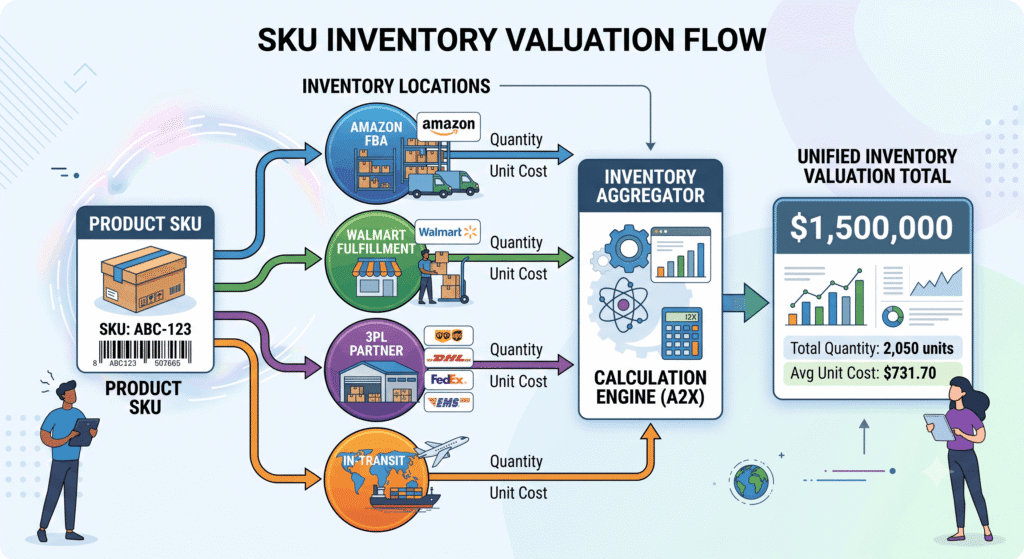
A single SKU might sit in an Amazon FBA warehouse, a 3PL, your garage, and in transit between all three. Each location reports stock differently, and none of them talk to each other by default.
Cost of Goods Sold Gets Distorted
When you buy inventory at different prices over time, you need a consistent method to match cost to each sale. Without one, your cost of goods sold shifts depending on which channel sold the unit, not what it actually cost.
Lost and Damaged Stock Disappears From the Books
Amazon loses or damages inventory more often than most sellers realize. If you do not track this separately, it just vanishes from your numbers instead of showing up as a real, reimbursable loss.
Your Profit Numbers Become Unreliable
If inventory value is wrong, your cost of goods sold is wrong. If cost of goods sold is wrong, your profit is wrong. Every decision built on that number, from pricing to ad spend, starts from bad data.
Step-by-Step Guide to Fixing Multi-Channel Inventory Accounting
Follow these steps in order. Each one closes a gap that causes inventory numbers to drift.
Step 1: Map Every Inventory Location
List every place your inventory physically exists. This includes Amazon FBA warehouses, Walmart fulfillment centers, a 3PL, and your own storage.
Do this before touching your accounting software. You cannot track what you have not listed.
Step 2: Standardize SKUs Across Channels
Use the same SKU for the same product on every channel. If Amazon and Shopify use different codes for the same item, your inventory reports will never match.
Create one master SKU list and map each channel’s product ID back to it.
Step 3: Choose One Costing Method for All Channels
Pick one costing method, such as FIFO, and apply it across every channel. Do not let one channel use average cost while another uses FIFO. For the exact setup in QuickBooks, see how to track Amazon FBA cost of goods sold in QuickBooks.
Step 4: Track In-Transit and Inbound Inventory Separately
Inventory shipped to Amazon but not yet received is not sellable stock, and it is not sitting at your warehouse either. Give it its own account so it does not get double-counted or lost between statuses.
Step 5: Reconcile Lost, Damaged, and Reserved Inventory Monthly
Check Amazon’s inventory and reimbursement reports every month. Match lost or damaged units against your own records, and record any reimbursement as income, not as a reduction to your original expense.
Step 6: Sync Inventory Data Automatically Where Possible
Manual updates across several channels will eventually create errors. Use software that syncs orders, refunds, and inventory changes automatically. See our comparison of A2X versus manual entry for Amazon bookkeeping if you are deciding between the two.
Step 7: Review Total Inventory Valuation Every Month
Add up inventory value across every location and compare it to your accounting system’s total. If the numbers do not match, investigate before closing the month. Our month-end bookkeeping checklist includes this check as a standard step.
Practical Tips for Better Results
Use these tips to keep multi-channel inventory accurate without spending hours on manual work.
Actionable Advice
- Recount physical inventory at least once a quarter, even with software syncing automatically
- Keep one master SKU list and update it before adding a new channel, not after
- Record Amazon reimbursements the month they are issued, not the month the loss happened
- Review inventory aging reports to catch slow-moving stock tying up cash
Common Mistakes to Avoid
- Using different SKUs for the same product on different channels
- Mixing costing methods across channels or time periods
- Leaving in-transit inventory out of the books entirely
- Treating a missing inventory reconciliation as a rounding error instead of investigating it
Efficiency Tips
- Automate the sync between sales channels and your accounting software instead of updating manually
- Set a recurring monthly task specifically for inventory reconciliation, separate from general bookkeeping
- Use one dashboard that pulls stock levels from every channel instead of checking each platform separately
- Flag any SKU with a stock mismatch immediately instead of waiting for month-end
Conclusion
Multi-channel inventory accounting breaks down because stock lives in too many places for a manual system to track. Mismatched SKUs, mixed costing methods, and untracked in-transit inventory all feed into one bad number: your cost of goods sold.
A structured process fixes this. Map every location, standardize your SKUs, pick one costing method, and reconcile monthly. The result is inventory numbers you can actually trust.
This is not a one-time cleanup. It is a system you run every month, and it keeps your profit numbers accurate as you add more channels, not less.
Ready to fix your inventory numbers? Talk to a bookkeeper who specializes in multi-channel Amazon inventory, and stop guessing at your true cost of goods sold.
By:

Ashfaq helps e-commerce business owners turn messy numbers into clear, reliable financials. With over 15 years of experience, he specializes in bookkeeping for Amazon and Shopify sellers, ensuring accuracy, clarity, and confident decision-making.
Categories
Latest Posts
- August 2, 2026
Amazon Seller Connector by QuickBooks: Complete Guide
- July 21, 2026
How COGS Accounting Works for Canadian FBA Sellers
Tags
A2X
Accounting Method
Amazon FBA
Amazon Marketplace Connector
Amazon Seller Central
Amazon Seller Connector
Bookkeeping Tips
Canada Tax Registration
Canadian Bookkeeping
Canadian Sales Tax
Chart of Accounts
COGS
E-Commerce
E-Commerce Bookkeeping
Finance
Financial Statements
GST/HST
Inventory
Payout Reconciliation
Profit and Loss
QuickBooks Online
Sales Tax
Sales Tax Compliance
Shopify
TaxCloud