QuickBooks Bookkeeping for Amazon FBA & Shopify | Thelonex


Track Amazon FBA Cost of Goods Sold in QuickBooks
- Home
- Track Amazon FBA Cost of Goods Sold in QuickBooks
- June 4, 2026
- 12 min read
- No Comments

Track Amazon FBA Cost of Goods Sold in QuickBooks
Your Amazon sales numbers look strong. But after FBA fees, shipping, and the cost of the products themselves, how much did you actually keep? Most sellers cannot answer that question accurately — because they are not tracking cost of goods sold correctly.
COGS is the single most important number on your profit and loss report. Get it wrong, and every other figure in your financials is unreliable. You cannot price products correctly, evaluate margins, or prepare accurate tax returns without it.
This guide shows you exactly how to track Amazon FBA cost of goods sold in QuickBooks Online — from setting up the right accounts to recording inventory purchases and reconciling COGS every month. By the end, you will have a working system that gives you accurate, real-time profitability data.
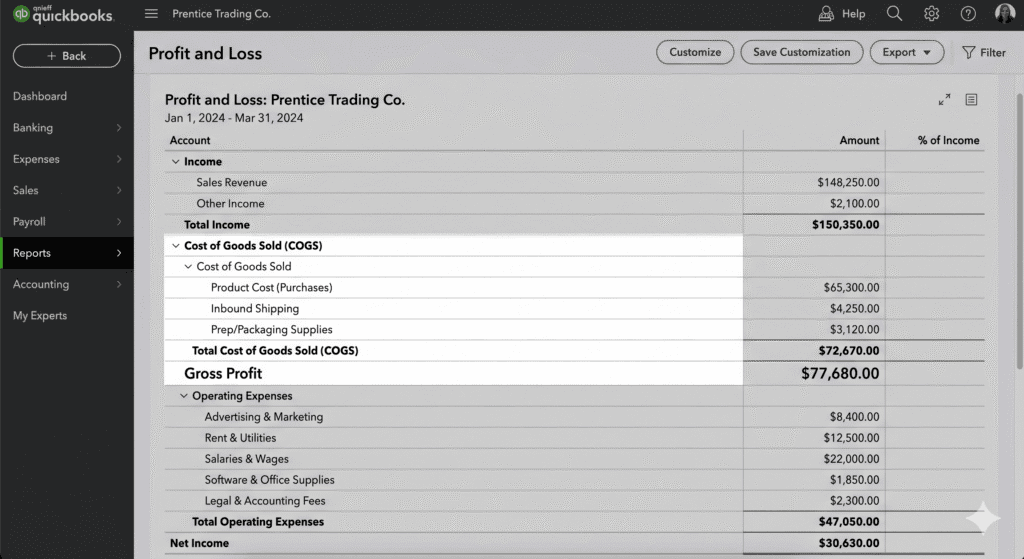
What Is the Cost of Goods Sold for Amazon FBA Sellers?
Cost of goods sold — COGS — is the total cost directly tied to producing or acquiring the products you sold during a given period. It is not your total inventory spend. It is the portion of inventory that corresponds specifically to the units you sold.
For Amazon FBA sellers, COGS typically includes:
- The purchase price of the product itself (what you paid your supplier)
- Inbound shipping costs — freight from your supplier to Amazon’s fulfillment centers
- Packaging, prep, and labeling costs if you handle those before sending to Amazon
- Customs, duties, and import fees for international sourcing
COGS does not include Amazon FBA fees, advertising, software, or other operating expenses. Those are separate line items in your income statement, below the gross profit line.
COGS Formula for Amazon FBA Sellers Beginning Inventory + Inventory Purchased — Ending Inventory = COGS Example: $8,000 beginning + $22,000 purchased — $6,000 ending = $24,000 COGS |
Who Needs to Track COGS in QuickBooks?
Any Amazon FBA seller who wants to know their real gross margin needs to track COGS properly. This is not optional if you file business taxes. In the US, COGS is deducted from gross revenue to arrive at gross profit — and then taxable income. An incorrect COGS figure means an incorrect tax return.
COGS tracking in QuickBooks is especially important for sellers who source internationally, manage multiple SKUs, or are planning to raise capital or sell their business. Investors and buyers require clean, verified financials.
For the foundation your COGS setup depends on, read: How to Set Up QuickBooks Online for Amazon FBA Sellers — particularly the chart of accounts section.
Why Tracking COGS Correctly in QuickBooks Matters
It Shows You Your Real Margin per SKU
Gross margin = Revenue minus COGS divided by Revenue. If you are not tracking COGS accurately, your gross margin is a guess. You may be scaling products that are actually unprofitable once you factor in full unit costs — and cutting products that are quietly your best performers.
With COGS tracked correctly in QuickBooks, you can filter your P&L by product or category and see exactly which SKUs are worth scaling and which are dragging your margin down.
It Is Required for Accurate Tax Filing
The IRS requires that businesses using inventory track COGS and use either accrual accounting or a specific inventory accounting method. For most Amazon sellers above a modest revenue threshold, cash-basis accounting is not appropriate — and a cash-basis P&L will misstate your profitability and potentially your tax liability.
When your COGS is tracked correctly in QuickBooks, your accountant has accurate data to work with at tax time. When it is not, they spend hours cleaning it up — at your expense.
It Prevents Inventory Distortions on Your Balance Sheet
In QuickBooks, unsold inventory lives on your balance sheet as an asset. When you sell units, the cost of those units moves from the inventory asset account to COGS on the income statement. If this transfer does not happen correctly — or at all — your balance sheet will overstate your assets and your P&L will understate your expenses.
This is the most common bookkeeping error for FBA sellers, and it compounds over time. The longer it goes unaddressed, the more difficult and expensive it becomes to correct.
Internal Link: See how A2X handles the settlement-level entries that feed into your COGS accounts: A2X vs Manual Entry: Which Is Better for Amazon Bookkeeping?
Step-by-Step: How to Track Amazon FBA COGS in QuickBooks
This process works in QuickBooks Online (Simple Start, Essentials, or Plus). The Plus tier includes native inventory tracking — which is relevant if you want QuickBooks to manage inventory quantities alongside costs.
Step 1: Build a COGS-Specific Chart of Accounts
Before you record a single transaction, your QuickBooks chart of accounts needs the right COGS categories. Without them, every cost lands in a catch-all account and your P&L is useless.
Here is the recommended account structure for Amazon FBA COGS:
Item | Suggested QBO Account | What It Covers |
Cost of Goods Sold | 5000 – COGS: Product Cost | Direct cost of items sold to customers |
FBA Inbound Freight | 5010 – COGS: Inbound Shipping | Cost to ship inventory to Amazon warehouses |
Prep and Packaging | 5020 – COGS: Prep / Packaging | Poly bags, labels, bundles, inserts |
Beginning Inventory | 1400 – Inventory Asset | Value of stock on hand at period start |
Inventory Purchases | 1400 – Inventory Asset | New stock purchased during the period |
Ending Inventory | 1400 – Inventory Asset | Value of remaining stock at period end |
Inventory Write-Down | 5030 – COGS: Inventory Adjustments | Damaged, lost, or expired stock |
Amazon Reimbursements | 4100 – Other Income: Reimbursements | Amazon payouts for lost/damaged FBA items |
In QuickBooks Online, go to Accounting > Chart of Accounts > New to add each account. Set the Account Type to Cost of Goods Sold for accounts in the 5000 range and Inventory for the 1400 inventory asset account.
See the full QuickBooks chart of accounts setup for e-commerce in: How to Set Up QuickBooks Online for Amazon FBA Sellers
Step 2: Choose Your Inventory Accounting Method
Before you start recording transactions, you need to decide which inventory accounting method you will use. The two main options for Amazon FBA sellers are FIFO (First In, First Out) and Average Cost.
Factor | FIFO (First In, First Out) | Average Cost |
Definition | Sells the oldest inventory first | Uses a weighted average cost for all units |
Best for | Products with changing costs over time | Products purchased in large consistent batches |
COGS when prices rise | Lower COGS, higher taxable profit | Smoothed COGS — more stable profit figure |
COGS when prices fall | Higher COGS, lower taxable profit | Smoothed COGS — more stable profit figure |
QuickBooks support | Yes — requires careful lot tracking | Yes — simpler to maintain in QBO |
IRS acceptance | Yes (US) | Yes (US) |
Recommended for most FBA sellers | Only if product costs vary significantly | Yes — simpler and easier to audit |
For most Amazon FBA sellers purchasing from overseas suppliers, Average Cost is simpler and more practical. FIFO is better suited to sellers whose unit costs change significantly from one purchase order to the next.
Note: Once you choose an accounting method and file a tax return using it, you generally need IRS approval to change it. Confirm your choice with your accountant before starting.
Step 3: Record Every Inventory Purchase Correctly
Every time you purchase inventory — whether from a domestic supplier or an overseas factory — you need to record it in QuickBooks correctly.
The entry looks like this:
- Debit: Inventory Asset (account 1400) — the full cost of the purchased stock
- Credit: Accounts Payable or Bank Account — depending on how you paid
Include all costs that are part of getting the inventory to Amazon’s warehouse: the product price, freight, customs fees, and any prep costs. All of these belong in the cost basis of the inventory, not as separate operating expenses.
If you use a freight forwarder, add their invoice to the same inventory purchase entry. If you pay import duties separately, record them against the same Inventory Asset account.
Common mistake: recording inventory purchases as an expense. If you post your inventory purchases directly to COGS when you buy them, your P&L will show huge expenses in months when you restock — and understated expenses when you sell through existing stock. Always record inventory to the balance sheet first, then transfer to COGS as units are sold. |
Step 4: Record the COGS Entry When Units Sell
When your products sell on Amazon, the cost of those units needs to move from Inventory Asset to COGS. This is how QuickBooks records your true cost of goods sold for the period.
If you use QuickBooks Plus with inventory tracking enabled, QuickBooks can handle this automatically when you record a sale. For sellers using Simple Start or Essentials, or those using A2X for bookkeeping, this transfer is done via a manual journal entry or as part of your month-end process.
The COGS journal entry for a period looks like this:
- Debit: COGS: Product Cost (account 5000) — cost of units sold
- Credit: Inventory Asset (account 1400) — same amount
If you purchased 100 units at $15 each and sold 60 of them, you move 60 x $15 = $900 to COGS. The remaining 40 units ($600) stay on the balance sheet as inventory.
Step 5: Use A2X to Automate Settlement-Level COGS Data
A2X connects Amazon Seller Central to QuickBooks and automatically pulls your settlement data — including sales, refunds, fees, and reimbursements — into clean journal entries.
A2X does not record your inventory purchase costs automatically — you still need to enter those manually or via your supplier invoices. But A2X ensures your revenue figures in QuickBooks are accurate, which is the other half of your gross margin calculation. Accurate COGS plus accurate revenue equals a reliable P&L.
For sellers using A2X, the workflow is: enter inventory purchases to Inventory Asset as they happen, let A2X post settlement revenue monthly, then run your COGS journal entry at month-end to transfer sold-unit costs from Inventory to COGS.
Learn how to connect A2X to QuickBooks and configure account mapping: A2X vs Manual Entry: Which Is Better for Amazon Bookkeeping?
Step 6: Reconcile COGS at Month-End
At the end of every month, reconcile your COGS figures. The goal is to verify that the COGS recorded in QuickBooks matches the actual units sold during the period.
To do this:
- Pull your Amazon sales report for the month — this shows units sold by SKU
- Multiply units sold by the per-unit cost for each SKU
- Compare the total to the COGS entries in QuickBooks for the same period
- Investigate any significant variance — it usually points to a missing inventory purchase entry or an incorrect unit cost
After reconciliation, your QuickBooks Inventory Asset balance should equal: Beginning Inventory + Purchases minus COGS for the month. If the math does not work, something is missing.
Use our Amazon FBA Bookkeeping Checklist: Month-End Tasks Every Seller Needs to make this reconciliation part of your monthly routine.
Practical Tips for Accurate Amazon FBA COGS Tracking
Record Inventory Costs at the Full Landed Cost
Landed cost is the total cost of getting one unit into Amazon’s warehouse: the product price plus freight, duties, insurance, and any prep costs. This is the number that belongs in your Inventory Asset account — not just the factory price.
If you only record the factory price and ignore shipping and duties, your COGS will be understated. Your gross margin will look better than it actually is. Pricing decisions based on that figure will leave you undercharging for margin and overstating profitability.
Track Inventory by SKU, Not by Category
If you record all inventory purchases to a single Inventory Asset account without tracking by SKU, you will not be able to calculate per-product COGS accurately. This matters when you run your P&L and want to see margin by product line.
QuickBooks Plus supports item-level inventory tracking. If you are on Simple Start or Essentials, maintain a separate spreadsheet that tracks unit counts and unit costs by SKU, then use that to calculate your monthly COGS journal entry.
Adjust for Amazon Reimbursements
When Amazon loses or damages your FBA inventory, they reimburse you. That reimbursement needs to be recorded correctly. It is not revenue from a sale — it is income that offsets the cost of lost inventory. Record it to an Other Income account (suggested: 4100 – Other Income: Reimbursements) and adjust your inventory count accordingly.
If you write down the lost inventory to COGS when Amazon issues the reimbursement, your COGS will be overstated. Keep these transactions clean and separate.
Common Mistakes to Avoid
- Expensing inventory purchases directly to COGS when purchased — this distorts monthly P&L and obscures true profitability
- Using only the supplier invoice price as unit cost — ignoring freight, duties, and prep means your COGS is understated
- Not recording inventory write-downs for lost, damaged, or expired FBA stock — this overstates your inventory asset balance
- Forgetting to account for returned items — customer returns add units back to inventory, which reduces COGS for that period
- Running COGS adjustments annually instead of monthly — annual COGS reconciliation leads to unreliable monthly P&L reports
Accrual vs Cash Accounting for Amazon FBA Sellers Cash basis accounting records revenue when cash is received and expenses when cash is paid. For inventory-based businesses, the IRS generally requires accrual accounting if annual gross receipts exceed $27 million (as of 2024). However, accrual is the correct method for any seller who wants to see accurate monthly profitability — because it matches revenue and costs to the period they belong to, not the period cash moves. |
Conclusion
Tracking Amazon FBA cost of goods sold in QuickBooks is not complicated once the system is set up correctly. The foundation is a well-built chart of accounts, a consistent method for recording inventory purchases at full landed cost, and a monthly reconciliation process that keeps everything in balance.
With COGS tracked accurately, your QuickBooks P&L shows your real gross margin. You know which products are profitable. Your tax returns are based on correct figures. And when it comes time to raise capital or sell your business, your financials hold up to scrutiny.
The sellers who build this system early — rather than trying to reconstruct it at tax time — spend less money on accounting, make better pricing decisions, and scale with confidence.

Ashfaq helps e-commerce business owners turn messy numbers into clear, reliable financials. With over 15 years of experience, he specializes in bookkeeping for Amazon and Shopify sellers, ensuring accuracy, clarity, and confident decision-making.
Want accurate COGS tracking set up in QuickBooks?
Thelonex builds and manages QuickBooks accounting systems for Amazon FBA sellers in the US and Canada. Starting at $199/month.
Categories
Latest Posts
- August 2, 2026
Amazon Seller Connector by QuickBooks: Complete Guide
- July 21, 2026
How COGS Accounting Works for Canadian FBA Sellers
Tags
A2X
Accounting Method
Amazon FBA
Amazon Marketplace Connector
Amazon Seller Central
Amazon Seller Connector
Bookkeeping Tips
Canada Tax Registration
Canadian Bookkeeping
Canadian Sales Tax
Chart of Accounts
COGS
E-Commerce
E-Commerce Bookkeeping
Finance
Financial Statements
GST/HST
Inventory
Payout Reconciliation
Profit and Loss
QuickBooks Online
Sales Tax
Sales Tax Compliance
Shopify
TaxCloud