QuickBooks Bookkeeping for Amazon FBA & Shopify | Thelonex


Amazon Catch-Up Bookkeeping: Fix Your Messy Books
- Home
- Amazon Catch-Up Bookkeeping: Fix Your Messy Books
- June 4, 2026
- 12 min read
- No Comments

Amazon Catch-Up Bookkeeping: Fix Your Messy Books
You have been selling on Amazon for months — maybe longer — and your books are a mess. Transactions are uncategorized, settlements are unreconciled, and you have no idea what your actual profit was last quarter. Tax season is getting closer, and the thought of dealing with it is overwhelming.
This situation is more common than most Amazon sellers admit. The good news is that it is fixable. Amazon catch-up bookkeeping is the process of going back through your transaction history, reconciling every period, and delivering a clean, accurate set of financial records.
This guide explains exactly what catch-up bookkeeping involves, how the process works step by step, what it typically costs, and how to make sure it never happens again once your books are clean.
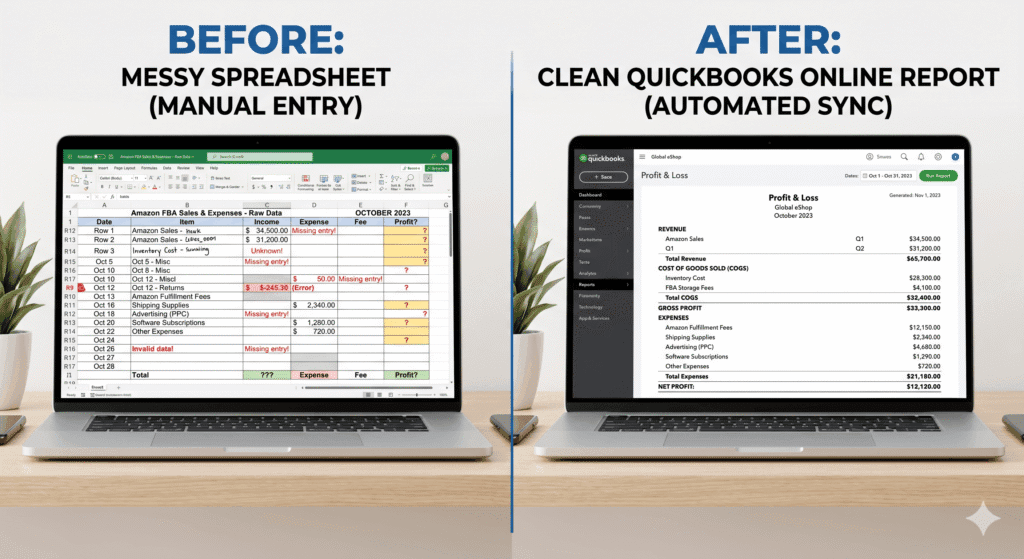
What Is Amazon Catch-Up Bookkeeping?
Catch-up bookkeeping — sometimes called backlog bookkeeping or cleanup bookkeeping — is the process of reconstructing and reconciling your financial records for periods that were never properly maintained.
For Amazon FBA sellers, this means going back through every Amazon settlement, every bank deposit, every supplier invoice, and every expense from the missed months — and entering, categorizing, and reconciling them correctly in QuickBooks Online.
The output is a complete, accurate set of financial statements for every month in the backlog period: a reconciled Profit and Loss report, a clean Balance Sheet, and verified bank account balances.
Who Needs Amazon Catch-Up Bookkeeping?
You likely need catch-up bookkeeping if any of these apply to you:
- You have not maintained your QuickBooks account for three months or more
- Your bank accounts in QuickBooks have not been reconciled
- You recorded Amazon settlements as a single gross deposit instead of breaking them down
- You have inventory purchases that were never entered or were categorized as expenses
- Your accountant or CPA has told you that your books are not tax-ready
- You are preparing to raise capital, seek a loan, or sell your business
Catch-up bookkeeping applies to sellers at any stage. Whether you are six months behind or two years behind, the process is the same — it just takes longer and costs more as the backlog grows.
Once your books are clean, use the Amazon Seller Accounting: The Complete Guide for US and Canada to build a system that prevents the backlog from forming again.
Why Amazon Catch-Up Bookkeeping Matters
You Cannot File an Accurate Tax Return Without Clean Books
Your annual tax return is built on your financial records. If your QuickBooks is months behind, your accountant cannot prepare an accurate return. They either ask you to clean up the records first — at your expense and under deadline pressure — or they file a return based on incomplete data, which can lead to overpaying tax or underpaying and facing penalties later.
Catch-up bookkeeping done before your tax deadline gives your accountant what they need: a verified Profit and Loss, an accurate COGS figure, and a reconciled balance sheet.
You Cannot Make Good Business Decisions Without Accurate Numbers
If your books are behind, you are running your business blind. You do not know your real gross margin. You cannot see which products are profitable. You do not know your cash position relative to your inventory commitments.
Sellers who clean up their books regularly describe a consistent experience: they discover expenses they had forgotten, inventory write-downs they missed, and profit margins that were different — sometimes significantly — from what they assumed.
Unclean Books Create Compounding Problems
Every month you delay makes the catch-up harder and more expensive. Supplier invoices get lost. Memory fades. Amazon settlement data gets harder to reconcile against older bank records. The further behind you fall, the more time a bookkeeper needs — and the higher the cost.
There is also a sales tax risk. If your books are behind, you may not have tracked whether you crossed economic nexus thresholds in new states during the backlog period. That creates potential back-tax liability that grows with time.
If you have nexus exposure during your backlog period, read: Amazon FBA Sales Tax Nexus: A State-by-State Guide for US Sellers before starting your catch-up.
Step-by-Step: How Amazon Catch-Up Bookkeeping Works
Whether you are doing this yourself or working with a bookkeeper, the process follows the same logical sequence. Do not skip steps — each one builds on the previous.
Step 1: Gather Every Source Document
Before touching QuickBooks, assemble all the raw data for the backlog period. You need:
- Amazon settlement reports — download every settlement from Seller Central for each month in the backlog
- Bank statements — every month, for every account used for the business
- Credit card statements — every month, for every card used for business expenses
- Supplier invoices — every purchase order and invoice for inventory received during the period
- Freight and logistics invoices — all inbound shipping, customs paperwork, and freight forwarder bills
- Expense receipts — software subscriptions, advertising invoices, professional fees, and any other operating costs
Missing documents are the biggest source of delay in catch-up work. The more complete your document collection before you start, the faster the process moves.
For Amazon settlements, Seller Central stores your reports indefinitely — you can download them at any time. For bank and credit card statements, most institutions make 12 to 24 months of statements available online. Beyond that, you may need to contact the institution directly.
Step 2: Decide: DIY or Professional Catch-Up Service?
This decision comes down to how far behind you are, how complex your transaction history is, and how confident you are in your accounting knowledge.
DIY catch-up is realistic if: You are 1–3 months behind. Your QuickBooks was mostly set up correctly before you fell behind. You understand how to categorize Amazon settlements, record inventory purchases, and reconcile bank accounts in QBO. Professional catch-up makes more sense if: You are 4+ months behind. Your QuickBooks chart of accounts was never set up correctly. You recorded settlements as gross deposits. You have inventory that was never entered. You need the books tax-ready under a deadline. |
Professional catch-up services typically charge a fixed fee based on the number of months in the backlog. The table below gives a general sense of cost ranges:
Backlog Length | Typical Cost Range | Notes |
1–3 months behind | $300 – $800 | Typically resolvable within 1–2 weeks for a skilled bookkeeper |
4–6 months behind | $700 – $1,500 | More settlement periods, more reconciliation work |
7–12 months behind | $1,200 – $2,500 | Full year cleanup — common for tax-driven projects |
12+ months behind | $2,500+ | Complex; may require accountant involvement for tax year corrections |
DIY with A2X + QBO | $29–$69/mo (A2X) + time | Realistic only if books were partially maintained — not for severe backlogs |
Cost ranges are estimates. Actual pricing depends on transaction volume, complexity, and the current state of your QuickBooks file. Request a fixed-price quote before engaging any service.
Step 3: Set Up QuickBooks Correctly First
If your QuickBooks chart of accounts was never configured correctly for an Amazon FBA business, fix it before you start entering historical data. Going back through months of transactions using the wrong account structure will produce books that are clean in appearance but inaccurate in substance.
The minimum requirements before catch-up work begins:
- Separate income accounts for Amazon sales and refunds
- COGS accounts for product cost, inbound freight, and packaging
- An Inventory Asset account on the balance sheet
- Expense accounts for FBA fees, advertising, software, and professional fees
- A reconciled opening balance for every bank and credit card account
See the full QuickBooks chart of accounts setup for FBA sellers: How to Set Up QuickBooks Online for Amazon FBA Sellers
Step 4: Process Amazon Settlements With A2X
The most time-consuming part of any Amazon bookkeeping backlog is reconciling the settlements. Each settlement bundles sales, fees, refunds, reimbursements, and other charges into a single net figure. Processing them manually — especially for a large backlog — is slow and error-prone.
A2X can pull your historical settlement data going back as far as your Seller Central account holds records. Once connected to QuickBooks, it categorizes each settlement component and posts clean journal entries for every period in your backlog. This alone can reduce the time required for a multi-month catch-up from days to hours.
If you are doing a DIY catch-up, setting up A2X is one of the highest-leverage decisions you can make. If you are working with a professional bookkeeper, confirm that they use A2X rather than processing settlements manually.
Learn how A2X works and how to connect it to QuickBooks: A2X vs Manual Entry: Which Is Better for Amazon Bookkeeping?
Step 5: Reconcile Inventory and COGS for Each Period
Once settlements are processed, you need to reconcile your inventory purchases and cost of goods sold for every month in the backlog.
For each month:
- Enter all supplier invoices for that month into QuickBooks Inventory Asset
- Calculate units sold from the Amazon sales report for that month
- Multiply units sold by the per-unit cost for each SKU
- Create a COGS journal entry moving that amount from Inventory Asset to COGS
- Verify the closing inventory balance makes sense given what you started with
If your inventory records are incomplete, this step is the hardest part of catch-up work. You may need to reconstruct unit costs from old supplier invoices or make best-estimate adjustments, which should be documented clearly.
For a detailed explanation of COGS accounting for Amazon FBA sellers: How to Track Amazon FBA Cost of Goods Sold in QuickBooks
Step 6: Reconcile Every Bank Account
For each month in the backlog, reconcile every business bank account and credit card in QuickBooks against its corresponding statement. In QuickBooks Online, go to Accounting > Reconcile, select the account, enter the closing balance from the statement, and match every transaction.
Unmatched items typically fall into two categories: transactions that were never entered (fix by adding them) or duplicate entries (fix by removing the extra one). Do not force a reconciliation by adjusting the opening balance — that masks errors and distorts the balance sheet.
Work through the months chronologically, starting from the earliest unreconciled period and moving forward. Each reconciled period becomes the verified starting point for the next.
Step 7: Review and Close Each Period
After reconciling both the settlement data and the bank accounts for a given month, run the Profit and Loss report for that month in QuickBooks. Review it for obvious errors:
- Revenue should reflect gross Amazon sales — not net settlements
- COGS should be a logical percentage of revenue (typically 20–60% for most FBA businesses)
- No expenses should be missing or misclassified
- The balance sheet inventory asset should reflect the remaining stock at cost
Once the month looks accurate, move to the next. When all months are complete, run a full-year P&L and Balance Sheet. This is your deliverable — a clean, reconciled, tax-ready set of books.
Practical Tips for a Faster, Cleaner Catch-Up
Start With the Most Recent Month, Then Work Backward
Counterintuitively, starting with your most recent data can be more efficient. Your memory is freshest for recent transactions, and recent bank statements are easiest to access. Once the most recent months are clean, working backward to older periods is more structured because you know what the ending balance should be.
Some bookkeepers prefer the opposite approach — oldest to newest — because it builds forward correctly. Either method works; what matters is consistency. Do not jump around between periods.
Get Fixed-Price Quotes for Professional Services
Never agree to hourly billing for catch-up bookkeeping without a clear estimate. Hourly billing for backlog work has no ceiling — the final cost depends on what the bookkeeper finds, which neither party can predict fully. A fixed-price quote puts the risk on the service provider and gives you budget certainty.
At Thelonex, all catch-up engagements are quoted at a fixed price based on a review of the backlog before work begins.
Do Not Mix Catch-Up and Ongoing Work
Once you start the catch-up process, keep historical periods and current periods completely separate in your workflow. If you start entering current-month transactions into a QuickBooks file that still has unresolved historical issues, you create reconciliation conflicts that are harder to unwind.
Complete the full backlog first. Then set up your ongoing monthly bookkeeping system — and keep it going forward.
Common Mistakes to Avoid
- Starting catch-up before the chart of accounts is correctly configured — you will need to re-categorize everything again
- Using average settlement deposits instead of actual settlement reports — this produces estimates, not accurate books
- Skipping inventory reconciliation — books that show accurate revenue but wrong COGS are still inaccurate
- Forcing bank reconciliations by adjusting opening balances — this hides errors that will surface later
- Paying for catch-up work and then falling behind again within three months — without a monthly bookkeeping system in place, the backlog will return
What clean books look like when catch-up is complete: Every bank account is reconciled with zero unmatched transactions. Every Amazon settlement is broken into gross sales, fees, refunds, and reimbursements. Every inventory purchase is entered at full landed cost. COGS reconciled to units sold for every period. A Profit and Loss report that an accountant can use directly for tax preparation. |
Conclusion
Amazon catch-up bookkeeping is a fixable problem. Whether you are three months behind or eighteen months behind, the path to clean books follows the same logical sequence: gather your documents, set up QuickBooks correctly, process your settlements with A2X, reconcile your inventory and COGS, and verify every period from the bank statement up.
The cost of doing it professionally is real — but it is almost always less than the cost of filing inaccurate tax returns, missing deductions, or trying to raise capital with books no investor will trust.
Once your books are clean, the only job is keeping them that way. A monthly bookkeeping process — where settlements are reconciled, bank accounts are matched, and COGS is updated every single month — prevents the backlog from ever forming again.
By

Ashfaq helps e-commerce business owners turn messy numbers into clear, reliable financials. With over 15 years of experience, he specializes in bookkeeping for Amazon and Shopify sellers, ensuring accuracy, clarity, and confident decision-making.
Behind on your Amazon books? Get a fixed-price catch-up quote.
Thelonex specializes in Amazon FBA catch-up bookkeeping for US and Canadian sellers. We quote a fixed price based on your backlog before work begins
Categories
Latest Posts
- August 2, 2026
Amazon Seller Connector by QuickBooks: Complete Guide
- July 21, 2026
How COGS Accounting Works for Canadian FBA Sellers
Tags
A2X
Accounting Method
Amazon FBA
Amazon Marketplace Connector
Amazon Seller Central
Amazon Seller Connector
Bookkeeping Tips
Canada Tax Registration
Canadian Bookkeeping
Canadian Sales Tax
Chart of Accounts
COGS
E-Commerce
E-Commerce Bookkeeping
Finance
Financial Statements
GST/HST
Inventory
Payout Reconciliation
Profit and Loss
QuickBooks Online
Sales Tax
Sales Tax Compliance
Shopify
TaxCloud