QuickBooks Bookkeeping for Amazon FBA & Shopify | Thelonex


Amazon Seller Accounting: The Complete Guide
- Home
- Amazon Seller Accounting: The Complete Guide
- June 4, 2026
- 7 min read
- No Comments

Amazon Seller Accounting: The Complete Guide
Most Amazon sellers know how to sell. But keeping accurate books? That is where things fall apart.
Bad bookkeeping leads to tax problems, surprise liabilities, and cash flow confusion. If you sell on Amazon in the US or Canada, clean and accurate accounting is not optional — it is the foundation your business runs on.
This guide walks you through everything you need: what Amazon seller accounting actually involves, why it matters, and a clear step-by-step process to get your books in order using QuickBooks Online, A2X, and TaxCloud.
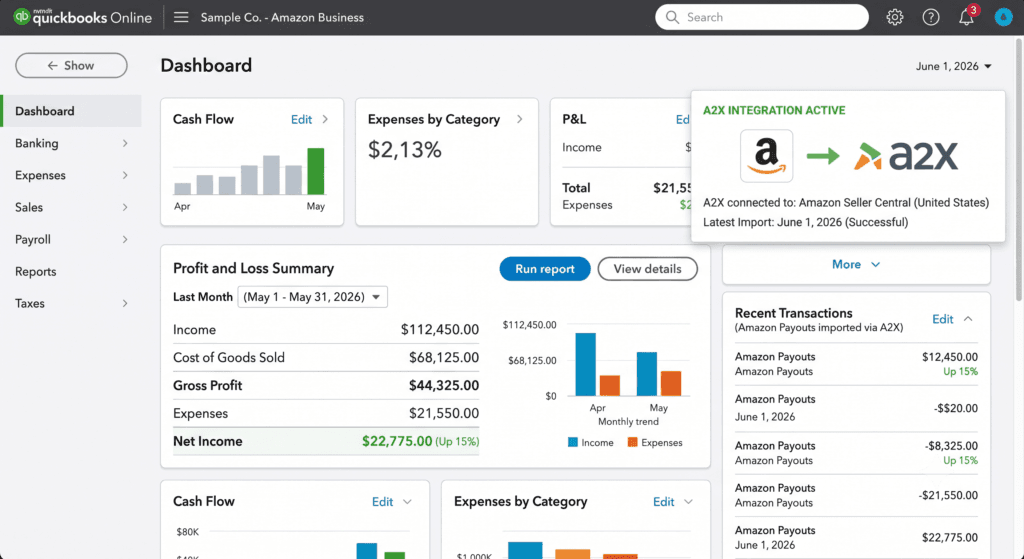
What Is Amazon Seller Accounting?
Amazon seller accounting is the process of recording, organizing, and reporting every financial transaction that flows through your Amazon business. This includes your sales revenue, Amazon fees, refunds, shipping costs, advertising spend, cost of goods sold (COGS), and inventory.
It is not just about tracking deposits. Amazon pays you in net settlements — one lump-sum payout that bundles dozens of different line items together. Proper accounting means breaking that settlement down correctly so your books actually reflect what is happening in your business.
Who Is This For?
This guide is for Amazon FBA sellers in the United States and Canada who want to:
- Set up accurate bookkeeping using QuickBooks Online
- Connect their Amazon account to QuickBooks automatically
- Stay compliant with US sales tax and Canadian GST/HST
- Get tax-ready financials every month
Why Amazon Seller Accounting Matters
Many sellers delay their bookkeeping until tax season. By then, months of transactions are piled up, and reconciling them is expensive and stressful.
Here is why staying on top of your Amazon FBA accounting pays off:
You Know Your Real Profit
Amazon fees eat into your margins significantly. Without proper accounting, you may think you are profitable when you are actually losing money on certain SKUs. Accurate books show you gross margin, net profit, and which products are worth scaling.
You Stay Compliant With Sales Tax
After the South Dakota v. Wayfair ruling in 2018, US states can require out-of-state sellers to collect sales tax once they cross an economic nexus threshold. That threshold varies by state. If you have inventory stored in Amazon fulfillment centers across multiple states, you may already owe tax in those states.
In Canada, sellers who exceed CA$30,000 in revenue over 12 months must register for GST/HST. If you sell into Canada, this applies to you.
Your Business Is Fundable and Scalable
Investors, lenders, and potential buyers require clean financials. A well-maintained P&L and balance sheet in QuickBooks shows your business is serious.
Step-by-Step: How to Set Up Amazon Seller Accounting
Follow these steps to build a solid accounting foundation. This system uses QuickBooks Online as the core software, A2X for data sync, and TaxCloud for sales tax management.
Step 1: Open a Dedicated Business Bank Account
Never mix personal and business finances. Open a business checking account exclusively for your Amazon operations. All payouts from Amazon Seller Central should land in this account. This one step makes reconciliation dramatically easier.
Step 2: Set Up QuickBooks Online
QuickBooks Online (QBO) is the accounting software that holds your books. If you do not have it set up yet, you need to:
- Create a QBO account (Simple Start or Plus tier works for most FBA sellers)
- Set up a chart of accounts tailored to e-commerce — include accounts for Amazon fees, COGS, refunds, advertising, and inventory
- Connect your business bank account to QBO for bank feeds
If you are in Canada, make sure your QBO is set to Canadian tax settings so GST/HST is handled correctly.
See our guide on How to Set Up QuickBooks Online for Amazon FBA Sellers for a full walkthrough.
Step 3: Connect A2X to Amazon and QuickBooks
This is the step that transforms your workflow.
A2X is a data connector that sits between Amazon Seller Central and QuickBooks Online. Instead of you manually interpreting each Amazon settlement, A2X:
- Pulls your Amazon settlement data automatically
- Breaks it down into categorized line items (sales, fees, refunds, FBA charges, reimbursements)
- Posts clean, summarized journal entries directly into QuickBooks
Without A2X, you are either pasting raw data into spreadsheets or having your bookkeeper spend hours untangling each payout. With A2X, it takes minutes.
Compare the full workflow in A2X vs Manual Entry: Which Is Better for Amazon Bookkeeping?
Step 4: Categorize Your Amazon Expenses Correctly
A2X brings in your revenue data cleanly. But you also need to correctly categorize your expenses in QuickBooks:
- Cost of Goods Sold (COGS) — what you paid to source or manufacture your products
- Amazon FBA fees — fulfillment, storage, referral fees
- Amazon PPC advertising costs
- Shipping and freight costs
- Software subscriptions and tools
Getting COGS right is especially important. Understating or overstating COGS skews your gross profit and leads to incorrect tax filings.
Read our deep dive: How to Track Amazon FBA Cost of Goods Sold in QuickBooks
Step 5: Set Up Sales Tax Compliance With TaxCloud
Sales tax for Amazon sellers is complex. You may have nexus in states where Amazon stores your FBA inventory — even if you never set foot there.
TaxCloud is a sales tax automation tool that:
- Tracks where you have economic nexus across all US states
- Calculates the correct tax rate for each transaction
- Files your state sales tax returns automatically
For Canadian sellers, you need to handle GST/HST separately. If your revenue exceeds CA$30,000, you must register with the CRA and begin collecting GST/HST.
Get the full picture in Amazon FBA Sales Tax Nexus: A State-by-State Guide and TaxCloud for Amazon Sellers
Step 6: Reconcile Your Books Every Month
Month-end reconciliation is how you verify that QuickBooks matches your bank statements and Amazon settlement reports.
Every month, you or your bookkeeper should:
- Match every Amazon payout to its corresponding A2X entry in QuickBooks
- Reconcile your bank account in QBO
- Review your P&L and balance sheet for errors
- Update inventory values if needed
A reconciled set of books means tax season is never a scramble.
Use our Amazon FBA Bookkeeping Checklist: Month-End Tasks Every Seller Needs to stay on track.
Practical Tips for Better Amazon Accounting
Do Not Let Months Pile Up
Falling behind on bookkeeping is the most common mistake Amazon sellers make. Every month you skip creates a backlog that compounds. If you are already behind, the fastest fix is a professional catch-up service — where a bookkeeper reconciles your full transaction history and delivers clean, tax-ready books.
Learn more about Amazon Catch-Up Bookkeeping: How to Fix Months of Messy Records
Use Accrual Accounting, Not Cash Basis
Cash basis accounting records income when cash hits your account. Accrual accounting records it when it is earned. For FBA sellers with inventory, accrual accounting gives you a more accurate picture of profitability and is required if your revenue is above a certain threshold. QuickBooks Online supports both — set yours up correctly from the start.
Never Record Amazon Settlements as Gross Revenue
This is the most common bookkeeping error for Amazon sellers. Your Amazon payout is a net amount — Amazon already deducted its fees. If you book the settlement as your total revenue, you are understating your actual sales and missing fee data entirely. A2X solves this by breaking out every component of the settlement.
Register for Sales Tax Before You Hit the Nexus Threshold
Waiting until you receive a notice from a state tax authority is costly. Track your revenue by state from day one. TaxCloud can flag when you are approaching nexus thresholds, giving you time to register proactively rather than scramble to catch up.
Conclusion
Amazon seller accounting does not have to be overwhelming. With the right tools — QuickBooks Online for your books, A2X for your Amazon data, and TaxCloud for sales tax — you can run a clean, compliant, and scalable accounting system.
Start with the basics: a dedicated bank account, a properly configured QuickBooks setup, and A2X connected to your Amazon store. Build the habit of monthly reconciliation. Stay on top of your sales tax obligations in every state where you have nexus.
The sellers who understand their numbers grow faster, pay less in taxes, and sell their businesses for more.

Ashfaq helps e-commerce business owners turn messy numbers into clear, reliable financials. With over 15 years of experience, he specializes in bookkeeping for Amazon and Shopify sellers, ensuring accuracy, clarity, and confident decision-making.
Need clean Amazon books — fast?
Thelonex is a QuickBooks-certified bookkeeping firm built exclusively for Amazon FBA and Shopify sellers in the US and Canada. Starting at $199/month.
Categories
Latest Posts
- August 2, 2026
Amazon Seller Connector by QuickBooks: Complete Guide
- July 21, 2026
How COGS Accounting Works for Canadian FBA Sellers
Tags
A2X
Accounting Method
Amazon FBA
Amazon Marketplace Connector
Amazon Seller Central
Amazon Seller Connector
Bookkeeping Tips
Canada Tax Registration
Canadian Bookkeeping
Canadian Sales Tax
Chart of Accounts
COGS
E-Commerce
E-Commerce Bookkeeping
Finance
Financial Statements
GST/HST
Inventory
Payout Reconciliation
Profit and Loss
QuickBooks Online
Sales Tax
Sales Tax Compliance
Shopify
TaxCloud