QuickBooks Bookkeeping for Amazon FBA & Shopify | Thelonex


Amazon FBA Sales Tax Nexus: A Seller’s Guide
- Home
- Amazon FBA Sales Tax Nexus: A Seller’s Guide
- June 4, 2026
- 11 min read
- No Comments

Amazon FBA Sales Tax Nexus: A Seller’s Guide
You might be collecting sales tax in your home state. But if Amazon stores your inventory in fulfillment centers across the country — and it does — you may owe sales tax in a dozen more states you have never even sold from.
This is the reality of Amazon FBA sales tax nexus. Most sellers either do not know about it or discover it too late, after a state tax authority has sent them a notice.
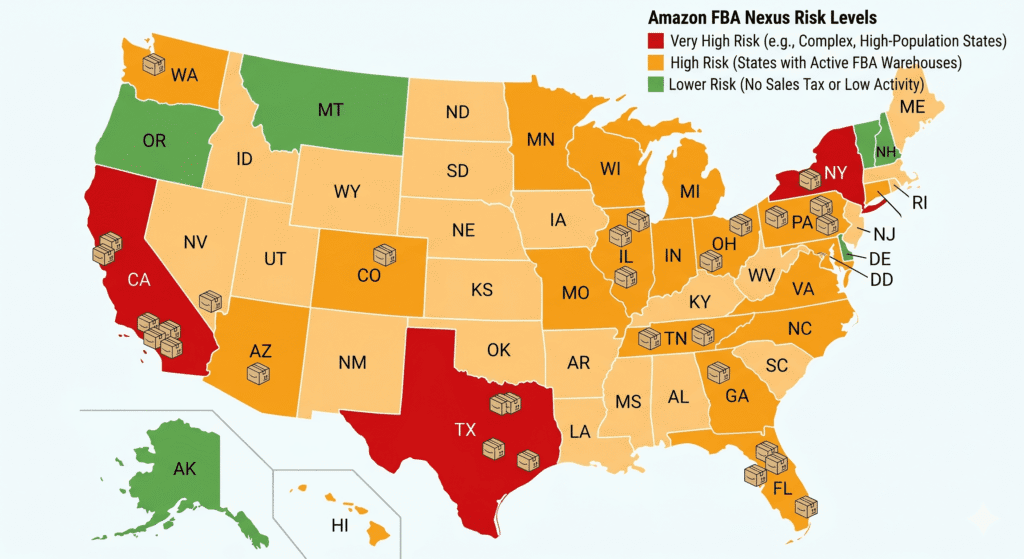
This guide explains exactly what economic nexus is, why FBA creates it across multiple states automatically, which states you need to watch, and what steps to take to get compliant. You will also find a state-by-state reference table covering the most relevant US markets for Amazon FBA sellers.
What Is Amazon FBA Sales Tax Nexus?
Nexus is the legal connection between your business and a US state that requires you to collect and remit sales tax in that state. Before 2018, nexus almost always meant physical presence — a store, an office, or an employee in that state.
That changed after the US Supreme Court ruling in South Dakota v. Wayfair in June 2018. The court held that states can require out-of-state sellers to collect sales tax based on economic activity alone — no physical presence required. This is called economic nexus.
For Amazon FBA sellers, there is a second type of nexus that predates Wayfair and still applies: inventory nexus. When Amazon stores your FBA inventory in a fulfillment center located in a given state, you have a physical presence in that state. That alone creates nexus, regardless of how much revenue you generate there.
Economic Nexus vs Inventory Nexus for FBA Sellers
Economic Nexus (post-Wayfair) Triggered when your sales to customers in a state cross a revenue or transaction threshold. Every state sets its own threshold — most are $100,000 in annual revenue or 200 transactions. Inventory Nexus (physical presence) Triggered when Amazon stores your FBA inventory in a fulfillment center in that state. This applies even if your sales in that state are zero. Amazon operates fulfillment centers in over 30 states. |
As an FBA seller, you are likely dealing with both types simultaneously. Amazon decides where to store your inventory — you have limited control over which fulfillment centers hold your products at any given time.
Who Does This Apply To?
Amazon FBA sales tax nexus applies to any seller using Fulfillment by Amazon to store and ship products within the United States. It does not matter where your business is incorporated or where you live. If Amazon moves your inventory to a fulfillment center in Texas, you have nexus in Texas.
It applies to US-based sellers and to international sellers who store inventory in the US through FBA.
For a full picture of how Amazon accounting and sales tax fit together, read: Amazon Seller Accounting: The Complete Guide for US and Canada
Why Amazon FBA Sales Tax Nexus Matters
Ignoring Nexus Creates Back-Tax Liability
States do not forget. If you have had nexus in a state and have not been collecting sales tax, you owe the uncollected tax — plus penalties and interest. State departments of revenue have become increasingly active in pursuing out-of-state sellers, particularly after Wayfair opened the door to broader enforcement.
Back-tax liability can go back years. For a seller doing $500,000 a year across multiple states, the exposure can be significant.
Amazon Does Not Handle This for You
This is the most common misconception among FBA sellers. Amazon collects marketplace facilitator tax on your behalf in most states — meaning Amazon collects the sales tax from your customers and remits it to the state directly. However, this does not remove your obligation to register with each state where you have nexus.
Several states still require sellers to register and file returns even when Amazon is remitting the tax. Some states also have categories of transactions or products that marketplace facilitator rules do not cover. If you are not registered, you may still face compliance issues even if Amazon is collecting the tax.
Voluntary Disclosure Is Better Than Being Found
Most states offer a Voluntary Disclosure Agreement (VDA) program. If you come forward before a state contacts you, you can often limit the lookback period to two or three years and have penalties waived. If a state contacts you first, you lose that option.
Acting proactively through a VDA is almost always less expensive than responding to an audit or a state notice.
Learn how TaxCloud automates nexus tracking and filing across all US states: TaxCloud for Amazon Sellers: How to Automate Sales Tax Filing.
State-by-State Nexus Reference: Key States for Amazon FBA Sellers
The table below covers the US states most relevant to Amazon FBA sellers based on fulfillment center concentration and economic nexus thresholds. Note that five US states have no state-level sales tax: Alaska, Delaware, Montana, New Hampshire, and Oregon. FBA sellers do not owe sales tax on sales to customers in those states.
| State | Revenue Threshold | Transaction Threshold | FBA Nexus Risk |
| Alabama | $250,000 | 200 transactions | High — has fulfillment centers |
| Arizona | $100,000 | 200 transactions | High — major FBA hub |
| California | $500,000 | No transaction threshold | Very High — largest FBA state |
| Colorado | $100,000 | 200 transactions | High |
| Florida | $100,000 | 200 transactions | High — major FBA state |
| Georgia | $100,000 | 200 transactions | High — has fulfillment centers |
| Illinois | $100,000 | 200 transactions | High — major FBA hub |
| Indiana | $100,000 | 200 transactions | High |
| Kansas | $100,000 | No transaction threshold | Moderate |
| Kentucky | $100,000 | 200 transactions | High — has fulfillment centers |
| Michigan | $100,000 | 200 transactions | High |
| Minnesota | $100,000 | 200 transactions | Moderate |
| New Jersey | $100,000 | 200 transactions | High — has fulfillment centers |
| New York | $500,000 | 100 transactions | Very High — largest market |
| North Carolina | $100,000 | 200 transactions | High — has fulfillment centers |
| Ohio | $100,000 | 200 transactions | High — major FBA hub |
| Pennsylvania | $100,000 | No transaction threshold | High — has fulfillment centers |
| Tennessee | $100,000 | 200 transactions | High — has fulfillment centers |
| Texas | $500,000 | No transaction threshold | Very High — major FBA state |
| Virginia | $100,000 | 200 transactions | High — has fulfillment centers |
| Washington | $100,000 | No transaction threshold | High |
Source: State revenue authority websites as of 2025. Thresholds and rules change — verify current requirements at each state’s department of revenue or use TaxCloud to monitor automatically. This table is for general reference only and does not constitute tax advice
Note: GST/HST obligations for Amazon sellers in Canada
Step-by-Step: How to Get Compliant With Amazon FBA Sales Tax Nexus
Getting compliant does not have to be overwhelming. Follow these steps in order.
Step 1: Pull Your Amazon Inventory Placement Report
Log in to Amazon Seller Central. Go to Reports > Fulfillment > Inventory. Download the Inventory Ledger or the Inventory Event Detail report. This shows you which fulfillment centers currently hold your inventory and which states those centers are located in.
Every state on that list is a state where you already have inventory nexus — regardless of your sales volume there.
Step 2: Check Your Sales by State
Next, pull your sales-by-state data. In Seller Central, go to Reports > Business Reports > Sales and Traffic by Date. You can also find this data in your A2X settlement breakdowns if you use A2X for bookkeeping.
For each state where you have inventory nexus, check your 12-month revenue and transaction count. For states where you do not have inventory nexus, compare your revenue and transaction figures against that state’s economic nexus threshold.
Step 3: Identify Where You Have Nexus Right Now
Compile a list of states where you have either inventory nexus or economic nexus. Be conservative — if you are close to a threshold, assume nexus applies.
If you use TaxCloud, it can perform this analysis automatically by pulling your sales data and comparing it against every state’s current thresholds. This removes the manual work and ensures you catch states you might otherwise overlook.
Step 4: Register in Each Nexus State
Once you know which states require registration, you need to obtain a sales tax permit in each one. Registration is handled through each state’s department of revenue website. The process typically involves:
- Submitting a business registration application online
- Providing your EIN (Employer Identification Number) or Social Security Number
- Specifying your business type and the nature of your products
- Receiving a sales tax permit number — usually within a few days
Some states, such as California and New York, have more involved registration processes. Others are straightforward and take under 15 minutes.
Important: Do not collect sales tax in a state before you are registered. Collecting tax without a permit creates its own compliance problem.
Step 5: Configure Your Sales Tax Collection
Once registered, you need to collect the correct sales tax from customers in each nexus state. If you use TaxCloud, it integrates directly with your Amazon account and calculates the accurate tax rate for each transaction based on the buyer’s location — accounting for state, county, and city tax rates.
Without an automated tool, you would need to manually maintain tax rates for every jurisdiction in every nexus state. Given that US tax jurisdictions number in the thousands, automation is not optional at any meaningful sales volume.
Step 6: File and Remit Returns on Schedule
Every nexus state has a filing schedule — monthly, quarterly, or annually, depending on your sales volume in that state. You must file a return by the due date even in periods when you owe zero tax.
Missing a filing deadline triggers penalties. Missing multiple deadlines escalates the problem quickly.
TaxCloud handles return preparation and submission for all your registered states. Your bookkeeper or accountant can also handle this if they specialize in e-commerce sales tax compliance.
Step 7: Handle Back-Tax Through a VDA (If Applicable)
If you have had nexus in a state for months or years without registering, do not ignore it. Contact the state’s voluntary disclosure program before the state contacts you. A VDA can limit your lookback period and waive penalties in most cases. – fix months of messy Amazon records
This step is best handled with the help of a sales tax specialist or an accountant experienced in e-commerce compliance. The cost of professional help is almost always less than the penalty exposure you are trying to resolve.
Need help managing your Amazon books and sales tax in one place? Read: Amazon Catch-Up Bookkeeping: How to Fix Months of Messy Records if you are also behind on bookkeeping.
Practical Tips for Amazon FBA Sales Tax Compliance
Check Your Inventory Placement Every Quarter
Amazon regularly moves FBA inventory between fulfillment centers as part of its logistics network. A state that had none of your inventory last quarter may have it this quarter. Run the inventory placement report every three months and update your nexus list accordingly.
Do Not Rely on Amazon Marketplace Facilitator Collection Alone
Amazon collects and remits marketplace facilitator tax in all US states with a sales tax. But you still need to be registered in each nexus state. Some states audit sellers who are unregistered even when Amazon is collecting the tax on their behalf. Registration is separate from collection.
Track Your Revenue by State From Day One
Do not wait until you are near a threshold to start tracking. Keep a simple spreadsheet — or use TaxCloud — to monitor your cumulative revenue and transaction count by state. Catching nexus early gives you time to register proactively rather than scramble after the fact.
Understand Which Products Are Taxable in Each State
Not all products are taxable in every state. Groceries, clothing, prescription medications, and certain digital products may be exempt in some states and taxable in others. TaxCloud uses product tax codes to apply the correct taxability rules automatically. If you manage compliance manually, you need to research taxability rules for your specific product categories in every nexus state.
Common Mistakes to Avoid
- Assuming Amazon handles all your sales tax obligations — it handles collection and remittance in most states, but not registration
- Registering in states before you have nexus — this creates unnecessary filing obligations
- Missing filing deadlines in low-revenue states — zero-dollar returns are still required
- Not updating your nexus list when Amazon opens a new fulfillment center — your nexus can expand without any action on your part
- Using incorrect tax rates because you are not accounting for local (city or county) taxes
States with no sales tax — FBA sellers do not owe sales tax on sales to customers in: Alaska, Delaware, Montana, New Hampshire, and Oregon. If Amazon has a fulfillment center in one of these states, you still have inventory nexus there — but there is no sales tax to collect or remit. |
Conclusion
Amazon FBA sales tax nexus is one of the most misunderstood compliance issues in e-commerce. It does not start when you decide to register. It starts the moment Amazon places your inventory in a fulfillment center in a new state — or when your sales cross a state’s economic nexus threshold.
The path to compliance is straightforward once you understand the rules: identify where you have nexus, register in each state, configure accurate tax collection, and file returns on schedule. Tools like TaxCloud automate most of this process so it does not consume your time every quarter.
The sellers who stay ahead of this issue do so by treating sales tax as part of their accounting system — not a separate problem to deal with later. When your QuickBooks books are clean, your A2X data is accurate, and TaxCloud is managing your state obligations, you have a fully compliant operation that can scale without surprises.

Ashfaq helps e-commerce business owners turn messy numbers into clear, reliable financials. With over 15 years of experience, he specializes in bookkeeping for Amazon and Shopify sellers, ensuring accuracy, clarity, and confident decision-making.
Not sure which states you owe sales tax in?
Thelonex manages sales tax nexus tracking, registration, and filing for Amazon FBA sellers in the US and Canada. Starting at $199/month.
Categories
Latest Posts
- August 2, 2026
Amazon Seller Connector by QuickBooks: Complete Guide
- July 21, 2026
How COGS Accounting Works for Canadian FBA Sellers
Tags
A2X
Accounting Method
Amazon FBA
Amazon Marketplace Connector
Amazon Seller Central
Amazon Seller Connector
Bookkeeping Tips
Canada Tax Registration
Canadian Bookkeeping
Canadian Sales Tax
Chart of Accounts
COGS
E-Commerce
E-Commerce Bookkeeping
Finance
Financial Statements
GST/HST
Inventory
Payout Reconciliation
Profit and Loss
QuickBooks Online
Sales Tax
Sales Tax Compliance
Shopify
TaxCloud