QuickBooks Bookkeeping for Amazon FBA & Shopify | Thelonex


Amazon FBA Bookkeeping Checklist: Month-End Tasks
- Home
- Amazon FBA Bookkeeping Checklist: Month-End Tasks
- June 4, 2026
- 12 min read
- No Comments

Amazon FBA Bookkeeping Checklist: Month-End Tasks
Most Amazon sellers spend more time thinking about their next product launch than their monthly bookkeeping. Then quarter-end arrives, tax season starts, or a lender asks for financials — and suddenly the books become urgent.
The sellers who never end up in that position do one thing differently: they close their books every single month, using a consistent, repeatable process. Not because they enjoy accounting, but because accurate monthly books make every other financial decision easier and less expensive.
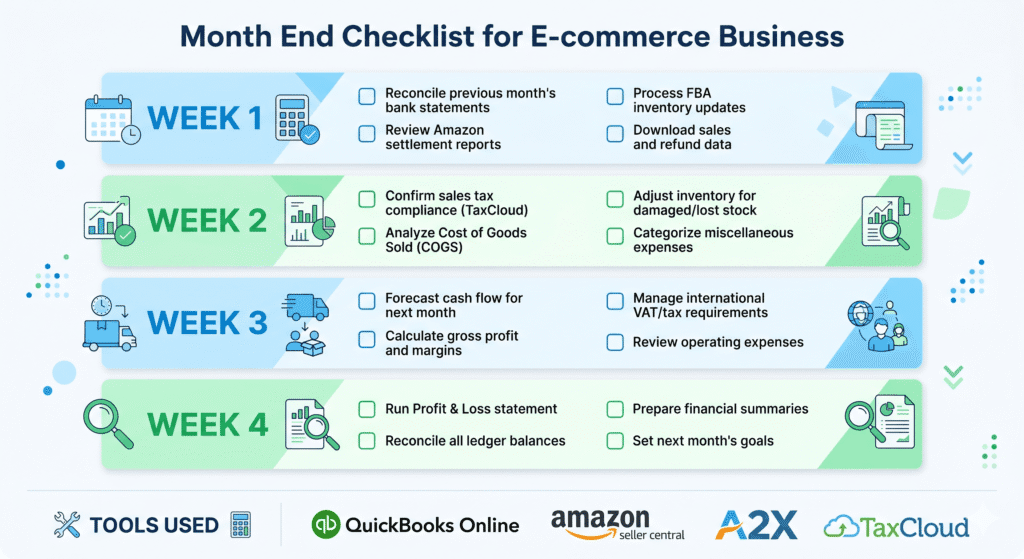
This guide gives you a complete Amazon FBA bookkeeping checklist — 15 tasks, organized by week, covering settlements, COGS, bank reconciliation, sales tax, and financial reporting. Use it every month, and your books will always be tax-ready.
What Is an Amazon FBA Bookkeeping Checklist?
An Amazon FBA bookkeeping checklist is a structured list of accounting tasks that you — or your bookkeeper — complete at the end of every month to ensure your financial records are accurate and up to date.
It covers everything from downloading your Amazon settlement reports and posting them in QuickBooks to reconciling your bank accounts, updating your inventory values, and confirming that sales tax returns have been filed.
The checklist is not about doing more work. It is about doing the right work in the right order, every month, so nothing falls through the cracks.
Who Is This Checklist For?
This checklist is designed for Amazon FBA sellers in the US and Canada who use QuickBooks Online for bookkeeping, A2X for settlement data, and TaxCloud for sales tax compliance. It applies whether you manage your own books or oversee a bookkeeper.
If you are managing your books yourself, use this checklist as your monthly guide. If you work with a bookkeeper, use it as a scope document to confirm what should be included in their monthly deliverable.
If your QuickBooks is not yet set up for Amazon FBA, start here: How to Set Up QuickBooks Online for Amazon FBA Sellers before working through this checklist.
Why a Monthly Amazon FBA Bookkeeping Checklist Matters
Monthly Books Eliminate Year-End Surprises
When bookkeeping is done monthly, tax season is not an event. Your accountant gets a clean, verified set of records. They file the return. It is done. No scrambling, no expensive cleanup, no reconstructing records from memory.
When bookkeeping is done annually — or not at all — tax season involves several weeks of backlog cleanup. Bookkeepers charge more for catch-up work. Accountants bill extra for sorting through disorganized records. The cost of staying current is always less than the cost of falling behind.
It Makes Your P&L Reliable Every Month
A monthly close means your Profit and Loss report is always accurate. You can see your real gross margin, your actual advertising spend as a percentage of revenue, and your net income — not rough estimates based on bank deposits.
This matters for pricing decisions, inventory reinvestment, and cash flow management. Sellers who review a verified monthly P&L make faster, better decisions than those who guess.
It Keeps Sales Tax Compliance on Track
Sales tax obligations do not pause if you forget to check them. States have filing deadlines — monthly, quarterly, or annually — and missing them triggers penalties. A month-end checklist that includes a TaxCloud review ensures every return is filed and every state is covered before the deadline passes.
See the full picture of how these tools work together: Amazon Seller Accounting: The Complete Guide for US and Canada.
Tools You Need for Month-End Amazon FBA Bookkeeping
This checklist is built around the four-tool stack that Thelonex uses for Amazon FBA sellers in the US and Canada. Here is what each tool does in your monthly close:
Tool | Role in Month-End Close | Where to Access |
Amazon Seller Central | Source of truth for sales, settlements, fees, and inventory reports | Reports > Payments, Reports > Fulfillment, Business Reports > Sales and Traffic |
QuickBooks Online | Core accounting software — holds the books, P&L, and balance sheet | Accounting > Reconcile; Reports > P&L; Reports > Balance Sheet |
A2X (Data Connect) | Automates Amazon settlement import into QuickBooks — eliminates manual data entry | A2X dashboard > Settlements > Post to QuickBooks |
TaxCloud | Tracks nexus, calculates tax rates, and files state returns automatically | TaxCloud dashboard > Returns > Review and confirm filed returns |
Bank portal | Monthly bank and credit card statements for reconciliation | Download PDF statements for each account and card |
If you are not yet using A2X, your settlement reconciliation will take significantly longer. If you are not using TaxCloud, you need to verify sales tax filings manually across every nexus state. Both gaps are worth closing before you try to systematize your monthly process.
Learn how A2X eliminates manual settlement entry: A2X vs Manual Entry: Which Is Better for Amazon Bookkeeping?
The Amazon FBA Month-End Bookkeeping Checklist
The 15 tasks below are organized into four weekly phases. Working through them in order ensures each step has what it needs from the previous one. Complete this process within the first 10 business days after the month ends.
Task | What to Check / Where to Find It | |
W1 | Download all Amazon settlement reports for the month | Seller Central > Reports > Payments — download every settlement that closed in the period |
W1 | Review A2X settlement postings in QuickBooks | Confirm A2X posted clean journal entries for each settlement — check sales, fees, refunds, and reimbursements |
W1 | Verify gross revenue in QuickBooks matches Seller Central | Run a Sales by Date report in Seller Central and compare to A2X-posted revenue in QuickBooks P&L |
W2 | Enter all inventory purchases for the month | Record every supplier invoice at full landed cost to the Inventory Asset account in QuickBooks |
W2 | Calculate and post COGS journal entry | Units sold x unit cost per SKU — debit COGS: Product Cost, credit Inventory Asset |
W2 | Confirm FBA fees are categorized correctly | Check that fulfillment, storage, and referral fees are in the correct COGS or expense accounts |
W2 | Record Amazon advertising (PPC) spend | Match PPC charges from Seller Central to the Advertising expense account in QuickBooks |
W3 | Reconcile all business bank accounts | QuickBooks > Accounting > Reconcile — match every transaction to the closing bank statement balance |
W3 | Reconcile business credit cards | Reconcile every credit card used for business expenses against the monthly statement |
W3 | Categorize uncategorized transactions | Review the uncategorized transactions list in QuickBooks and assign every item to the correct account |
W4 | Run and review the month-end P&L report | Check gross revenue, COGS, gross profit %, and net income — flag any obvious outliers |
W4 | Review the balance sheet | Confirm inventory asset balance makes sense given purchases and COGS; verify accounts payable |
W4 | Check sales tax obligations | Review nexus states — confirm TaxCloud has filed returns for all due states for the period |
W4 | Update inventory count (if applicable) | Reconcile QuickBooks inventory unit count against Amazon FBA inventory reports for each SKU |
W4 | File and save period-end reports | Export and save the P&L and Balance Sheet as PDFs — store in a dated folder for each month |
W1 = Week 1 tasks (data gathering and settlement posting). W2 = Week 2 (inventory and COGS). W3 = Week 3 (bank and card reconciliation). W4 = Week 4 (review, reporting, and tax confirmation).
How to Complete the Key Tasks in This Checklist
Most tasks in the checklist are straightforward once your tools are connected. These are the ones that need the most attention.
Task 2: Review A2X Settlement Postings
After A2X posts your settlements to QuickBooks, do not just assume they are correct. Open the A2X dashboard and confirm that every settlement from the month has a status of Posted. Then open the corresponding journal entry in QuickBooks and check that the totals for sales, fees, and refunds match the settlement report in Seller Central.
Discrepancies here usually mean a mapping issue — a fee type that A2X is sending to the wrong QuickBooks account. Fix the mapping in A2X, then repost the affected settlement.
Task 5: Calculate and Post the COGS Journal Entry
This is the task most sellers either skip or get wrong. COGS is not the same as your total inventory purchases for the month — it is the cost of the specific units you sold.
To calculate COGS for the month:
- Pull the Sales by SKU report from Seller Central for the month
- Multiply units sold by your per-unit cost for each SKU
- Sum the totals across all SKUs to get your total COGS for the period
- Create a journal entry in QuickBooks: Debit COGS: Product Cost, Credit Inventory Asset
If you track multiple SKUs at different cost levels, this calculation takes 15 to 30 minutes with a spreadsheet. Once your QuickBooks Plus inventory tracking is set up correctly, QuickBooks can handle this automatically.
For a detailed COGS walkthrough: How to Track Amazon FBA Cost of Goods Sold in QuickBooks
Task 8: Reconcile All Business Bank Accounts
Bank reconciliation in QuickBooks Online means matching every transaction in QuickBooks against your bank statement, line by line, until the QuickBooks balance equals the bank statement closing balance.
Go to Accounting > Reconcile in QuickBooks. Select the account. Enter the closing balance from your bank statement. QuickBooks will show you unmatched transactions on both sides. Work through them:
- Transactions in the bank but not in QuickBooks — add them to QuickBooks with the correct category
- Transactions in QuickBooks but not in the bank — check for duplicates and delete them
Never close a reconciliation by adjusting the opening balance to force a match. That hides errors and distorts your balance sheet permanently.
Task 13: Check Sales Tax Obligations
Log in to TaxCloud and confirm that returns for all nexus states with a period ending in the previous month have been filed and a confirmation number has been issued. Also check whether your sales have crossed any new state nexus thresholds — particularly if you had a strong month.
If any state return is still pending, confirm the due date and submit before it passes. TaxCloud auto-files in most cases, but it is worth a manual confirmation once per month.
For a full guide to managing nexus and TaxCloud filing: TaxCloud for Amazon Sellers: How to Automate Sales Tax Filing
Practical Tips for Staying Consistent With Your Checklist
Block the Same Time Every Month
The sellers who maintain clean books treat month-end close like a fixed appointment. Block two to three hours in your calendar during the first week after each month ends. Do not let it get pushed to the third or fourth week — the further you get from the month, the harder it is to remember context around unusual transactions.
Complete Each Task Fully Before Moving to the Next
The checklist is sequential by design. You cannot reconcile your bank accounts correctly until A2X has posted all settlements. You cannot verify your P&L until your COGS entries are done. Jumping ahead creates partial reconciliations that are harder to unwind than starting them correctly.
Save Your Work at Each Stage
After posting A2X entries, export a settlements summary as a PDF. After reconciling each bank account, export the reconciliation report from QuickBooks and save it to a dated folder. After the final P&L and Balance Sheet review, export both reports as PDFs. This gives you a monthly audit trail that is invaluable if you ever need to revisit a specific period.
If You Fall Behind, Prioritize Getting Current Before Adding Process
If you missed last month — or several months — do not try to build a monthly checklist habit on top of a backlog. Clean up the historical records first, then implement the checklist going forward. Trying to maintain both simultaneously creates confusion about which period you are in.
If you have a bookkeeping backlog, start here: Amazon Catch-Up Bookkeeping: How to Fix Months of Messy Records
Common Mistakes to Avoid
- Skipping the COGS journal entry and only recording it at year-end — this makes every monthly P&L useless for decision-making
- Reconciling bank accounts without matching A2X entries first — settlements that have not posted will show up as unexplained deposits
- Using the Amazon settlement deposit date as the revenue recognition date — revenue should be recognized in the period the sales occurred, not when Amazon pays you
- Ignoring the balance sheet — most sellers only review the P&L, but the balance sheet is where inventory errors, unpaid liabilities, and unrecorded purchases hide
- Not confirming TaxCloud filings — auto-filing works consistently, but a monthly manual check takes two minutes and prevents missed deadlines from compounding
How long should month-end close take? For a seller using A2X and TaxCloud with an organized QuickBooks file, month-end close should take 2–4 hours per month. The first few times you run the checklist will take longer as you learn the process. Once it is routine, most months take under 3 hours. If it is regularly taking 6 or more hours, something in your setup is not working correctly — either your chart of accounts needs restructuring or your A2X mapping has gaps. |
Conclusion
A monthly bookkeeping checklist is the difference between knowing your numbers and guessing at them. The 15 tasks in this checklist — spread across four weekly phases — give you a complete, verified close every month: settlements reconciled, COGS updated, bank accounts matched, sales tax confirmed.
The sellers who run this process consistently do not dread tax season. They do not pay extra for catch-up work. And when they need to make a pricing decision, refinance inventory, or evaluate a product line, they have accurate data to work from.
Bookmark this checklist. Block the time. Run it every month. It is one of the highest-value habits an Amazon FBA seller can build.

Ashfaq helps e-commerce business owners turn messy numbers into clear, reliable financials. With over 15 years of experience, he specializes in bookkeeping for Amazon and Shopify sellers, ensuring accuracy, clarity, and confident decision-making.
Want this checklist handled for you every month?
Thelonex manages monthly Amazon FBA bookkeeping for US and Canadian sellers — settlements, COGS, bank reconciliation, and sales tax. Starting at $199/month.
Categories
Latest Posts
- August 2, 2026
Amazon Seller Connector by QuickBooks: Complete Guide
- July 21, 2026
How COGS Accounting Works for Canadian FBA Sellers
Tags
A2X
Accounting Method
Amazon FBA
Amazon Marketplace Connector
Amazon Seller Central
Amazon Seller Connector
Bookkeeping Tips
Canada Tax Registration
Canadian Bookkeeping
Canadian Sales Tax
Chart of Accounts
COGS
E-Commerce
E-Commerce Bookkeeping
Finance
Financial Statements
GST/HST
Inventory
Payout Reconciliation
Profit and Loss
QuickBooks Online
Sales Tax
Sales Tax Compliance
Shopify
TaxCloud