QuickBooks Bookkeeping for Amazon FBA & Shopify | Thelonex


How Do You Calculate COGS for Online Sellers?
- Home
- How Do You Calculate COGS for Online Sellers?
- July 20, 2026
- 6 min read
- No Comments

How Do You Calculate COGS for Online Sellers?
Two sellers can have identical revenue and completely different profit, and the reason is almost always COGS. Get this number wrong, and your profit and loss statement will lie to you every single month.
This guide explains what COGS includes for Amazon FBA and Shopify sellers, walks through the formula, and shows how to calculate it correctly using real numbers. It is part of our full e-commerce bookkeeping guide, which covers every step of building an accurate bookkeeping system.
What Is COGS for E-Commerce Sellers?
COGS, or cost of goods sold, is the direct cost of the products you sold during a specific period. It does not include marketing, software, or general operating expenses. It only includes costs tied directly to the physical product.
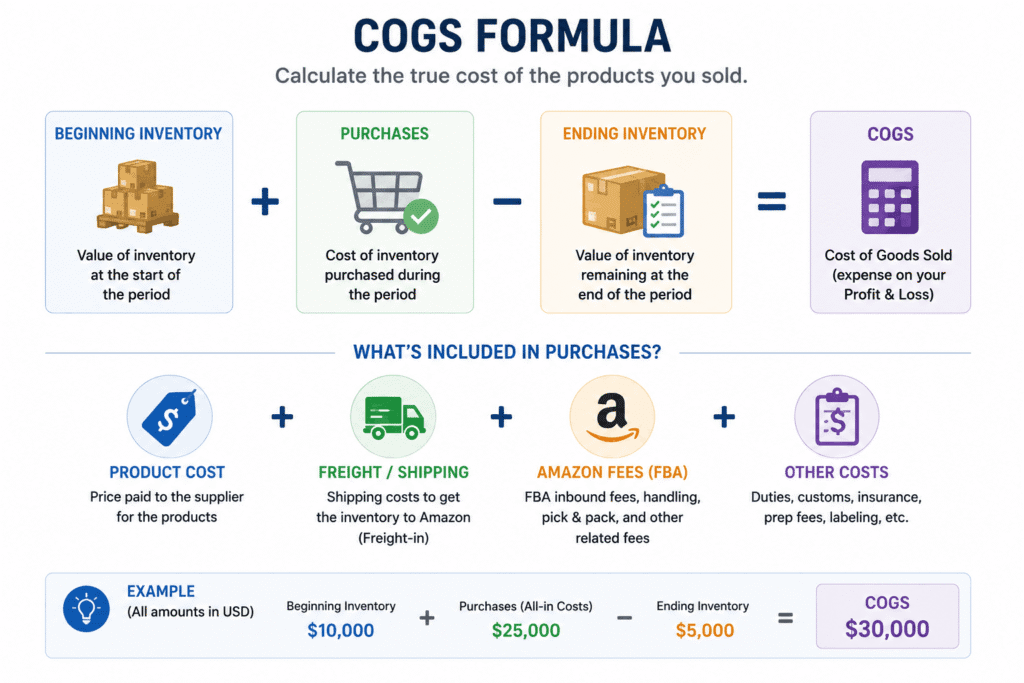
For e-commerce sellers, COGS typically includes:
- Product manufacturing or wholesale cost
- Inbound freight and customs duties
- Amazon FBA fulfillment fees tied to the unit sold
- Packaging materials included with the product
Who Needs to Track COGS Closely
Accurate COGS tracking matters most for:
- Amazon FBA sellers paying per-unit fulfillment fees
- Shopify sellers managing their own inventory and shipping
- Any seller trying to identify which products are actually profitable
- Businesses preparing tax filings that require accurate inventory valuation
A Worked Example
Say you started the month with 500 units in inventory, valued at $8 each, for $4,000. You purchased 1,000 more units at $8.50 each, for $8,500. At month end, you have 300 units left, valued at $8.50 each (using FIFO, since the oldest, cheaper units sold first), for $2,550. Your COGS for the month is $4,000 + $8,500 − $2,550 = $9,950. That number, not your total spend on inventory, is what belongs on your profit and loss statement.
Why Accurate COGS Matters
It reveals your true gross margin. Revenue minus COGS equals gross profit. Without accurate COGS, this number is a guess, and every decision built on it is a guess too.
It shows which products to scale and which to cut. A product with high revenue but thin margin after COGS may be worth less than a lower-revenue product with a strong margin. You cannot see this without accurate per-product COGS.
It affects your tax return. Inventory-based businesses generally must use accrual accounting and properly value COGS for tax purposes. Our guide on cash vs accrual accounting explains how COGS and accounting method connect directly.
It keeps your chart of accounts meaningful. COGS needs its own dedicated accounts, separate from operating expenses, to produce an accurate gross margin. See our guide on setting up a chart of accounts for e-commerce for the account structure this requires.
It supports smarter pricing decisions. Once you know your true per-unit cost, including freight and fulfillment fees, you can set prices that protect your margin instead of guessing based on competitor pricing alone.
Step-by-Step Guide to Calculating COGS
Step 1: Use the Standard COGS Formula
The basic formula is: Beginning Inventory + Purchases During the Period − Ending Inventory = COGS. This formula accounts for what you started with, what you added, and what you have left.
Step 2: Value Your Beginning and Ending Inventory Correctly
Inventory should be valued at cost, not retail price. If you use FIFO (first in, first out), the oldest inventory cost is used first. Most e-commerce sellers use FIFO because it matches how physical inventory actually moves through a warehouse.
Weighted average cost is another common method, where you calculate one blended cost per unit across all purchases. It is simpler to maintain but slightly less precise than FIFO when your product costs change often.
Step 3: Add Inbound Freight and Duties
Include the cost of shipping inventory to your warehouse or Amazon fulfillment center, plus any customs duties paid. These costs are part of what it took to get the product ready to sell, not a separate expense.
Step 4: Include Per-Unit Fulfillment Fees
Amazon FBA fulfillment fees, and any Shopify fulfillment or 3PL fees tied directly to shipping a specific order, belong in COGS. Storage fees and advertising costs do not; those are operating expenses.
Step 5: Calculate COGS by Product, Not Just in Total
Break your total COGS down by SKU where possible. A single blended COGS number hides which products are actually profitable after accounting for their real cost.
Step 6: Reconcile COGS Against Your Inventory System
Compare your calculated COGS against your inventory management system or A2X reporting each month. Discrepancies usually point to missing purchase records or unrecorded inventory adjustments.
If you use an inventory management tool alongside QuickBooks Online, confirm the two systems agree on unit counts before you close your books each month. A mismatch of even a few units per SKU compounds into a meaningful COGS error over a full year.
Practical Tips for Better Results
Update your product costs regularly. Supplier prices and shipping costs change. Using outdated per-unit costs will slowly distort your margin calculations over time.
Do not forget returned inventory. When a customer returns a product, the cost of that unit should move back into inventory, not stay recorded as sold. Skipping this step overstates your COGS.
Separate defective or written-off inventory. Damaged or unsellable inventory should be written off separately, not buried inside your regular COGS calculation, so you can see the real cost of shrinkage.
Use your free margin calculator. Instead of calculating gross margin by hand every month, use our free profit margin calculator to check your numbers quickly.
Review COGS every month, not just at tax time. Sellers who only calculate COGS once a year miss months of pricing or sourcing decisions that could have improved their margin sooner.
Track bundle and multipack costs carefully. If you sell bundles or multipacks, calculate the combined cost of every component, not just the primary product, so bundled listings do not quietly erode your margin.
A common mistake is treating Amazon’s settlement report as a complete COGS source. Settlement reports show fees and payouts, not your actual product cost. You still need your own purchase and inventory records to calculate true COGS.
Conclusion
COGS is the number that separates real profit from revenue that looks good on paper. For Amazon FBA and Shopify sellers, it requires more than a simple formula; it requires tracking product cost, freight, and fulfillment fees accurately, by product, every month.
Once your COGS is accurate, you can finally trust your gross margin and make real pricing and sourcing decisions. The next step is learning how this number flows into your full financial picture. See our guide on reading your e-commerce profit and loss statement to see exactly where COGS fits.
Want your COGS calculated and reconciled correctly every month without doing it by hand? Book a free consultation with our team.
By:

Ashfaq helps e-commerce business owners turn messy numbers into clear, reliable financials. With over 15 years of experience, he specializes in bookkeeping for Amazon and Shopify sellers, ensuring accuracy, clarity, and confident decision-making.
Categories
Latest Posts
- August 2, 2026
Amazon Seller Connector by QuickBooks: Complete Guide
- July 21, 2026
How COGS Accounting Works for Canadian FBA Sellers
Tags
A2X
Accounting Method
Amazon FBA
Amazon Marketplace Connector
Amazon Seller Central
Amazon Seller Connector
Bookkeeping Tips
Canada Tax Registration
Canadian Bookkeeping
Canadian Sales Tax
Chart of Accounts
COGS
E-Commerce
E-Commerce Bookkeeping
Finance
Financial Statements
GST/HST
Inventory
Payout Reconciliation
Profit and Loss
QuickBooks Online
Sales Tax
Sales Tax Compliance
Shopify
TaxCloud