QuickBooks Bookkeeping for Amazon FBA & Shopify | Thelonex


How Do You Read an E-Commerce P&L Statement?
- Home
- How Do You Read an E-Commerce P&L Statement?
- July 20, 2026
- 6 min read
- No Comments

How Do You Read an E-Commerce P&L Statement?
Your profit and loss statement is the most important report in your business, and most sellers barely look at it. They check their bank balance instead, which tells a very different, and often misleading, story.
This guide breaks down every line of an e-commerce P&L statement, explains what each number actually means, and shows you what to look for each month. It builds on our full e-commerce bookkeeping guide, which covers the full process behind producing accurate financials.
What Is a Profit and Loss Statement?
A profit and loss statement, also called a P&L or income statement, shows your revenue, costs, and profit over a specific period, such as a month, quarter, or year. It answers one core question: did your business make money?
For e-commerce sellers, a proper P&L breaks revenue and costs down by category, so you can see not just whether you made money, but where it came from and where it went.
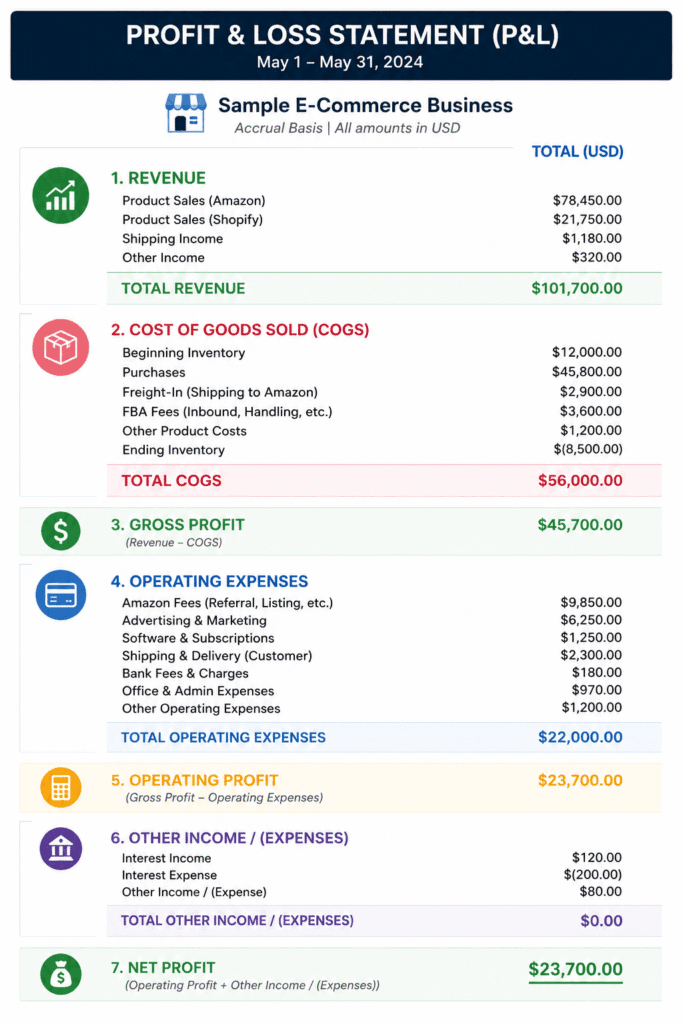
Who Should Be Reading Their P&L Regularly
Every Amazon FBA and Shopify seller should review their P&L monthly, especially those who:
- Are scaling ad spend and need to confirm it is still profitable
- Sell multiple products and want to compare margins
- Are preparing for tax season or a loan application
- Have noticed their bank balance and their sense of profit do not match
A Quick Example
Say your P&L shows $50,000 in revenue, $2,000 in refunds, $18,000 in COGS, and $22,000 in operating expenses, including advertising and software. Net revenue is $48,000. Gross profit is $48,000 minus $18,000, or $30,000, a 62.5 percent gross margin. Net profit is $30,000 minus $22,000, or $8,000. Reading only the bottom line would have told you the business made $8,000. Reading the full statement tells you why.
Why Reading Your P&L Matters
It shows real profit, not cash on hand. Your bank balance reflects timing, including pending payouts and upcoming bills. Your P&L, especially under accrual accounting, reflects actual performance for the period.
It reveals which costs are growing faster than revenue. A P&L reviewed monthly shows early warning signs, like rising ad spend or shipping costs, before they quietly erode your margin.
It supports better pricing and sourcing decisions. Once you can see your gross margin clearly, you know which products can absorb a price increase and which need a lower-cost supplier.
It is required for taxes, loans, and due diligence. Lenders, buyers, and tax preparers all start with the P&L. A seller who understands their own P&L moves through these processes far faster.
It builds confidence in growth decisions. Hiring, increasing ad budgets, or launching a new product all become easier calls when you can see, in numbers, exactly how much margin you have to work with.
Step-by-Step Guide to Reading Your P&L
Step 1: Start With Total Revenue
This is your gross sales across all channels, before any deductions. Confirm this matches your Amazon and Shopify reports for the period. If it does not, your channel connections may not be posting correctly.
Step 2: Subtract Refunds and Discounts
Refunds and discounts should appear as a separate line, not be netted invisibly against revenue. This lets you track your refund rate as its own metric, which often signals product quality or listing accuracy issues.
Step 3: Review Cost of Goods Sold
COGS should include product cost, inbound freight, and per-unit fulfillment fees. Subtracting COGS from net revenue gives you gross profit, the first real signal of whether your pricing covers your product costs. Our guide on calculating COGS explains exactly what belongs here.
Step 4: Check Your Gross Margin Percentage
Divide gross profit by revenue to get your gross margin percentage. This is one of the most useful numbers on the entire report, since it shows profitability before overhead, independent of how much you are spending on marketing.
A dropping gross margin, even with rising revenue, is one of the earliest signs of a pricing or sourcing problem. Catching it here, before it works its way down to net profit, gives you more time to fix it.
Step 5: Review Operating Expenses
This section includes advertising, software subscriptions, marketplace fees not tied to a specific unit, and team costs. Compare this month against last month to catch expenses that are creeping up.
Step 6: Confirm Your Net Profit
Net profit is what remains after every cost is subtracted from revenue. This is the true bottom line, and the number that should guide decisions about reinvestment, owner draws, or hiring.
Step 7: Compare Against Prior Periods
A single month of data tells you less than a trend. Compare your current P&L against the previous month and the same month last year to see whether your margin is improving or eroding over time.
For seasonal businesses, month-over-month comparisons can be misleading on their own. A December-to-January drop is normal for many retail categories. Comparing this January to last January filters out seasonality and shows real year-over-year performance.
Practical Tips for Better Results
Review your P&L on the same day every month. Consistency makes it easier to spot trends, and it turns reviewing financials into a habit instead of an occasional emergency task.
Watch gross margin more closely than net profit. Gross margin problems come from pricing or product cost. Net profit problems can come from anywhere. Diagnosing gross margin issues first narrows down the real cause faster.
Do not judge a single month in isolation. Seasonal sellers, in particular, need to compare year over year, not just month over month, to understand real performance.
Break your P&L down by channel. If you sell on Amazon and Shopify, review a P&L for each channel separately, not just combined. One channel can be quietly subsidizing losses from the other.
Use a class or location tracking in QuickBooks Online. This lets you filter your P&L by sales channel without building a separate report each time. Our QuickBooks setup service configures this correctly from the start.
A common mistake is reading only the bottom line. Net profit alone does not tell you whether the problem is pricing, fees, ad spend, or overhead. Reading every line, not just the last one, is what actually helps you fix a declining margin.
Conclusion
Your P&L is not just a report for your accountant. It is the clearest picture you have of whether your business is actually working. Reading it line by line, every month, turns bookkeeping data into decisions you can act on.
Once you are comfortable reading your P&L, the natural next step is making sure the accounting method behind it is the right one for your business. See our guide on cash vs accrual accounting for e-commerce sellers to confirm your numbers are timed correctly.
Want a bookkeeping team that delivers a clean, accurate P&L every month without the guesswork? Book a free consultation with our team.
By:

Ashfaq helps e-commerce business owners turn messy numbers into clear, reliable financials. With over 15 years of experience, he specializes in bookkeeping for Amazon and Shopify sellers, ensuring accuracy, clarity, and confident decision-making.
Categories
Latest Posts
- August 2, 2026
Amazon Seller Connector by QuickBooks: Complete Guide
- July 21, 2026
How COGS Accounting Works for Canadian FBA Sellers
Tags
A2X
Accounting Method
Amazon FBA
Amazon Marketplace Connector
Amazon Seller Central
Amazon Seller Connector
Bookkeeping Tips
Canada Tax Registration
Canadian Bookkeeping
Canadian Sales Tax
Chart of Accounts
COGS
E-Commerce
E-Commerce Bookkeeping
Finance
Financial Statements
GST/HST
Inventory
Payout Reconciliation
Profit and Loss
QuickBooks Online
Sales Tax
Sales Tax Compliance
Shopify
TaxCloud