QuickBooks Bookkeeping for Amazon FBA & Shopify | Thelonex


What Is E-Commerce Bookkeeping? Full 2026 Guide
- Home
- What Is E-Commerce Bookkeeping? Full 2026 Guide
- July 20, 2026
- 8 min read
- No Comments

What Is E-Commerce Bookkeeping? Full 2026 Guide
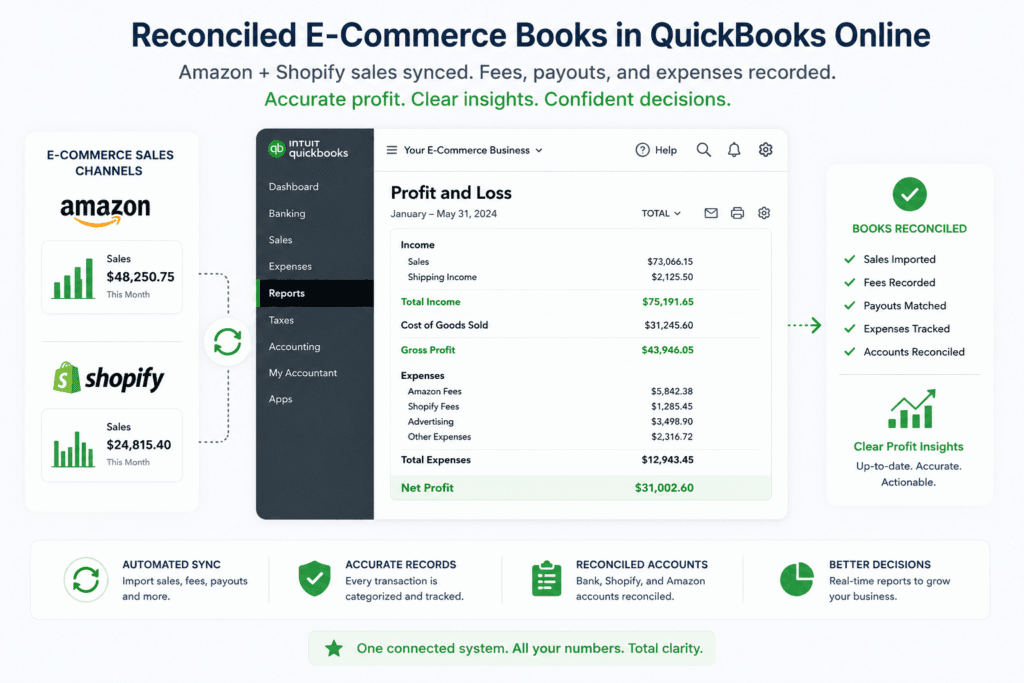
E-commerce bookkeeping is different from regular small business bookkeeping. Your sales come from Amazon, Shopify, PayPal, and Shop Pay, not from one simple bank deposit. Fees, refunds, and reserves get bundled into a single payout. Without the right process, your bank balance and your profit and loss statement never agree.
This guide explains what e-commerce bookkeeping means, why it matters for Amazon FBA and Shopify sellers, and how to build a system that keeps your books accurate every month. You will learn the exact steps to set up your books, the tools that make the process easier, and the mistakes that trip up most sellers.
By the end, you will know what a clean e-commerce bookkeeping system looks like, and how to build one for your business.
What Is E-Commerce Bookkeeping?
E-commerce bookkeeping is the process of recording, organizing, and reconciling every financial transaction from your online sales channels. This includes sales, refunds, marketplace fees, shipping costs, and cost of goods sold (COGS).
Traditional retail bookkeeping assumes one sale equals one deposit. E-commerce bookkeeping cannot make that assumption. Amazon settles payouts every two weeks. Shopify pays out through several gateways, including Shopify Payments, PayPal, and Shop Pay. Each payout bundles dozens of transaction types into a single number.
Good e-commerce bookkeeping breaks that bundled deposit apart. It shows exactly how much you earned in sales, how much you paid in fees, and how much profit you kept, not just what landed in your bank account.
Who E-Commerce Bookkeeping Is For
E-commerce bookkeeping applies to anyone selling online, including:
- Amazon FBA and Amazon Seller Central merchants
- Shopify store owners using Shopify Payments, PayPal, or Shop Pay
- Multi-channel sellers running Amazon, Shopify, and Walmart together
- Sellers registered for sales tax in multiple US states or GST/HST in Canada
If you sell through a marketplace or storefront and use QuickBooks Online, this guide is for you.
A Quick Example
Say Amazon deposits $8,400 into your bank account this week. That single number hides real activity: $11,200 in gross sales, $2,100 in referral and FBA fees, $500 in refunds, and $200 in storage fees. Your bank feed shows one deposit. Your books should show all five numbers separately.
This is the core job of e-commerce bookkeeping: turning one bundled deposit into an accurate, itemized record of what happened in your business. It is also worth knowing that bookkeeping and accounting are related but not identical. Bookkeeping records and organizes the numbers; accounting interprets them for decisions and tax filing. Our guide on bookkeeping vs accounting explains where one ends and the other begins.
Why E-Commerce Bookkeeping Matters
Clean books are not just a compliance task. They shape every decision you make as a seller.
You see your real profit, not your bank balance. A high bank balance can hide thin margins. Bookkeeping separates revenue, fees, and COGS so you know your true profit per product, not a guess based on cash on hand.
You stay ready for sales tax and income tax. The US operates under economic nexus rules after the Wayfair decision, and Canada requires GST/HST registration once you cross revenue thresholds. Accurate books make both far easier to manage.
You catch problems early. Rising fees, shrinking margins, or inventory shortages show up in your numbers before they show up in your bank account.
You look investor- and lender-ready. Clean, audit-ready financials matter if you ever sell your business, apply for a loan, or bring on a partner.
You make faster, better inventory decisions. When your COGS and inventory accounts are accurate, you know which products actually make money once fees and returns are factored in. That changes what you reorder and what you discontinue.
Sellers who skip proper bookkeeping usually find out about problems the hard way, at tax time, during a slow sales tax audit, or when a lender asks for financials they cannot produce. Building the system early avoids all three.
For a full breakdown of what goes wrong without a solid system, see our guide on common accounting mistakes small businesses make.
Step-by-Step Guide to E-Commerce Bookkeeping
Follow these steps to build a bookkeeping system that works for your Amazon or Shopify business.
Step 1: Choose Your Accounting Software
Most e-commerce sellers in the US and Canada use QuickBooks Online. It supports multi-currency, connects with sales channel tools, and produces the reports your accountant or tax authority expects. If you are unsure which software fits your business, compare options in our guide to accounting software for small businesses.
Step 2: Connect Your Sales Channels With A2X
A2X pulls settlement data from Amazon and Shopify and posts it into QuickBooks Online as clean, summarized journal entries. This step removes manual data entry and stops your bank feed from lumping fees and sales into one confusing number.
Step 3: Set Up an E-Commerce Chart of Accounts
A generic chart of accounts will not capture marketplace fees, shipping costs, or COGS correctly. You need dedicated accounts for platform fees, refunds, advertising spend, and inventory. Learn how to build one in our guide on setting up a chart of accounts for e-commerce.
Step 4: Choose Cash or Accrual Accounting
Your accounting method decides when you record income and expenses. Most growing e-commerce brands use accrual accounting because it matches revenue to the period it was earned, giving a more accurate profit picture. Compare both methods in our guide on cash vs accrual accounting for e-commerce sellers.
Step 5: Track Cost of Goods Sold and Inventory
COGS includes your product cost, inbound freight, and the Amazon FBA fees tied to inventory. Without accurate COGS, your P&L will overstate profit. See our step-by-step guide on calculating COGS for Amazon and Shopify sellers.
Step 6: Reconcile Every Month
Reconciliation means matching your QuickBooks records against your bank statements and marketplace settlement reports. Set a fixed monthly deadline, such as the 5th business day, so your numbers stay current. Our Amazon FBA bookkeeping checklist walks through every month-end task in order.
Step 7: Handle Sales Tax Correctly
Sales tax compliance in the US and Canada is one of the most common failure points for e-commerce sellers. Use a dedicated tool like TaxCloud to track economic nexus, calculate rates, and file returns. Keeping this process separate from general bookkeeping prevents costly penalties. If you sell in several states, our guide on registering for sales tax in 45 US states covers the registration process in detail.
Step 8: Review Your Financial Statements Monthly
Once your books are reconciled, review your profit and loss statement and balance sheet every month. This step turns bookkeeping data into business decisions. Learn how in our guide on reading your e-commerce profit and loss statement.
Practical Tips for Better Results
Automate what you can, review what matters. Tools like A2X and QuickBooks Online automate data entry. Your time is better spent reviewing margins and cash flow, not typing numbers by hand.
Separate business and personal finances. Use a dedicated business bank account and credit card. Mixing funds makes bookkeeping and tax filing far harder than it needs to be.
Do not skip catch-up work. If your books fall behind, address it right away. The longer you wait, the more transactions pile up, and the harder reconciliation becomes.
Watch your sales tax registrations closely. Registering in a state before you have nexus wastes money on filings you do not need yet. Registering late risks penalties and interest. Track your thresholds by state and province with our free sales tax nexus calculator.
Avoid the summary-only trap. Some sellers post only summarized totals to QuickBooks and lose product-level detail. Decide upfront whether you need summary or detail posting based on how deep your reporting needs to go.
Start with a proven chart of accounts. Rather than building one from scratch, download our free e-commerce chart of accounts template from the free downloads library and adjust it to your business.
Know when to bring in help. DIY bookkeeping works early on. As order volume, states, or SKUs grow, the time cost of doing it yourself often exceeds the cost of hiring a specialist. Many sellers switch over once monthly reconciliation starts taking more than a few hours.
Common mistakes to avoid: judging profit only by your bank balance, ignoring reconciliation until tax season, treating sales tax as an afterthought instead of a monthly task, and mixing personal and business spending on the same card.
Conclusion
E-commerce bookkeeping is not optional once you are selling on Amazon or Shopify. It is the system that tells you whether your business is actually profitable, keeps you compliant with US and Canadian tax rules, and gives you the numbers to grow with confidence.
Start with the fundamentals: connect your sales channels, build the right chart of accounts, choose your accounting method, and reconcile every month. Every guide linked in this article breaks one of these steps down further, so you can build a bookkeeping system that keeps working as your business scales.
Clean books today mean fewer surprises at tax time and more confidence in every growth decision you make. If you would rather hand this off to specialists who already know Amazon and Shopify accounting, book a free consultation with our team.
By:

Ashfaq helps e-commerce business owners turn messy numbers into clear, reliable financials. With over 15 years of experience, he specializes in bookkeeping for Amazon and Shopify sellers, ensuring accuracy, clarity, and confident decision-making.
Categories
Latest Posts
- August 2, 2026
Amazon Seller Connector by QuickBooks: Complete Guide
- July 21, 2026
How COGS Accounting Works for Canadian FBA Sellers
Tags
A2X
Accounting Method
Amazon FBA
Amazon Marketplace Connector
Amazon Seller Central
Amazon Seller Connector
Bookkeeping Tips
Canada Tax Registration
Canadian Bookkeeping
Canadian Sales Tax
Chart of Accounts
COGS
E-Commerce
E-Commerce Bookkeeping
Finance
Financial Statements
GST/HST
Inventory
Payout Reconciliation
Profit and Loss
QuickBooks Online
Sales Tax
Sales Tax Compliance
Shopify
TaxCloud