QuickBooks Bookkeeping for Amazon FBA & Shopify | Thelonex


What Are Canada’s GST/HST Rates by Province?
- Home
- What Are Canada’s GST/HST Rates by Province?
- July 19, 2026
- 7 min read
- No Comments
What Are Canada’s GST/HST Rates by Province?
Charge the wrong tax rate in Canada and you either lose margin or collect too little. GST/HST rates are not the same across the country. Ontario charges 13%. Alberta charges 5%. Quebec adds its own provincial tax on top of GST.
This guide breaks down every province’s rate for 2026, explains why the differences exist, and shows you how to apply the right rate automatically in Shopify, Amazon, and QuickBooks Online. For the bigger picture on registration and filing, start with our Canadian GST/HST guide.
What Are GST/HST Rates by Province?
Canada uses three different tax structures depending on the province. Understanding which one applies to your customer’s shipping address is the first step to charging correctly.
GST-only provinces charge just the federal 5% Goods and Services Tax. HST provinces combine the federal tax with a provincial rate into one number. The remaining provinces charge GST plus a separate provincial sales tax, calculated independently.
Who this applies to: any seller shipping physical goods to Canadian addresses, including US-based Amazon FBA and Shopify sellers, once they are registered for GST/HST. If you have not registered yet, read our guide on how to register for GST/HST before applying any of these rates.
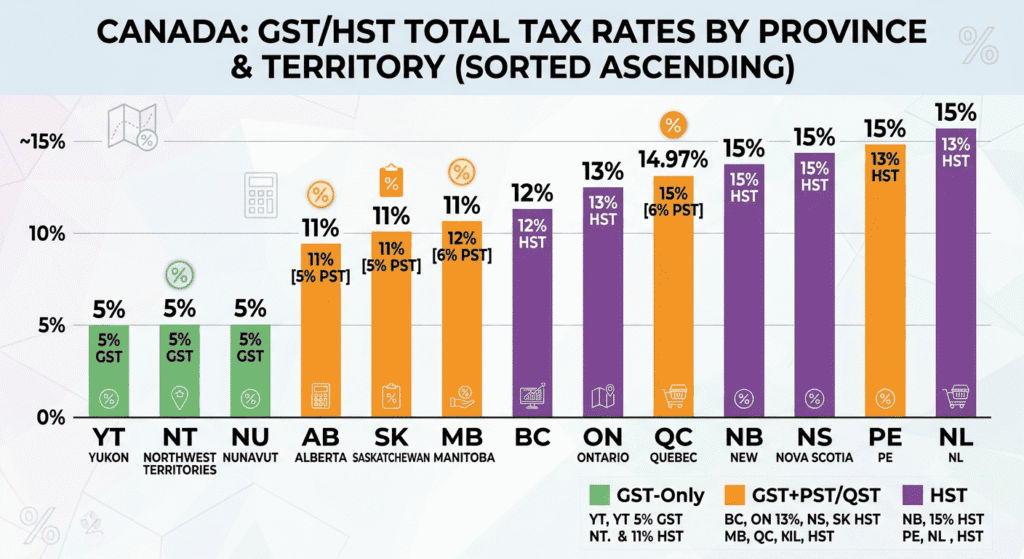
2026 GST/HST Rates by Province
Federal & provincial sales tax rates across Canada
| Province | GST | PST/QST | HST (Combined) | Total Rate |
|---|---|---|---|---|
| Alberta | 5% | — | — | 5% |
| British Columbia | 5% | 7% PST | — | 12% |
| Manitoba | 5% | 7% RST | — | 12% |
| New Brunswick | — | — | 15% | 15% |
| Newfoundland and Labrador | — | — | 15% | 15% |
| Nova Scotia | — | — | 14% | 14% |
| Ontario | — | — | 13% | 13% |
| Prince Edward Island | — | — | 15% | 15% |
| Quebec | 5% | 9.975% QST | — | 14.975% |
| Saskatchewan | 5% | 6% PST | — | 11% |
| Northwest Territories | 5% | — | — | 5% |
| Nunavut | 5% | — | — | 5% |
| Yukon | 5% | — | — | 5% |
Total rate scale
5%
11–12%
13–14%
14.975–15%
— indicates no separate provincial sales tax applies. Rates shown reflect standard rates for most goods. Some items, like basic groceries and certain children's products, are zero-rated or exempt regardless of province. Always confirm current rates with the CRA before filing, since provincial governments can adjust rates between budget cycles.
Why Provincial Rates Matter for E-Commerce Sellers
A flat, one-size-fits-all tax rate across Canada is one of the most common setup mistakes we see. It creates two problems, and both cost money.
Overcharging customers in low-tax provinces like Alberta damages trust and can trigger customer complaints or chargebacks. Undercharging in HST provinces like Ontario means you remit less than you collected as tax liability, and the CRA will still expect the full amount at filing time.
Accurate provincial rates also protect your input tax credit calculations. If your sales tax liability account in QuickBooks does not match what you actually collected, your net GST/HST payment will be wrong every single period.
Step-by-Step Guide to Applying the Right Rate
Step 1: Identify the Customer’s Shipping Province
GST/HST is based on the destination of the shipment, not where your business is located. A sale shipped to Ontario charges 13% HST even if your warehouse sits in British Columbia.
Step 2: Match the Province to Its Tax Type
Use the table above to confirm whether the destination province is GST-only, HST, or GST-plus-PST. Quebec is the exception to watch closely, since QST requires its own separate registration number in addition to your federal GST/HST number.
Step 3: Configure Rates in Shopify and Amazon
In Shopify, Canadian tax rates update automatically once you enable tax collection by region, but you should still verify each province’s rate after any CRA rate change. Amazon FBA sellers should check Seller Central’s tax settings and confirm which provinces Amazon already collects and remits under marketplace facilitator rules. Our Amazon FBA Canada tax guide covers this in detail, and our Shopify GST/HST guide walks through the exact settings screens.
Step 4: Verify Collected Tax Monthly
Pull a tax collected report from your sales channel each month and compare it against the rates in this guide. A mismatch usually means a product tax code is misconfigured or a rate update was missed.
Step 5: Reconcile in QuickBooks Online
Once collected tax is verified, make sure it posts correctly into your QuickBooks Online GST/HST liability accounts, broken out by province if you file multiple provincial returns. This is the same data you will need when you file your GST/HST return in QuickBooks Online.
Practical Tips for Better Results
Set a recurring calendar reminder to check for provincial rate changes. Rates do not change often, but when they do, outdated settings can go unnoticed for months.
Common mistake: assuming Quebec follows standard HST rules. Quebec uses GST plus QST, calculated as two separate amounts, and QST has its own registration process through Revenu Québec.
Common mistake: applying your home province’s rate to every Canadian order. This single error is behind most of the tax discrepancies we find during client onboarding.
Efficiency tip: automate rate lookups instead of maintaining a spreadsheet. TaxCloud applies the correct rate at checkout and keeps a rate table updated without manual maintenance.
Conclusion
Provincial GST/HST rates are not optional details. They determine exactly how much tax you collect, remit, and can claim back through input tax credits. Confirm your rate table twice a year, verify your channel settings match it, and reconcile monthly in QuickBooks Online.
Need help auditing your current tax settings across provinces? Book a free consultation and we will review your Shopify, Amazon, and QuickBooks setup together.
By:

Ashfaq helps e-commerce business owners turn messy numbers into clear, reliable financials. With over 15 years of experience, he specializes in bookkeeping for Amazon and Shopify sellers, ensuring accuracy, clarity, and confident decision-making.
Categories
Latest Posts
- August 2, 2026
Amazon Seller Connector by QuickBooks: Complete Guide
- July 21, 2026
How COGS Accounting Works for Canadian FBA Sellers
Tags
A2X
Accounting Method
Amazon FBA
Amazon Marketplace Connector
Amazon Seller Central
Amazon Seller Connector
Bookkeeping Tips
Canada Tax Registration
Canadian Bookkeeping
Canadian Sales Tax
Chart of Accounts
COGS
E-Commerce
E-Commerce Bookkeeping
Finance
Financial Statements
GST/HST
Inventory
Payout Reconciliation
Profit and Loss
QuickBooks Online
Sales Tax
Sales Tax Compliance
Shopify
TaxCloud