QuickBooks Bookkeeping for Amazon FBA & Shopify | Thelonex


A2X vs Manual Entry: Best Amazon Bookkeeping?
- Home
- A2X vs Manual Entry: Best Amazon Bookkeeping?
- June 4, 2026
- 11 min read
- No Comments

A2X vs Manual Entry: Best Amazon Bookkeeping?
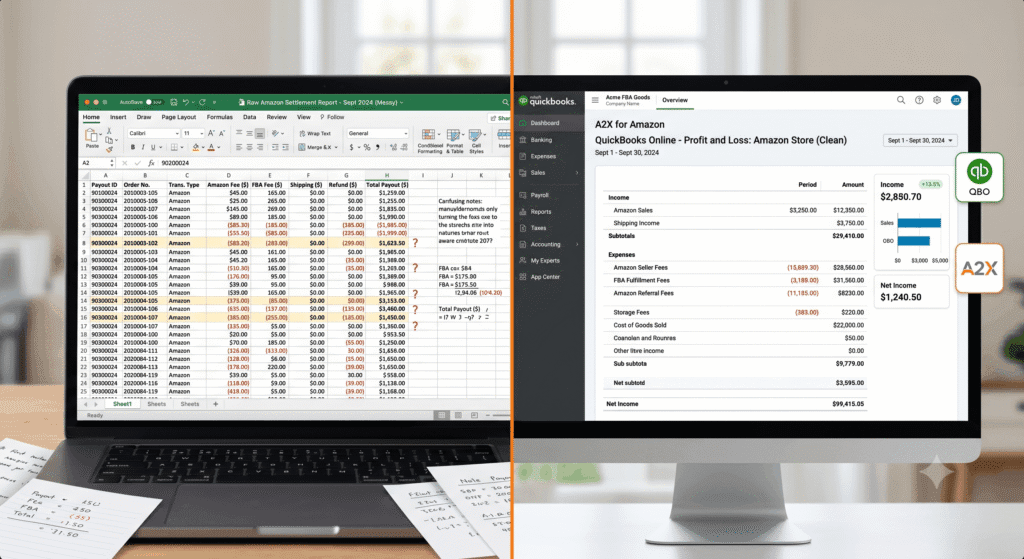
You spend hours every month trying to make sense of your Amazon payout. It does not match your sales figures. You cannot tell what Amazon charged you in fees. And your profit and loss report looks nothing like your bank account.
This is the reality for most Amazon FBA sellers who rely on manual bookkeeping. There is a better way — and it is called A2X.
This post breaks down exactly how A2X compares to manual entry for Amazon bookkeeping. You will learn what each approach involves, where manual entry breaks down, and how A2X connects Amazon to QuickBooks Online automatically. By the end, you will know which method is right for your business.
What Is A2X Amazon Bookkeeping?
A2X is a software tool that sits between Amazon Seller Central and your accounting software — in this case, QuickBooks Online. It is a data connector specifically built for e-commerce sellers.
Every time Amazon generates a settlement (the payout summary it sends you every two weeks), A2X pulls that data automatically. It then breaks the settlement down into clean, categorized line items and posts them as journal entries in QuickBooks.
Those line items include:
- Gross product sales revenue
- Amazon FBA fulfillment fees
- Amazon referral fees
- Advertising (PPC) costs
- Customer refunds and returns
- FBA storage fees
- Reimbursements from Amazon
- Multi-currency conversions (important for US sellers selling into Canada)
The result is a set of clean, reconciled accounts in QuickBooks that match your actual Amazon activity — not a vague deposit figure.
Who Is A2X For?
A2X is built for Amazon FBA sellers who use QuickBooks Online for their bookkeeping. It works whether you sell in the US only, in Canada, or across both markets. It suits sellers at any revenue level, but it delivers the most value once you are processing more than a handful of orders per month.
Learn how to get QuickBooks configured correctly before connecting A2X in our guide: How to Set Up QuickBooks Online for Amazon FBA Sellers.
What Is Manual Entry for Amazon Bookkeeping?
Manual entry means recording your Amazon financial data into QuickBooks — or a spreadsheet — by hand. You download your settlement report from Amazon Seller Central, review each line item, and enter the figures yourself.
Some sellers do this transaction by transaction. Others download the full settlement CSV and work through it in batches. Either way, the process requires significant time and accounting knowledge to do correctly.
The Core Problem With Manual Entry
Amazon does not pay you your gross revenue. It pays you a net settlement — one deposit that represents your sales minus all the fees, refunds, and charges Amazon has already deducted. If you book that deposit as your revenue in QuickBooks, you are recording the wrong number. You are understating your true sales and losing all visibility into your actual fee structure.
This creates three serious problems:
- Your profit and loss report shows inaccurate gross revenue
- You cannot see which Amazon fees are eating into your margins
- Your tax filings are based on incorrect figures
Many sellers do not realize this error exists until their accountant finds it during tax prep — by which point months of records need to be corrected.
If your books are already behind, read our post on Amazon Catch-Up Bookkeeping: How to Fix Months of Messy Records to understand your options.
Why A2X Amazon Bookkeeping Matters
The case for A2X is not just about saving time — though it does that significantly. It is about accuracy, compliance, and having financial data you can actually trust.
Accuracy at the Transaction Level
A2X pulls every component of your Amazon settlement and maps each one to the correct QuickBooks account. Sales go to your revenue account. FBA fees go to cost of sales. Refunds are deducted correctly. Nothing gets lumped together.
This level of detail is what gives you a real profit and loss report. You can see your actual gross margin, your true advertising spend as a percentage of revenue, and your net profit after all Amazon charges.
Time Savings Every Settlement Period
Amazon generates a settlement report roughly every two weeks. For a mid-volume seller, manually processing one settlement can take one to three hours. That is up to six hours a month just on data entry.
With A2X, that same task takes under five minutes. A2X pulls the data, categorizes it, and posts the journal entry. You review and approve. Done.
Compliance With US Sales Tax and Canadian GST/HST
A2X captures sales tax data at the transaction level. This is critical if you are managing nexus across multiple US states using TaxCloud, because accurate per-transaction data feeds directly into your sales tax calculations. If you also sell into Canada, A2X handles multi-currency entries so your CAD revenue is recorded correctly in QuickBooks.
See how TaxCloud works alongside A2X in: TaxCloud for Amazon Sellers: How to Automate Sales Tax Filing.
A2X vs Manual Entry: Side-by-Side Comparison
Here is how the two approaches compare across the factors that matter most to Amazon FBA sellers in the US and Canada:
Factor | A2X (Automated) | Manual Entry |
Time per settlement | ~5 minutes (automated) | 60–180+ minutes per settlement |
Error rate | Very low — auto-categorized | High — human data entry |
Revenue breakdown | Full line-item detail | One lump sum unless done carefully |
COGS tracking | Synced with QBO accounts | Manual — prone to miscategorization |
Sales tax data | Accurate per-transaction | Often missed or lumped together |
Multi-currency (CA$) | Handled automatically | Requires manual conversion |
Monthly cost | $19–$69/month (approx.) | $0 but high bookkeeper hours |
Best for | FBA sellers at any volume | Very low-volume sellers only |
Note: A2X pricing is approximate and subject to change. Check a2xaccounting.com for current rates.
Step-by-Step: How to Connect A2X to Amazon and QuickBooks
Setting up A2X takes less than 30 minutes if your QuickBooks Online account is already configured. Here is the process:
Step 1: Create Your A2X Account
Go to a2xaccounting.com and sign up. Select Amazon as your selling platform. A2X offers a free trial so you can test it with your actual data before committing to a plan.
Step 2: Connect A2X to Amazon Seller Central
Inside A2X, click Connect to Amazon. You will be prompted to authorize A2X to access your Seller Central account. This connection is read-only — A2X can pull your settlement data but cannot make any changes to your Amazon account.
Once connected, A2X will pull in your most recent settlement reports. This may take a few minutes depending on how much transaction history you have.
Step 3: Connect A2X to QuickBooks Online
Click Connect to QuickBooks inside the A2X dashboard. You will be taken to the QuickBooks authorization screen. Log in with your QuickBooks Online credentials and grant access.
A2X will then read your existing QuickBooks chart of accounts so it can map your Amazon data to the right accounts.
Step 4: Set Up Your Account Mapping
This is the most important configuration step. A2X needs to know which QuickBooks account each Amazon line item should go to. For example:
- Amazon product sales -> Income: Product Sales
- FBA fulfillment fees -> Cost of Sales: FBA Fees
- Customer refunds -> Income: Returns and Refunds
- Amazon PPC costs -> Expenses: Advertising
- FBA storage fees -> Expenses: Amazon Storage
If you have a properly built chart of accounts in QuickBooks, this mapping takes around 10 to 15 minutes. If you are not sure how to set up your chart of accounts for e-commerce, this is worth getting right before you proceed.
Read our full walkthrough: How to Set Up QuickBooks Online for Amazon FBA Sellers — including a recommended e-commerce chart of accounts.
Step 5: Review and Post Your First Settlement
Once mapping is complete, A2X will prepare your first settlement for review. You will see a summary showing all the line items and the QuickBooks accounts they are mapped to. Review the figures against your Amazon settlement report. If everything looks correct, click Post to QuickBooks.
A2X will create a journal entry in QuickBooks that records every component of the settlement. Your accounts will update automatically.
Step 6: Set Up Auto-Posting (Optional but Recommended)
Once you trust the mapping, you can enable automatic posting. A2X will detect each new settlement as it closes and post the journal entry to QuickBooks without you needing to log in and approve it manually. You can still review the entries any time inside QuickBooks.
Practical Tips for Better A2X Amazon Bookkeeping
Build Your Chart of Accounts Before You Connect A2X
The most common A2X setup mistake is connecting the tool before QuickBooks is properly configured. If your chart of accounts does not have the right categories, A2X will map your data to catch-all accounts, and your books will still be inaccurate.
Set up separate expense accounts for FBA fees, storage, advertising, and returns before you begin the A2X connection process.
Do Not Mix Your Amazon and Shopify Data
If you sell on both Amazon and Shopify, use separate A2X connections for each. A2X supports both platforms but keeps them as distinct data sources. Mixing them in a single set of accounts creates reconciliation problems that are difficult to unwind.
Review Your Mapping When Amazon Changes Its Fee Structure
Amazon occasionally changes the names or structure of the fees it charges — especially around FBA fulfillment and storage. When this happens, A2X may flag unmapped items. Check your mapping in A2X whenever you see a mapping warning to make sure new fee types are assigned to the correct QuickBooks account.
Reconcile Monthly, Not Just at Tax Time
A2X automates the data entry. But you still need to reconcile your QuickBooks accounts against your bank statements every month. A reconciled set of books means your P&L is reliable, your balance sheet is clean, and tax season is not a scramble.
Use our Amazon FBA Bookkeeping Checklist: Month-End Tasks Every Seller Needs as your monthly reconciliation guide.
Common Mistakes to Avoid
- Booking the Amazon net settlement as gross revenue — this is the most widespread error
- Not mapping refunds to a separate returns account — this distorts your revenue figures
- Ignoring reimbursements — Amazon occasionally reimburses you for lost or damaged inventory; these should be tracked as income
- Skipping the A2X review step — even with automation, a quick review each settlement period catches exceptions
- Using A2X without a properly configured QuickBooks file — garbage in, garbage out
Is A2X Worth the Monthly Cost?
A2X costs between $29 and $159 per month depending on your order volume and whether you need multi-channel support. For most FBA sellers, it pays for itself several times over.
Consider the alternative: if your bookkeeper charges $40 to $80 per hour and spends two hours per settlement on manual entry, that is $80 to $160 per month just for data entry — not including the time to review and correct errors. A2X eliminates most of that work.
For sellers who manage their own books, the time savings alone justify the cost. For sellers who outsource bookkeeping, A2X reduces the hours your bookkeeper spends on your account, which directly lowers your monthly bookkeeping fee.
When manual entry still makes sense: If you have fewer than 10 Amazon orders per month and one settlement every two weeks, manual entry is manageable. At that volume, the math on A2X is less clear-cut. But as soon as your order volume grows — or you add a second marketplace — A2X becomes the logical choice. |
Conclusion
Manual entry for Amazon bookkeeping is not just slow — it is error-prone at its core. When you record your Amazon settlement as a single deposit, you lose visibility into your real revenue, your actual fees, and your true margin.
A2X solves this by pulling your settlement data directly from Amazon Seller Central and posting fully categorized journal entries into QuickBooks Online. The result is accurate books, clean financials, and far less time spent on data entry every month.
For Amazon FBA sellers in the US and Canada, A2X is not a luxury — it is the accounting infrastructure that makes everything else work correctly: your profit reporting, your sales tax compliance, and your year-end tax preparation.
Start with a properly configured QuickBooks account, connect A2X, and reconcile your books every month. That is the system that gives you numbers you can trust.
Want A2X set up and connected to QuickBooks correctly?
Thelonex sets up and manages A2X + QuickBooks for Amazon FBA sellers in the US and Canada. Starting at $199/month.
By

Ashfaq helps e-commerce business owners turn messy numbers into clear, reliable financials. With over 15 years of experience, he specializes in bookkeeping for Amazon and Shopify sellers, ensuring accuracy, clarity, and confident decision-making.
Categories
Latest Posts
- August 2, 2026
Amazon Seller Connector by QuickBooks: Complete Guide
- July 21, 2026
How COGS Accounting Works for Canadian FBA Sellers
Tags
A2X
Accounting Method
Amazon FBA
Amazon Marketplace Connector
Amazon Seller Central
Amazon Seller Connector
Bookkeeping Tips
Canada Tax Registration
Canadian Bookkeeping
Canadian Sales Tax
Chart of Accounts
COGS
E-Commerce
E-Commerce Bookkeeping
Finance
Financial Statements
GST/HST
Inventory
Payout Reconciliation
Profit and Loss
QuickBooks Online
Sales Tax
Sales Tax Compliance
Shopify
TaxCloud