QuickBooks Bookkeeping for Amazon FBA & Shopify | Thelonex


Amazon Seller Bookkeeping for Multi-Channel Sellers
- Home
- Amazon Seller Bookkeeping for Multi-Channel Sellers
- July 4, 2026
- 6 min read
- No Comments
Amazon Seller Bookkeeping for Multi-Channel Sellers
Why is it so hard to find good Amazon seller bookkeeping when you sell on more than one channel? Most bookkeeping firms build their workflows around Shopify. Shopify is simple. One platform, one payment feed, one clean report.
Amazon is not simple. Add Walmart, TikTok Shop, or your own website, and most bookkeepers give up. This leaves multi-channel Amazon sellers with messy books and no real support.
In this guide, you will learn why this gap exists, what it costs you, and how to fix it. If you are new to Amazon accounting basics first, start with our complete guide to Amazon seller accounting, then come back here for the multi-channel process.
What Is Amazon Seller Bookkeeping?
Amazon seller bookkeeping is the process of tracking income, expenses, and inventory for a business that sells on Amazon. It covers FBA fees, refunds, reserves, and settlement reports.
This is different from standard e-commerce bookkeeping. Standard bookkeeping assumes one clean sales feed. Amazon bookkeeping deals with delayed payouts, bundled fees, and inventory sitting in multiple warehouses.
Who This Is For
This applies to sellers who:
- Sell on Amazon FBA, FBM, or both
- Also sell on Shopify, Walmart, TikTok Shop, or eBay
- Manage inventory across more than one channel
- Need accurate profit numbers by channel, not just totals
If you sell only on Shopify with one supplier, your books are simpler. If you sell on Amazon and anywhere else, you need a different approach.
Why Amazon Seller Bookkeeping Matters
Clean books are not just for tax season. They shape every decision you make in your business.
You Can See Real Profit, Not Guessed Profit
Amazon settlement reports bundle sales, fees, refunds, and ads into one confusing number. Without proper bookkeeping, you cannot tell which products actually make money.
You Avoid Tax Season Panic
Multi-channel sellers often have sales tax obligations in several states. Messy books make this worse. Clean records make filing simple and accurate.
You Make Better Inventory Decisions
When inventory sits across Amazon warehouses, a 3PL, and your own storage, tracking stock by hand leads to errors. Good bookkeeping shows true stock levels and true cost of goods sold.
You Build a Sellable Business
Buyers and investors want clean financials. A business with accurate, channel-level books is worth more and sells faster than one with guesswork numbers.
Step-by-Step Guide to Amazon Seller Bookkeeping
Follow these steps to build a bookkeeping system that works across every channel you sell on.
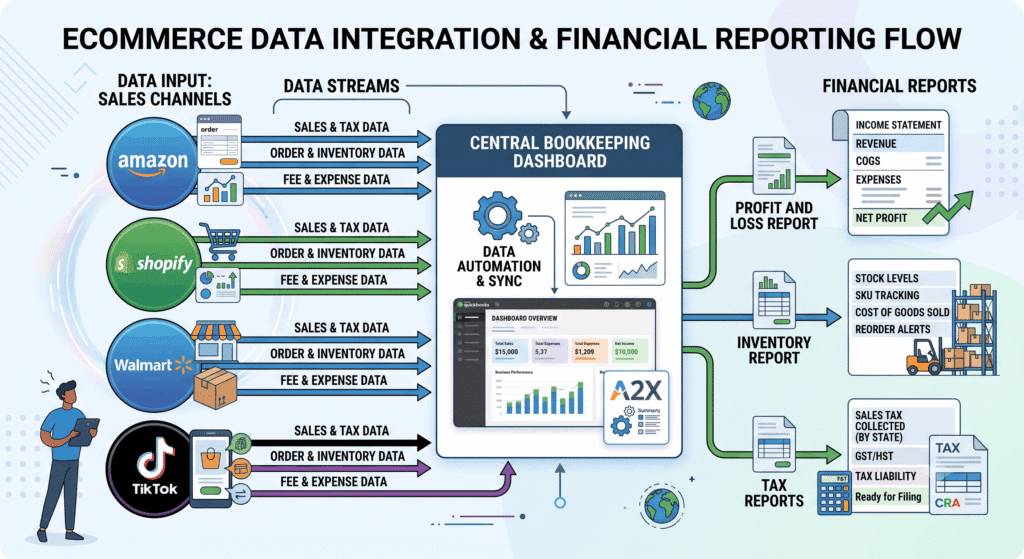
Step 1: Connect All Sales Channels to One System
Start by linking Amazon, Shopify, Walmart, and any other channel to a single accounting tool. Do not manage each channel in a separate spreadsheet.
Use software built for multi-channel sellers. It should pull orders, fees, and refunds automatically from each platform.
Step 2: Break Down Amazon Settlement Reports
Amazon pays out every two weeks. Each payout includes sales, FBA fees, storage fees, advertising costs, and refunds, all mixed together.
Separate each of these into its own category. This step alone fixes most of the confusion sellers have about their real profit. Most sellers automate this with A2X — here is how to set up A2X for Amazon sellers.
Step 3: Track Inventory Across All Locations
List every place your inventory lives: Amazon FBA warehouses, your own storage, a 3PL, or Walmart fulfillment centers.
Record cost of goods sold (COGS) for each unit, no matter where it sits. This keeps your profit numbers accurate across channels. For the exact QuickBooks setup, see how to track Amazon FBA cost of goods sold in QuickBooks.
Inventory is usually where multi-channel accounting breaks down first. For the full breakdown of why, see why multi-channel inventory accounting breaks down.
Step 4: Reconcile Reimbursements and Reserves
Amazon holds a reserve on your payouts and sometimes owes you reimbursements for lost or damaged inventory. Many sellers miss this money entirely.
Check your reimbursement reports monthly. Match them against your records to confirm you received what you were owed.
Step 5: Set Up Channel-Level Profit and Loss Reports
Build a profit and loss statement that breaks out revenue and cost by channel. This shows you which platform actually drives profit, not just sales volume.
Step 6: Review Sales Tax Obligations by State
Multi-channel selling often creates sales tax nexus in multiple states, often triggered simply by storing FBA inventory in a state. Review your obligations at least quarterly — see our full Amazon FBA sales tax nexus guide for the state-by-state triggers.
Work with a bookkeeper who understands multi-channel tax rules, since generic advice often misses Amazon-specific triggers like FBA inventory storage.
Step 7: Close Your Books Monthly
Do not wait until tax time. Close your books every month. This catches errors early and keeps your numbers ready for decisions year-round. Use this month-end bookkeeping checklist to keep the close consistent every cycle.
Practical Tips for Better Results
Use these tips to keep your books accurate and your process efficient.
Actionable Advice
- Reconcile your Amazon settlement report every two weeks, right when it posts
- Track COGS by SKU, not by broad product category
- Separate personal and business expenses from day one
- Use a bookkeeper who has direct experience with Amazon FBA, not just general e-commerce
Common Mistakes to Avoid
- Treating Amazon deposits as pure revenue instead of net payouts
- Ignoring inventory sitting in transit or in Amazon’s inbound process
- Skipping reimbursement checks, which leaves money on the table
- Waiting until January to organize a full year of transactions
Efficiency Tips
- Automate bank and channel feeds so data updates daily, not manually
- Use one chart of accounts across all channels for consistent reporting
- Set calendar reminders for monthly closes and quarterly tax reviews
- Keep a simple SKU-to-COGS reference sheet updated after every inventory order
Conclusion
Amazon seller bookkeeping is harder than standard e-commerce bookkeeping. Settlement reports, multi-warehouse inventory, and reimbursements make it easy to lose track of real profit.
Following a clear, step-by-step process fixes this. Clean books give you accurate profit numbers, smoother tax filing, and a business that is ready to grow or sell.
This kind of clarity does not come from a one-time fix. It comes from a system you run every month, which keeps paying off in better decisions all year.
Ready to get your books in order? Talk to a bookkeeper who specializes in Amazon and multi-channel sellers, and stop guessing at your real profit.
By:

Ashfaq helps e-commerce business owners turn messy numbers into clear, reliable financials. With over 15 years of experience, he specializes in bookkeeping for Amazon and Shopify sellers, ensuring accuracy, clarity, and confident decision-making.
Categories
Latest Posts
- August 2, 2026
Amazon Seller Connector by QuickBooks: Complete Guide
- July 21, 2026
How COGS Accounting Works for Canadian FBA Sellers
Tags
A2X
Accounting Method
Amazon FBA
Amazon Marketplace Connector
Amazon Seller Central
Amazon Seller Connector
Bookkeeping Tips
Canada Tax Registration
Canadian Bookkeeping
Canadian Sales Tax
Chart of Accounts
COGS
E-Commerce
E-Commerce Bookkeeping
Finance
Financial Statements
GST/HST
Inventory
Payout Reconciliation
Profit and Loss
QuickBooks Online
Sales Tax
Sales Tax Compliance
Shopify
TaxCloud