QuickBooks Bookkeeping for Amazon FBA & Shopify | Thelonex


A2X Summary vs Detail Posting: Which Setting to Use
- Home
- A2X Summary vs Detail Posting: Which Setting to Use
- July 4, 2026
- 7 min read
- No Comments
A2X Summary vs. Detail Posting: Which Setting to Use
A2X gives you a choice before your first settlement posts: summary or detail. Most sellers pick one without fully understanding what changes between them. That choice affects how your QuickBooks file looks, how easily you can reconcile, and how much flexibility you have when something needs investigating.
This guide explains what each setting does, the trade-offs between them, and which one fits different types of stores and reporting needs.
By the end, you will know exactly which posting mode to use for your store and why.
What Is A2X Summary vs. Detail Posting?
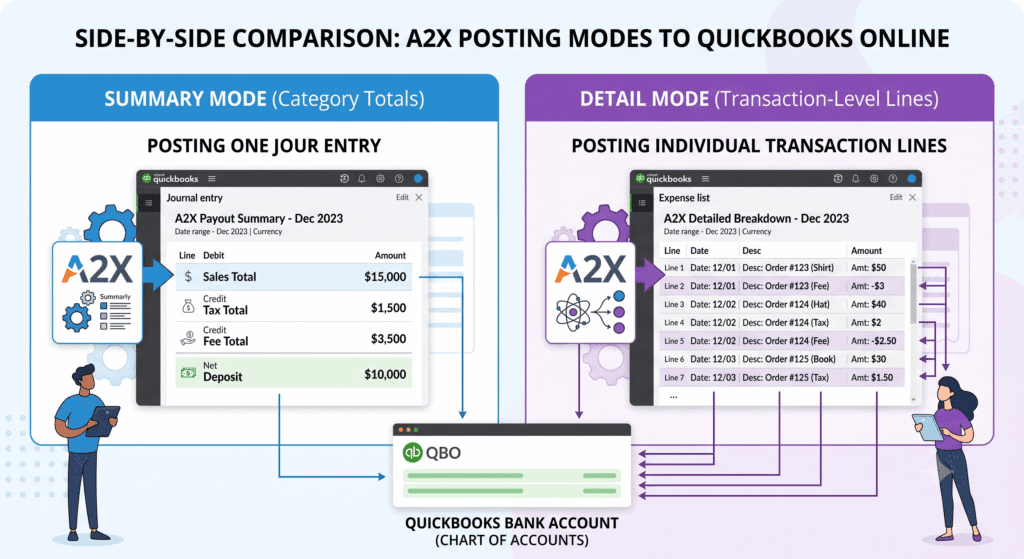
A2X gives you two ways to post settlement data into QuickBooks Online.
Summary posting creates one consolidated journal entry per settlement period. Instead of individual line items for each order or transaction, A2X combines all sales, fees, refunds, and tax into category totals and posts them as a single entry.
Detail posting creates a separate line item or entry for each individual transaction within the settlement. Every order, refund, and fee appears as its own record in QuickBooks.
Both options post to the same accounts you defined in your A2X chart of accounts mapping. The difference is in how much data gets broken out, and how much volume lands in your QuickBooks file.
Why This Setting Matters
The posting mode you choose affects three things directly: the readability of your QuickBooks file, the speed of your bank reconciliation, and how easily you can drill into a specific transaction when something looks wrong.
Summary posting keeps QuickBooks lean and reconciliation fast. Detail posting gives you a transaction-level audit trail. Neither is universally better. The right choice depends on your order volume, your reporting preferences, and how you investigate discrepancies.
This is also a relevant decision before you finalize your mapping setup. If you plan to use detail posting, you may want more granular accounts in your chart of accounts. If you use summary posting, broader categories often work fine. Our chart of accounts mapping guide covers both scenarios.
A2X Summary Posting: What You Get
How It Works
A2X totals up every transaction in the settlement by category, then posts one journal entry. You see one line for total sales, one for total refunds, one for total fees, one for tax, and so on.
That single entry ties directly to the bank deposit, making the QuickBooks bank reconciliation a straightforward match.
Who It Works Best For
- Sellers processing high order volumes where line-by-line detail would make QuickBooks unwieldy
- Stores where category-level reporting is sufficient for decision-making
- Sellers who want fast monthly reconciliation without digging into individual transactions
- Businesses where the accountant or bookkeeper works at the report level, not the transaction level
Trade-offs
You lose transaction-level visibility inside QuickBooks. If a customer asks about a specific refund, or you need to match a single order to a QuickBooks entry, you have to go back to the Amazon or Shopify source reports instead of finding it directly in QuickBooks.
A2X Detail Posting: What You Get
How It Works
A2X posts a separate record for each transaction. A settlement with 300 orders generates hundreds of individual entries in QuickBooks, one for each sale, refund, and fee line item.
Who It Works Best For
- Lower-volume sellers who process a manageable number of orders per month
- Stores where customer-level or order-level reporting is important for operations or accounting
- Sellers who need a full audit trail inside QuickBooks without returning to source reports
- Businesses with an accountant who specifically requests transaction-level data in QuickBooks
Trade-offs
High order volumes make QuickBooks files large and slow. Bank reconciliation becomes more complex because you are matching many individual entries to one bank deposit instead of one entry to one deposit.
For Amazon sellers specifically, detail posting can make the reconciliation process time-consuming at volume. Our guide to reconciling Amazon settlements with A2X is written with summary posting as the baseline, since that’s what most established sellers use.
Step-by-Step Guide: Choosing and Setting Your Posting Mode
Step 1: Assess Your Monthly Order Volume
Count your average monthly orders across all connected channels. As a general guideline, stores processing several hundred or more orders per month benefit most from summary posting. Lower-volume stores can use detail posting without performance issues.
Step 2: Clarify Your Reporting Needs
Ask yourself whether you need transaction-level data inside QuickBooks, or whether category-level reports give you everything you need to manage the business. If your key financial reports are profit and loss statements and cash flow summaries, summary posting is sufficient. If you frequently need to look up individual orders or customer-level data, detail posting preserves that.
Step 3: Consider Your Reconciliation Process
Summary posting reconciles faster because one journal entry matches one bank deposit. Detail posting requires matching many entries to one deposit, which adds time. If you reconcile frequently, as our Amazon settlement reconciliation guide recommends, summary posting saves time each cycle.
Step 4: Set Your Posting Mode in A2X
Inside A2X, navigate to your settlement posting preferences and choose summary or detail. If you connect multiple channels, you can set the mode per channel, so Amazon might use summary while a lower-volume Shopify store uses detail.
Step 5: Test With One Settlement Before Committing
Post a single settlement using your chosen mode and review the QuickBooks output. Confirm the journal entry matches what you expected, the bank reconciliation closes cleanly, and the report detail level meets your needs.
Changing posting modes later is possible but requires adjusting historical entries for comparability. Getting it right before the first real settlement saves time.
Practical Tips for Better Results
- Start with summary posting if you’re unsure. You can switch to detail later, but summary keeps your QuickBooks file simpler and reconciliation faster by default.
- Match your posting mode to your order volume, not your curiosity. Detail posting at high volume creates real performance and usability problems in QuickBooks.
- Use different settings for different channels if your volumes differ significantly. A2X allows per-channel posting configuration, which is useful for sellers running both Amazon at high volume and Shopify at lower volume.
- Align your chart of accounts depth with your posting mode. Detail posting with broad, catch-all accounts defeats the purpose of transaction-level data. Make sure your account mapping is granular enough to match your posting detail level.
- If you switch modes, notify your bookkeeper or accountant first. A change in posting mode changes how QuickBooks reports look, and a change without context creates confusion during review.
- If your QuickBooks file is getting slow, check whether detail posting is the cause. Switching to summary posting at high volume often restores normal performance.
Conclusion
Summary posting fits most established sellers because it keeps QuickBooks clean, reconciliation fast, and reports readable at a glance. Detail posting fits lower-volume sellers or those who need a transaction-level audit trail inside QuickBooks without returning to source reports.
Whichever you choose, make sure your mapping is correct first. Posting mode determines how much data appears. Mapping determines whether that data lands in the right place. See our chart of accounts mapping guide and the complete A2X tutorial to confirm both are set up correctly before your first settlement posts.
If you want a team to review your A2X configuration and recommend the right posting mode for your specific setup, book a free consultation with Thelonex. A QuickBooks-certified team can set this up correctly the first time.
By:

Ashfaq helps e-commerce business owners turn messy numbers into clear, reliable financials. With over 15 years of experience, he specializes in bookkeeping for Amazon and Shopify sellers, ensuring accuracy, clarity, and confident decision-making.
Categories
Latest Posts
- August 2, 2026
Amazon Seller Connector by QuickBooks: Complete Guide
- July 21, 2026
How COGS Accounting Works for Canadian FBA Sellers
Tags
A2X
Accounting Method
Amazon FBA
Amazon Marketplace Connector
Amazon Seller Central
Amazon Seller Connector
Bookkeeping Tips
Canada Tax Registration
Canadian Bookkeeping
Canadian Sales Tax
Chart of Accounts
COGS
E-Commerce
E-Commerce Bookkeeping
Finance
Financial Statements
GST/HST
Inventory
Payout Reconciliation
Profit and Loss
QuickBooks Online
Sales Tax
Sales Tax Compliance
Shopify
TaxCloud