QuickBooks Bookkeeping for Amazon FBA & Shopify | Thelonex


Here’s How to Reconcile Amazon Settlements in A2X
- Home
- Here’s How to Reconcile Amazon Settlements in A2X
- June 24, 2026
- 5 min read
- No Comments
Here’s How to Reconcile Amazon Settlements in A2X
A single settlement is easy to match. The problem shows up a few months in, when reserve holds, split deposits, and overlapping settlement periods start making your bank feed look wrong even when it isn’t.
This guide covers the recurring reconciliation process for Amazon sellers already using A2X, including how to handle the edge cases that trip up even experienced bookkeepers.
By the end, you will know how to reconcile Amazon settlements every cycle without losing time chasing variances that aren’t actually errors.
What Is Amazon Settlement Reconciliation With A2X?
Amazon settlement reconciliation is the process of confirming that every A2X journal entry in QuickBooks matches an actual deposit in your bank account. If you haven’t connected A2X to Amazon yet, start with our A2X setup guide for Amazon sellers, which covers the basic single-settlement match.
This guide picks up from there, for sellers running reconciliation as an ongoing monthly process rather than a one-time check.
It applies to any Amazon seller using QuickBooks Online, especially those with reserve holds, multiple settlement periods per month, or settlements that span month-end.
Why Ongoing Reconciliation Matters
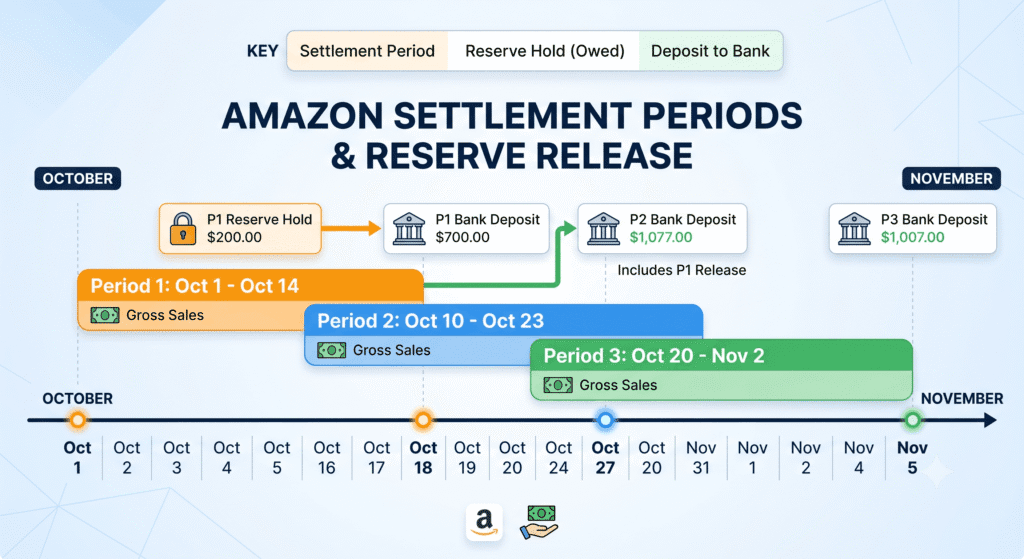
Amazon settles payouts roughly every two weeks, which means most months include two or three separate settlements. Each one needs to be matched individually.
Without a consistent process, small variances pile up. A reserve hold from October might not release until December, and if you’re not tracking it, your December numbers look inflated for no clear reason.
Done well, reconciliation gives you a profit and loss statement you can trust at any point in the year, not just one you patch together before tax season.
It also matters if your mapping was off when you first set things up. Recurring reconciliation is often where mapping mistakes surface. If variances keep appearing in the same category every cycle, revisit your chart of accounts mapping before assuming it’s a one-off issue.
Step-by-Step Guide to Reconciling Amazon Settlements
Step 1: Pull the Settlement Report Alongside the A2X Entry
For each settlement period, open the Amazon settlement report in Seller Central next to the journal entry A2X posted in QuickBooks. Confirm the net total matches before going further.
Step 2: Match the Entry to the Bank Deposit
In your QuickBooks bank feed, locate the deposit that corresponds to this settlement. Match it to the A2X journal entry. If your A2X setup uses a clearing account, the entry should pass through it before landing in the bank.
Step 3: Investigate Reserve Holds
Amazon sometimes holds back a portion of a settlement as a reserve, releasing it in a later period. This shows up as a difference between what the settlement report says you earned and what actually deposited.
Track held reserves in a separate account so you can see what’s pending versus what’s already landed in your bank. When the reserve releases, it should match an entry you were already expecting, not appear as a surprise.
Step 4: Handle Settlements That Span Month-End
A settlement period does not always align neatly with a calendar month. When a settlement starts in one month and ends in the next, decide on a consistent approach: either let A2X post it to the period it closes in, or split it manually if your reporting needs more precision.
Whichever approach you choose, apply it consistently every cycle so your month-to-month comparisons stay meaningful.
Step 5: Document Recurring Discrepancies
If the same type of variance shows up settlement after settlement, it’s rarely a coincidence. Keep a short log of what the variance was and what caused it, whether that’s a mapping issue, a reserve timing difference, or a fee category Amazon added.
This log makes it much faster to diagnose the next discrepancy. If you’re seeing repeated sync failures rather than just timing differences, check our guide to common A2X sync errors and how to fix them.
Step 6: Close Out the Reconciliation in QuickBooks
Once every settlement for the period is matched and any reserve holds are tracked separately, close out the bank reconciliation in QuickBooks for that statement period. This locks in your numbers and makes the next cycle easier to compare against.
Practical Tips for Better Results
- Reconcile on a fixed schedule, not whenever you remember. A recurring calendar reminder tied to Amazon’s settlement cycle keeps variances small and easy to trace.
- Track reserve holds separately from regular settlement income. This avoids confusing a held reserve with a missing deposit.
- Revisit your mapping if the same variance keeps appearing. A recurring mismatch is almost always a mapping issue, not a one-time mistake. See our full chart of accounts mapping guide to fix it at the source.
- Don’t force a reconciliation to balance by adjusting the wrong account. If totals don’t match, find the actual cause before posting a manual correction.
- Keep a simple discrepancy log. A one-line note per variance saves significant time when the same issue resurfaces months later.
- If reconciliation consistently takes hours every cycle, the issue is likely upstream. Check your original setup against our A2X setup guide for Amazon sellers to see what might have been missed.
Conclusion
Reconciling Amazon settlements is straightforward once it becomes a routine, not a scramble. The edge cases, reserve holds, split periods, and recurring variances, are predictable once you know what to look for.
For the full setup process before you reach this stage, see our A2X setup guide for Amazon sellers or the complete A2X tutorial. If reconciliation is eating more time than it should, our monthly bookkeeping service handles this on a fixed schedule every month.
Want this off your plate entirely? Book a free consultation with Thelonex and let a QuickBooks-certified team manage your reconciliation.
By:

Ashfaq helps e-commerce business owners turn messy numbers into clear, reliable financials. With over 15 years of experience, he specializes in bookkeeping for Amazon and Shopify sellers, ensuring accuracy, clarity, and confident decision-making.
Categories
Latest Posts
- August 2, 2026
Amazon Seller Connector by QuickBooks: Complete Guide
- July 21, 2026
How COGS Accounting Works for Canadian FBA Sellers
Tags
A2X
Accounting Method
Amazon FBA
Amazon Marketplace Connector
Amazon Seller Central
Amazon Seller Connector
Bookkeeping Tips
Canada Tax Registration
Canadian Bookkeeping
Canadian Sales Tax
Chart of Accounts
COGS
E-Commerce
E-Commerce Bookkeeping
Finance
Financial Statements
GST/HST
Inventory
Payout Reconciliation
Profit and Loss
QuickBooks Online
Sales Tax
Sales Tax Compliance
Shopify
TaxCloud