QuickBooks Bookkeeping for Amazon FBA & Shopify | Thelonex


Common A2X Sync Errors and How to Fix Them
- Home
- Common A2X Sync Errors and How to Fix Them
- July 4, 2026
- 7 min read
- No Comments
Common A2X Sync Errors and How to Fix Them
A2X runs quietly in the background most of the time. When it stops working, the first sign is usually a settlement that never posted to QuickBooks. By the time you notice, you might be two or three cycles behind.
This guide covers the most common A2X sync errors, what causes each one, and the fastest way to fix them so your books stay current.
By the end, you will know how to diagnose the most likely cause of any sync issue before spending time on guesswork.
What Are A2X Sync Errors?
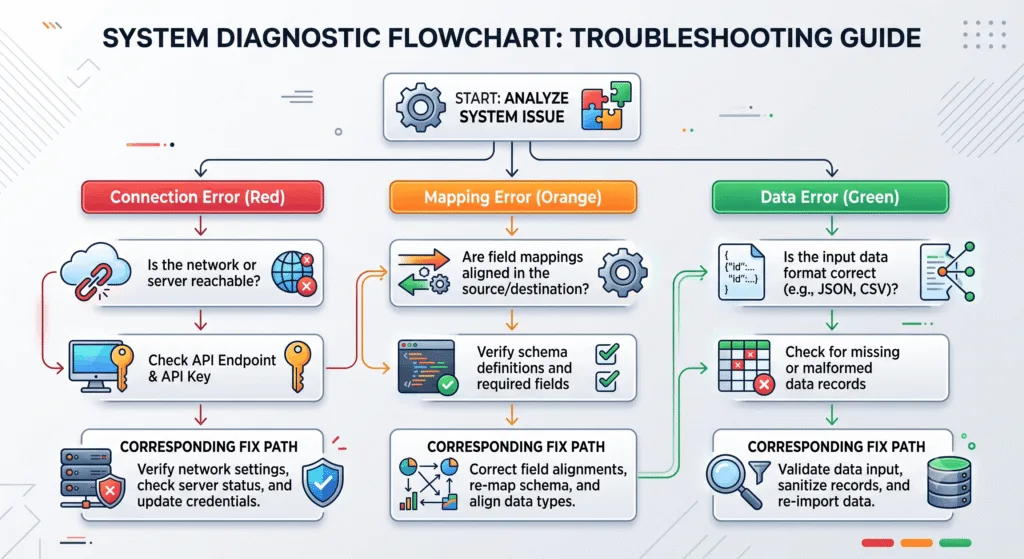
A2X sync errors occur when A2X cannot pull settlement data from Amazon or Shopify, cannot post a journal entry to QuickBooks, or posts an entry that doesn’t match what you expect. The result is the same in every case: your QuickBooks file falls behind your actual sales.
Most sync errors fall into one of three categories: connection errors, mapping errors, and data errors. Each has a different fix. If you haven’t yet confirmed your initial setup is correct, revisit the complete A2X tutorial before troubleshooting individual errors, since many sync problems trace back to a setup step that was skipped or incomplete.
Why Fixing Sync Errors Quickly Matters
Every unfixed sync error is a gap in your books. A missed settlement means your revenue, expenses, and reconciliation are all off for that period.
Fixing errors quickly keeps the gap small. A gap you find the same week is easy to patch. A gap you find three months later means rebuilding reconciliations across multiple periods, which takes significantly longer.
Recurring errors also signal something structural. If the same error reappears after each settlement, it is almost always a mapping issue, not a one-time glitch. Fixing the root cause saves more time than patching each instance individually. See our chart of accounts mapping guide if errors keep pointing back to the same account.
The Most Common A2X Sync Errors and How to Fix Them
Error 1: A2X Cannot Connect to Amazon or Shopify
This is the most straightforward error. A2X loses its authorized connection to your sales channel when you change your Amazon or Shopify password, revoke API access, or let credentials expire.
Fix: Go to your A2X dashboard, navigate to the channel connection settings, and reconnect by re-authorizing A2X with your current Seller Central or Shopify credentials. This does not affect your existing mapping or historical data.
Error 2: A2X Cannot Connect to QuickBooks Online
Similar to the above, but on the accounting side. If your QuickBooks Online session times out, your subscription lapses, or you revoke A2X’s access from within QuickBooks, the sync link breaks.
Fix: In A2X, go to your accounting connection and reconnect to QuickBooks Online. Log in with your QuickBooks credentials and re-authorize. Check that your QuickBooks subscription is active before troubleshooting further.
Error 3: Settlement Posts With Wrong Totals
This is not a connection error — A2X synced successfully, but the journal entry total doesn’t match your bank deposit. The entry landed in QuickBooks, but the numbers are wrong.
Most likely cause: Account mapping is routing a transaction type to the wrong account, inflating or deflating the total. A common example is sales tax being mapped to income instead of a liability account.
Fix: Review your mapping settings in A2X and correct the account assignment. Then void the incorrectly posted entry in QuickBooks and re-post the settlement. See our chart of accounts mapping guide for the correct account for each transaction type.
Error 4: Settlement Is Available in A2X But Not Posting
A2X has received the settlement data from Amazon or Shopify, but the journal entry never appears in QuickBooks.
Most likely causes: The QuickBooks connection dropped between the time A2X pulled the data and when it tried to post. Alternatively, a duplicate transaction block is preventing the entry.
Fix: Reconnect A2X to QuickBooks Online, then manually trigger the posting from inside your A2X dashboard. If a duplicate block is the issue, check your QuickBooks duplicate transaction settings and clear any flagged entries.
Error 5: A2X Shows a Settlement But the Amount Is Zero
A2X pulled a settlement, but the total shows as zero dollars. This happens when a settlement period has no net payout, usually because refunds, fees, or reserves exactly offset sales, or because Amazon held the entire amount as a reserve.
Fix: This is usually not an error. Check the corresponding settlement report in Seller Central to confirm the net payout is genuinely zero or that a reserve hold explains the difference. If a reserve is holding the full amount, track it in a reserve holding account and match it when it releases.
Error 6: Fees or Refunds Are Missing From the Posted Entry
A2X posted a settlement, but certain line items such as FBA fees, refunds, or reimbursements are absent from the journal entry in QuickBooks.
Most likely cause: Those transaction types were not mapped in A2X. Unmapped items are silently dropped rather than posted to a default account.
Fix: Open your A2X mapping settings and confirm every transaction type that appears in your settlements has a designated QuickBooks account. Re-post the affected settlement after correcting the mapping. For the full list of transaction types and their correct accounts, see the A2X chart of accounts mapping guide.
Error 7: Duplicate Journal Entries in QuickBooks
The same settlement appears twice in QuickBooks, creating an inflated balance and a reconciliation that won’t close.
Most likely cause: The settlement was posted manually and then synced again automatically, or a sync retry ran after a partial success.
Fix: Identify the duplicate by comparing entry dates and amounts. Void one of the entries in QuickBooks. Check your A2X dashboard to confirm the settlement shows as posted, not pending, so it doesn’t retry again.
Error 8: Reconciliation Won’t Close After A2X Posts
A2X posted the settlement, but the bank reconciliation in QuickBooks still shows a difference. This is the most common symptom reported by sellers after an apparent sync success.
Most likely cause: A timing mismatch between the settlement period and the bank deposit date, or a reserve hold that reduced the actual deposit below the settlement total. For a thorough walkthrough of this specific scenario, see our guide to reconciling Amazon settlements with A2X.
Fix: Confirm the bank deposit amount, check for reserve holds in Seller Central, and use a clearing account to bridge any timing differences. Do not force the reconciliation to balance with a manual adjustment without understanding the root cause.
Practical Tips for Better Results
- Check A2X for sync status alerts after every settlement cycle. A2X flags failed or pending syncs in your dashboard. Reviewing it regularly keeps gaps small.
- Map every transaction type before your first settlement posts. Unmapped items are dropped silently. You won’t get an error — the data just disappears.
- If the same error recurs across settlements, fix the mapping rather than re-posting each time. A recurring error is a structural issue, not a one-off glitch.
- Keep A2X’s QuickBooks connection active. If you log out of QuickBooks Online or change your password, re-authorize A2X immediately rather than waiting for a sync failure to alert you.
- Use a clearing account for settlement timing differences. This prevents bank reconciliation mismatches from looking like sync errors when the timing is simply off by a day or two.
- Don’t void and re-post unless you’ve fixed the root cause first. Re-posting the same settlement with the same mapping produces the same wrong result.
Conclusion
Most A2X sync errors have a straightforward cause and a fast fix. Connection errors resolve with re-authorization. Mapping errors resolve by correcting the account assignment and re-posting. Timing mismatches resolve with a clearing account.
If errors keep returning after you’ve fixed the obvious causes, the most reliable next step is a full review of your setup against the complete A2X tutorial and the chart of accounts mapping guide. Most persistent sync issues trace back to a setup step that was incomplete at the start.
If troubleshooting is taking more time than the reconciliation itself, our monthly bookkeeping service monitors A2X, catches errors early, and keeps your QuickBooks file current every cycle. Book a free consultation with Thelonex to get support from a QuickBooks-certified team.
By:

Ashfaq helps e-commerce business owners turn messy numbers into clear, reliable financials. With over 15 years of experience, he specializes in bookkeeping for Amazon and Shopify sellers, ensuring accuracy, clarity, and confident decision-making.
Categories
Latest Posts
- August 2, 2026
Amazon Seller Connector by QuickBooks: Complete Guide
- July 21, 2026
How COGS Accounting Works for Canadian FBA Sellers
Tags
A2X
Accounting Method
Amazon FBA
Amazon Marketplace Connector
Amazon Seller Central
Amazon Seller Connector
Bookkeeping Tips
Canada Tax Registration
Canadian Bookkeeping
Canadian Sales Tax
Chart of Accounts
COGS
E-Commerce
E-Commerce Bookkeeping
Finance
Financial Statements
GST/HST
Inventory
Payout Reconciliation
Profit and Loss
QuickBooks Online
Sales Tax
Sales Tax Compliance
Shopify
TaxCloud